Aller directement au contenu

Linux

43 Sujets 392 Messages

Cette catégorie peut être suivie depuis le web social ouvert via le pseudo linux@lemmy.cyber-neurones.org

Sous-catégories


  • 1 2
    1 Sujets
    2 Messages
    fariasF
    10 décembre 2025 09:50 - 10:10 : Créer son assistant IA avec un RAG souverain et Open Source. 10 décembre 2025 11:20 - 11:40 : Neural Datafari – les moteurs de recherche pour entreprise en route pour l’IA. 10 décembre 2025 11:45 - 12:05 : Améliorer la gestion cloud assistée par l’IA avec le protocole de contexte de modèle 10 décembre 2025 14:00 - 17:00 : Side Event : Club DSAI « Conformité de l’IA » 10 décembre 2025 15:15 - 15:35 : 10 décembre 2025 16:45 - 17:05 : Je malmène ton LLM en direct avec 10 failles de sécurité 11 décembre 2025 09:30 - 09:50 : Focus sur la souveraineté : les réglementations européennes et l’impact mondial de l’open source 11 décembre 2025 10:20 - 10:40 : Orange et ses partenaires dans l’écosystème open source 11 décembre 2025 11:10 - 11:30 : Fireside Chat: « Etat de l’UE : ouverture à l’IA »
  • 2 4
    2 Sujets
    4 Messages
    fariasF
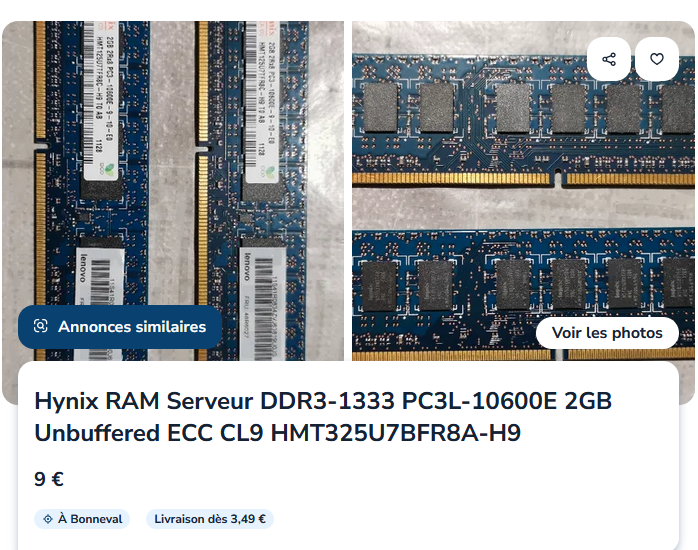
    Avec le Part Number : M471A4G43MB1-CTD https://semiconductor.samsung.com/dram/module/sodimm/m471a4g43mb1-ctd/
  • Installation llama.cpp sous Windows 11 avec Ubuntu 22

    wsl2 llama.cpp
    30
    1 Votes
    30 Messages
    116 Vues
    R
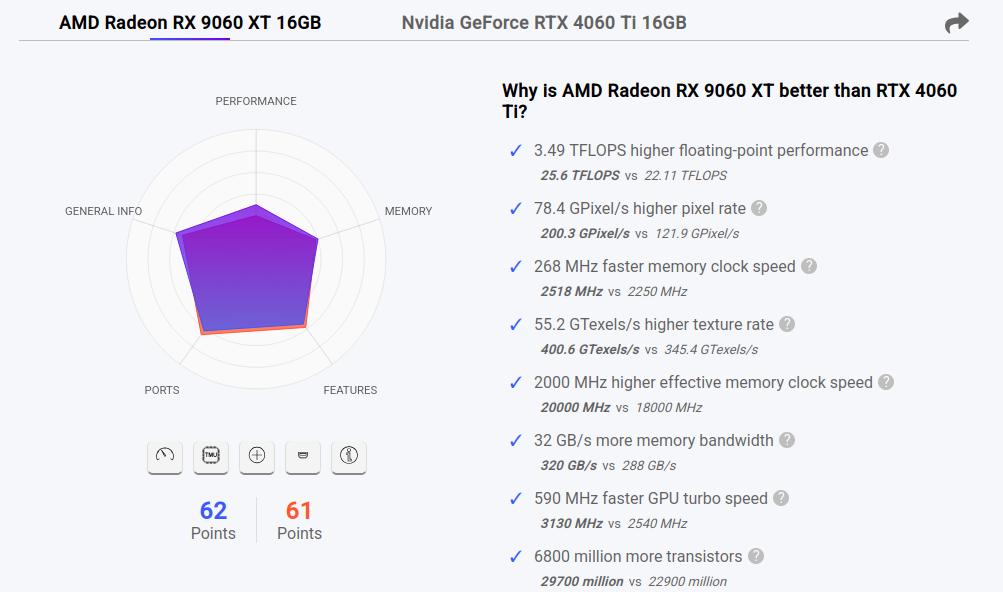
    Je fait un make install avant puis un nouveau test : root@pcremi:/workspace/llama.cpp/build/bin# ./llama-bench -m /models/Qwen3.6-27B-Q4_K_M.gguf ggml_cuda_init: found 1 ROCm devices (Total VRAM: 16304 MiB): Device 0: AMD Radeon RX 9060 XT, gfx1200 (0x1200), VMM: no, Wave Size: 32, VRAM: 16304 MiB | model | size | params | backend | ngl | test | t/s | | ------------------------------ | ---------: | ---------: | ---------- | --: | --------------: | -------------------: | pid:3402 tid:0x757b61d04280 [CreateContext] fail 11 llama-bench: /home/remia/librocdxg/src/wddm/queue.cpp:267: wsl::thunk::ComputeQueue::ComputeQueue(wsl::thunk::WDDMDevice*, void*, uint64_t, std::atomic<long unsigned int>*, std::atomic<long unsigned int>*, volatile int64_t*, uint32_t, uint32_t, bool): Assertion `ret' failed. Aborted (core dumped) Pas mieux.
  • Hermes configuration contexte en dur ...

    4
    0 Votes
    4 Messages
    3 Vues
    Tuxedo17T
    Requete pour la compression : { "messages": [ { "role": "user", "content": "You are a summarization agent creating a context checkpoint. Treat the conversation turns below as source material for a compact record of prior work. Produce only the structured summary; do not add a greeting, preamble, or prefix. Write the summary in the same language the user was using in the conversation — do not translate or switch to English. NEVER include API keys, tokens, passwords, secrets, credentials, or connection strings in the summary — replace any that appear with [REDACTED]. Note that the user had credentials present, but do not preserve their values.\n\nCreate a structured checkpoint summary for the conversation after earlier turns are compacted. The summary should preserve enough detail for continuity without re-reading the original turns
  • LLAMA-SWAP : 147 933 343 tokens Cached

    3
    2
    1 Votes
    3 Messages
    10 Vues
    Tuxedo17T
    Temps : [image: 1786011735209-llama-swap-daily-duration-resized.png]
  • Crash i915 0000:00:02.0: [drm] drm_WARN_ON_ONCE(t_vblank < vblank->time)

    1
    0 Votes
    1 Messages
    24 Vues
    Personne n'a répondu
  • TuxedoOS : Downgrade de NVIDIA (595.84)

    13
    1
    0 Votes
    13 Messages
    131 Vues
    Tuxedo17T
    J’avais oublier de modifier le script /usr/local/bin/aorus-bridge . VENDOR_ID="${VENDOR_ID:-0x10de}" # NVIDIA # DEVICE_ID: exact PCI device id to match (e.g. 0x2b85 for RTX 5090). Leave # empty to match ANY NVIDIA display controller by PCI class — this covers the # whole RTX 50-series (5090=0x2b85, 5060 Ti=0x2d04, …) without a hardcoded list, # in the same spirit as is_tb_tunneled below. Set DEVICE_ID to pin one board. DEVICE_ID="${DEVICE_ID:-0x2d04}" # PCI base class 0x03 = display controller (VGA 0x0300 / 3D 0x0302); selects the # GPU function and excludes its HDMI-audio function (class 0x0403). GPU_CLASS_PREFIX="${GPU_CLASS_PREFIX:-0x03}"
  • NodeBB audit

    3
    1 Votes
    3 Messages
    44 Vues
    fariasF
    J’ai fait un post : https://community.nodebb.org/ [image: 1785136048007-59b5581b-041a-4f1b-b7e2-2ebefa6f4ff2-image.png]
  • Installation de llama-swap

    6
    0 Votes
    6 Messages
    72 Vues
    Tuxedo17T
    Sur l’interface : [image: 1784730275084-20dcbc69-b2f8-4227-a6ca-368c352f2d2a-image.png]
  • Test Hermes IA en local (avec eGPU)

    13
    1 Votes
    13 Messages
    128 Vues
    Tuxedo17T
    A tester https://github.com/HalfbitStudio/hermes-plugin-rocketchat .
  • 0 Votes
    67 Messages
    1k Vues
    Tuxedo17T
    Nouveau test : # llama-bench -m /models/Qwen3.6-27B-Q3_K_M.gguf -dev CUDA0 -fa on --threads 12 -ngl 999 --cache-type-v q8_0 ggml_cuda_init: found 2 CUDA devices (Total VRAM: 21692 MiB): Device 0: NVIDIA GeForce RTX 5060 Ti, compute capability 12.0, VMM: yes, VRAM: 15888 MiB Device 1: NVIDIA GeForce RTX 3060 Laptop GPU, compute capability 8.6, VMM: yes, VRAM: 5803 MiB | model | size | params | backend | ngl | threads | type_v | fa | dev | test | t/s | | ------------------------------ | ---------: | ---------: | ---------- | --: | ------: | -----: | --: | ------------ | --------------: | -------------------: | | qwen35 27B Q3_K - Medium | 12.64 GiB | 26.90 B | CUDA | 999 | 12 | q8_0 | 1 | CUDA0 | pp512 | 387.17 ± 2.25 | | qwen35 27B Q3_K - Medium | 12.64 GiB | 26.90 B | CUDA | 999 | 12 | q8_0 | 1 | CUDA0 | tg128 | 18.31 ± 0.01 | # llama-bench -m /models/Qwen3.6-27B-Q3_K_M.gguf -fa on --threads 12 -ngl 999 --cache-type-v q8_0 ggml_cuda_init: found 2 CUDA devices (Total VRAM: 21692 MiB): Device 0: NVIDIA GeForce RTX 5060 Ti, compute capability 12.0, VMM: yes, VRAM: 15888 MiB Device 1: NVIDIA GeForce RTX 3060 Laptop GPU, compute capability 8.6, VMM: yes, VRAM: 5803 MiB | model | size | params | backend | ngl | threads | type_v | fa | test | t/s | | ------------------------------ | ---------: | ---------: | ---------- | --: | ------: | -----: | --: | --------------: | -------------------: | | qwen35 27B Q3_K - Medium | 12.64 GiB | 26.90 B | CUDA | 999 | 12 | q8_0 | 1 | pp512 | 367.28 ± 1.88 | | qwen35 27B Q3_K - Medium | 12.64 GiB | 26.90 B | CUDA | 999 | 12 | q8_0 | 1 | tg128 | 16.71 ± 0.03 |
  • Tuxedo 17 + GIGABYTE AORUS RTX 5060 Ti AI Box Carte Graphique - 16GB GDDR7.

    3
    0 Votes
    3 Messages
    56 Vues
    Tuxedo17T
    J’ai donc supprimer le service de Tuxedo et fait une mise à jours : # apt-get autoremove. # systemctl stop tccd # systemctl disable tccd # ubuntu-drivers autoinstall En fait tccd fait l’installation de 560.35.05 et pas de 595.71.05.
  • Test Hermes IA en local

    25
    1 Votes
    25 Messages
    492 Vues
    Tuxedo17T
    L’export en Markdown ne fonctionne pas : # hermes sessions export --format md --older-than 90 --dry-run usage: hermes [-h] [--version] [-z PROMPT] [--usage-file PATH] [-m MODEL] [--provider PROVIDER] [-t TOOLSETS] [--resume SESSION] [--continue [SESSION_NAME]] [--worktree] [--accept-hooks] [--skills SKILLS] [--yolo] [--pass-session-id] [--ignore-user-config] [--ignore-rules] [--safe-mode] [--tui] [--cli] [--dev] {chat,model,moa,fallback,secrets,migrate,gateway,proxy,lsp,setup,postinstall,whatsapp,whatsapp-cloud,slack,send,login,logout,auth,status,cron,webhook,portal,kanban,project,hooks,doctor,security,dump,debug,backup,checkpoints,import,config,console,pairing,skills,bundles,plugins,curator,pets,journey,learning,memory-graph,memory,tools,computer-use,mcp,sessions,insights,claw,version,update,uninstall,acp,profile,completion,dashboard,serve,desktop,gui,logs,prompt-size} ... hermes: error: unrecognized arguments: --format --older-than 90 --dry-run
  • Benchmark llama.cpp sur Tuxedo 17

    llama.cpp
    18
    0 Votes
    18 Messages
    203 Vues
    Tuxedo17T
    Pendant l’utilisation : # nvidia-smi Tue Jun 30 12:35:32 2026 +-----------------------------------------------------------------------------------------+ | NVIDIA-SMI 595.71.05 Driver Version: 595.71.05 CUDA Version: 13.2 | +-----------------------------------------+------------------------+----------------------+ | GPU Name Persistence-M | Bus-Id Disp.A | Volatile Uncorr. ECC | | Fan Temp Perf Pwr:Usage/Cap | Memory-Usage | GPU-Util Compute M. | | | | MIG M. | |=========================================+========================+======================| | 0 NVIDIA GeForce RTX 3060 ... Off | 00000000:01:00.0 Off | N/A | | N/A 55C P0 28W / 115W | 4621MiB / 6144MiB | 0% Default | | | | N/A | +-----------------------------------------+------------------------+----------------------+ +-----------------------------------------------------------------------------------------+ | Processes: | | GPU GI CI PID Type Process name GPU Memory | | ID ID Usage | |=========================================================================================| | 0 N/A N/A 1820494 G /usr/lib/xorg/Xorg 4MiB | | 0 N/A N/A 1845119 C /usr/local/bin/llama-server 4598MiB | +-----------------------------------------------------------------------------------------+
  • llama.cpp avec Vulkan

    llama.cpp ubuntu
    20
    0 Votes
    20 Messages
    225 Vues
    fariasF
    Petit test : 40.81 t/s
  • llama.cpp : exemple de fichier service

    1
    0 Votes
    1 Messages
    31 Vues
    Personne n'a répondu
  • llama.cpp : Installation

    llama.cpp ubuntu
    6
    0 Votes
    6 Messages
    103 Vues
    fariasF
    Mise à jours de Ollama : # curl -fsSL https://ollama.com/install.sh | sh >>> Cleaning up old version at /usr/local/lib/ollama >>> Installing ollama to /usr/local >>> Downloading ollama-linux-amd64.tar.zst ######################################################################## 100.0% >>> Adding ollama user to render group... >>> Adding ollama user to video group... >>> Adding current user to ollama group... >>> Creating ollama systemd service... >>> Enabling and starting ollama service... >>> NVIDIA GPU installed. Visiblement même problème : ... juin 19 10:51:37 ollama[2964]: time=2026-06-19T10:51:37.153Z level=INFO source=model_list_cache.go:111 msg="model list cache hydration complete" models=16 failures=0 elapsed=654.370427ms juin 19 10:51:42 ollama[2964]: time=2026-06-19T10:51:42.591Z level=WARN source=cuda_compat.go:38 msg="NVIDIA driver too old" device="Quadro M5000" compute=5.2 driver=535 required_driver="570 or newer" juin 19 10:51:42 ollama[2964]: time=2026-06-19T10:51:42.591Z level=WARN source=cuda_compat.go:38 msg="NVIDIA driver too old" device="Quadro M4000" compute=5.2 driver=535 required_driver="570 or newer" juin 19 10:51:43 ollama[2964]: time=2026-06-19T10:51:43.181Z level=INFO source=types.go:32 msg="inference compute" id=1 filter_id=1 library=Vulkan compute=0.0 name=Vulkan1 description="Quadro M4000" libd> juin 19 10:51:43 ollama[2964]: time=2026-06-19T10:51:43.181Z level=INFO source=types.go:32 msg="inference compute" id=0 filter_id=0 library=Vulkan compute=0.0 name=Vulkan0 description="Quadro M5000" libd> ...
  • llama.cpp : llama-bench : CPU ( no CUDA )

    llama.cpp benchmark
    1
    0 Votes
    1 Messages
    39 Vues
    Personne n'a répondu
  • llama.cpp : llama-server : Erreur 404 file not found

    llama.cpp
    3
    0 Votes
    3 Messages
    69 Vues
    Tuxedo17T
    Les logs avant le build : # export LD_LIBRARY_PATH=/usr/local/cuda/lib # export PATH=$PATH:/usr/local/cuda/bin # cmake .. -DGGML_CUDA=ON CMAKE_BUILD_TYPE=Release -- Warning: ccache not found - consider installing it for faster compilation or disable this warning with GGML_CCACHE=OFF -- CMAKE_SYSTEM_PROCESSOR: x86_64 -- GGML_SYSTEM_ARCH: x86 -- Including CPU backend -- x86 detected -- Adding CPU backend variant ggml-cpu: -march=native -- CUDA Toolkit found -- Using CMAKE_CUDA_ARCHITECTURES=75-virtual;80-virtual;86-real;89-real;90-virtual;120a-real;121a-real CMAKE_CUDA_ARCHITECTURES_NATIVE= -- CUDA host compiler is GNU 11.4.0 -- Including CUDA backend -- ggml version: 0.15.1 -- ggml commit: b4024af6c -- OpenSSL found: 3.0.2 -- Generating embedded license file for target: llama-app -- Configuring done -- Generating done -- Build files have been written to: /home/XXXX/GIT/llama.cpp/build
  • Informations générales

    llama.cpp
    4
    1
    0 Votes
    4 Messages
    73 Vues
    Tuxedo17T
    Après la mise à jours des modèles : # ollama list NAME ID SIZE MODIFIED gpt-oss:20b 17052f91a42e 13 GB About a minute ago llama2:latest 78e26419b446 3.8 GB 18 minutes ago phi4:latest ac896e5b8b34 9.1 GB 18 minutes ago qwen2:latest dd314f039b9d 4.4 GB 18 minutes ago gemma2:latest ff02c3702f32 5.4 GB 18 minutes ago mistral:latest 6577803aa9a0 4.4 GB 18 minutes ago llama3.1:latest 46e0c10c039e 4.9 GB 22 minutes ago llava:latest 8dd30f6b0cb1 4.7 GB 22 minutes ago llava:13b 0d0eb4d7f485 8.0 GB 16 months ago llava:7b 8dd30f6b0cb1 4.7 GB 16 months ago llama3.1:8b 46e0c10c039e 4.9 GB 16 months ago mistral:7b f974a74358d6 4.1 GB 16 months ago gemma2:9b ff02c3702f32 5.4 GB 16 months ago qwen2:7b dd314f039b9d 4.4 GB 16 months ago phi4:14b ac896e5b8b34 9.1 GB 16 months ago
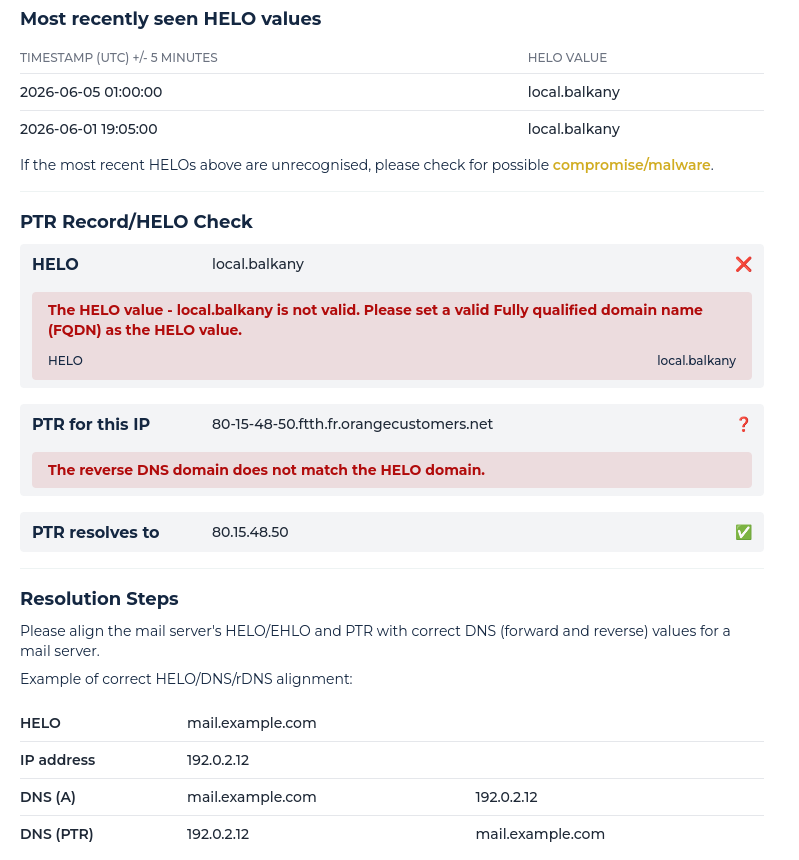
  • Configuration MailCow : PTR Record/HELO Check

    9
    3
    0 Votes
    9 Messages
    101 Vues
    fariasF
    Je viens de demander la suppression … à suivre. [image: 1780836881023-4e28bb1c-97e9-4c8d-b7d1-577215138732-image.png]
  • 0 Votes
    5 Messages
    78 Vues
    fariasF
    J’ai du mal à voir : # /usr/sbin/parted -l Model: ATA QEMU HARDDISK (scsi) Disk /dev/sda: 64,4GB Sector size (logical/physical): 512B/512B Partition Table: loop Disk Flags: Number Start End Size File system Flags 1 0,00B 64,4GB 64,4GB ext4 Model: ATA QEMU HARDDISK (scsi) Disk /dev/sdb: 85,9GB Sector size (logical/physical): 512B/512B Partition Table: msdos Disk Flags: Number Start End Size Type File system Flags 1 1049kB 63,4GB 63,4GB primary ext4 boot 2 63,4GB 64,4GB 1022MB extended 5 63,4GB 64,4GB 1022MB logical linux-swap(v1) swap