Ancienne version : 2025.7.0
# bash -c "$(curl -fsSL https://git.community-scripts.org/community-scripts/ProxmoxVE/raw/branch/main/ct/vaultwarden.sh)"
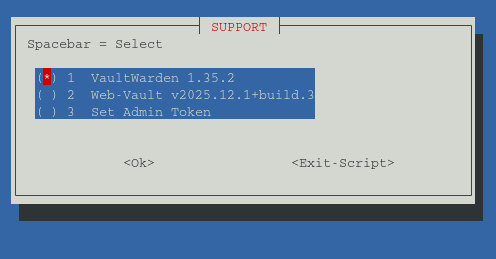
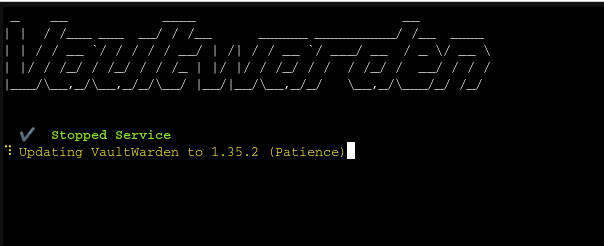
Core :
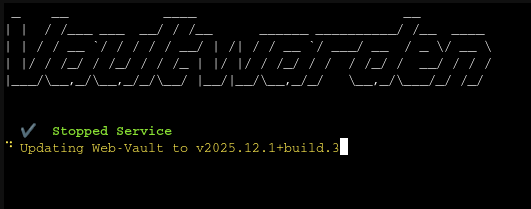
Web :
Sujets en dehors de ce forum. Les vues et opinions exprimées ici ne reflètent pas nécessairement celles de ce forum et de ses membres.
Un monde de contenus à portée de main…
Voyez cela comme votre fil de découverte global. Il rassemble des discussions intéressantes issues du web et d’autres communautés, en un seul endroit.
Bien que vous puissiez consulter les tendances du moment, la meilleure façon d’utiliser ce fil est de le personnaliser. En créant un compte, vous pouvez suivre des créateurs et des sujets spécifiques afin de filtrer le bruit et de ne voir que ce qui vous intéresse.
Prêt à vous lancer ? Créez un compte pour suivre d’autres personnes, recevoir des notifications quand on vous répond et sauvegarder vos contenus favoris.
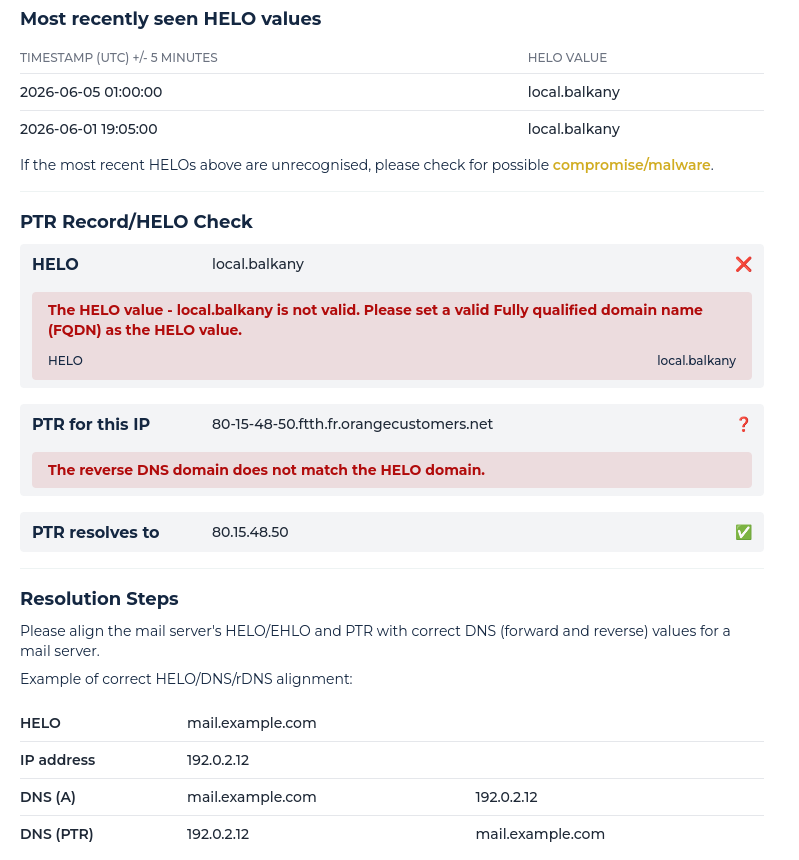
S'inscrire Se connecterVisiblement quand je regarde sur https://check.spamhaus.org/troubleshoot/ :
J’ai deux erreurs :
Alors que quand je regarde https://mxtoolbox.com/ :
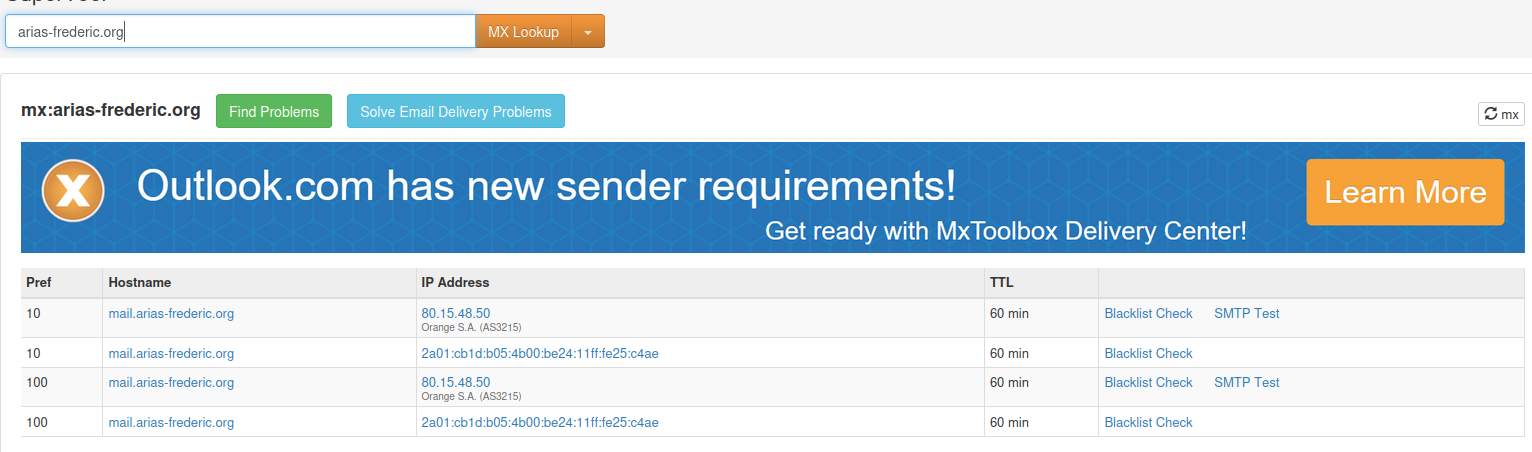
Ensuite si je demande un HELO Check :
Connecting to 80.15.48.50

220 mail.arias-frederic.org ESMTP Postcow [774 ms]
EHLO keeper-us-east-1d.mxtoolbox.com
250-mail.arias-frederic.org
250-PIPELINING
250-SIZE 104857600
250-ETRN
250-STARTTLS
250-ENHANCEDSTATUSCODES
250-8BITMIME
250 DSN [203 ms]
MAIL FROM:<supertool@mxtoolboxsmtpdiag.com>
250 2.1.0 Ok [219 ms]
RCPT TO:<test@mxtoolboxsmtpdiag.com>
454 4.7.1 <test@mxtoolboxsmtpdiag.com>: Relay access denied [297 ms]


- LookupServer [smtp:80.15.48.50] 2743ms
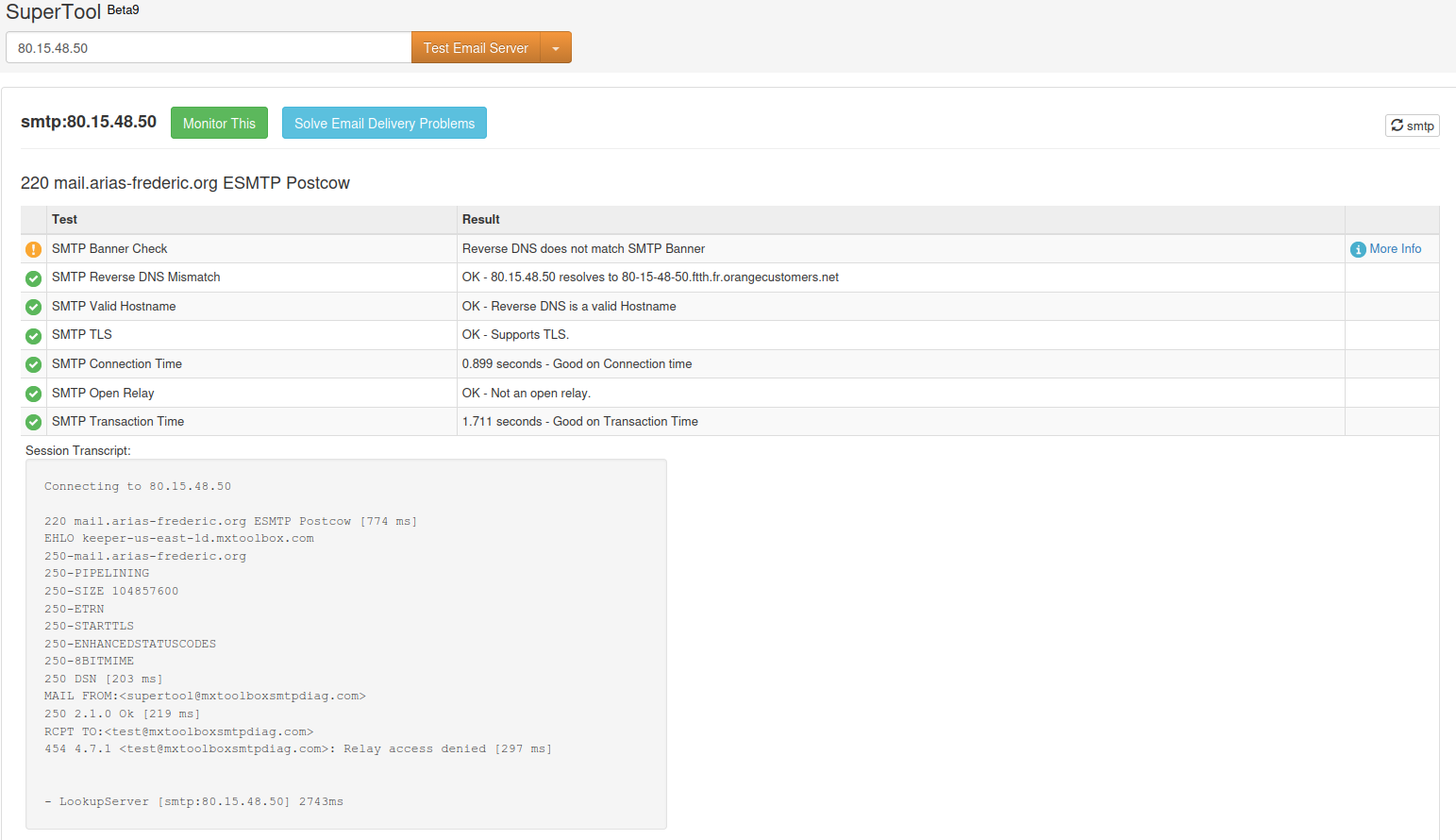
Bref j’ai bien : “mail.arias-frederic.org” et pas “local.balkany” .
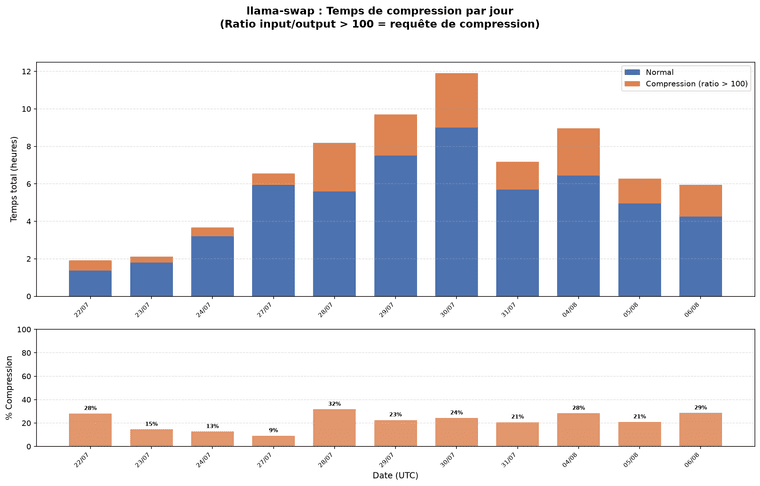
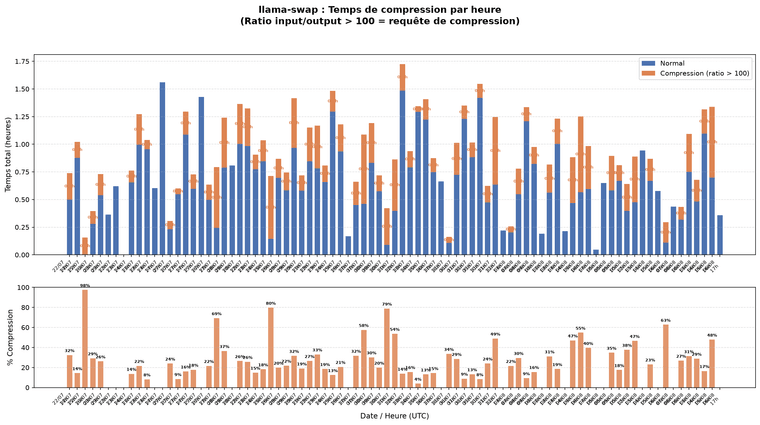
Méthode d’identification de la compression :
Le prompt “You are a summarization agent…” n’est pas stocké dans la table activity de llama-swap (elle ne garde que des métriques, pas le contenu des requêtes). J’ai donc identifié les requêtes de
compression par leur signature : un ratio input_tokens/output_tokens > 100 (un checkpoint énorme en entrée, un résultat de synthèse court en sortie).
Résultats clés :
| Métrique | Valeur |
|---|---|
| Période | 22/07 14h → 06/08 17h (85 heures) |
| Temps total | 72,40h |
| Temps compression | 16,61h (22,9%) |
| Temps normal | 55,79h (77,1%) |
| Pic compression | 98% à 22/07 16h |
| Pic moyen/jour | 32% à 28/07 |
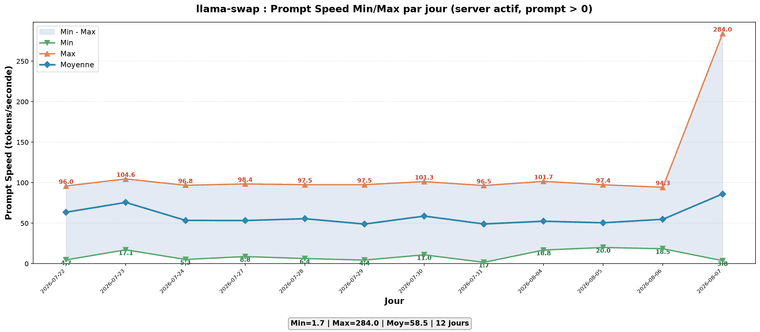
Les deux graphiques montrent :
Le graphique *-daily.png est plus lisible pour une vue d’ensemble, tandis que *-hourly.png donne le détail fin par heure.
# cd /www/pixelfed/pixelfed
# systemctl stop pixelfed
# rm composer.lock
...
# composer install --no-ansi --no-dev --no-interaction --no-progress --no-scripts --optimize-autoloader
...
Generating optimized autoload files
Class App\Rules\WebFinger located in ./app/Rules/Webfinger.php does not comply with psr-4 autoloading standard (rule: App\ => ./app). Skipping.
83 packages you are using are looking for funding.
Use the `composer fund` command to find out more!

# composer dump-autoload --optimize
...
#  php artisan config:cache

   INFO  Configuration cached successfully.

# php artisan route:cache

   INFO  Routes cached successfully.

# php artisan migrate --force

   INFO  Running migrations.

  2025_08_30_044247_fix_stories_table_set_view_counts_default ......................................................................... 77.42ms DONE
# chown -R pixelfed:pixelfed /www/pixelfed/pixelfed/
# systemctl start pixelfed
Bref j’ai eu une erreur, si je regarde : ./app/Rules/Webfinger.php
<?php

namespace App\Rules;

use Illuminate\Contracts\Validation\Rule;
Si je regarde les namespace dans les PHP
# grep "^namespace" ./app/*/*.* | awk '{print $2}' | sort -n | uniq -c
      1 App\Auth;
      1 App\Console;
      1 App\Events;
      1 App\Exceptions;
      1 App\Http;
      2 App\Listeners;
     19 App\Mail;
     53 App\Models;
     11 App\Observers;
      1 App\Policies;
      8 App\Providers;
      6 App\Rules;
     69 App\Services;
Dans composer.json j’ai :
        "psr-4": {
            "App\\": "app/"
        },
je comprends pas le problème mais la mise à jours semble fonctionner.
Avant :
$ go version
go version go1.22.2 linux/amd64
Après le but est l’installation de 1.27.1 à la place de 1.22.2 :
# go version
go version go1.27.1 linux/amd64
Le but est l’installation de https://github.com/josephburnett/jd
# wget -q https://go.dev/dl/go1.27.1.linux-amd64.tar.gz
Dans les logs :
31.10.328.437 I slot print_timing: id  1 | task 26420 |    graphs reused =      26082
31.10.331.740 I slot      release: id  1 | task 26420 | stop processing: n_tokens = 55637, truncated = 0
32.10.441.577 I srv    operator(): operator(): cleaning up before exit...
Dans le syslog, j’ai :
[64949.879619] ------------[ cut here ]------------
[64949.879627] i915 0000:00:02.0: [drm] drm_WARN_ON_ONCE(t_vblank < vblank->time)
[64949.879631] WARNING: drivers/gpu/drm/drm_vblank.c:1572 at drm_vblank_restore+0x205/0x280, CPU#7: eDP-1/1662
[64949.879646] Modules linked in: tcp_diag inet_diag tls ccm rfcomm snd_seq_dummy snd_hrtimer evdi(OE) nvidia_uvm(OE) qrtr nvidia(OE) cmac algif_hash algif_skcipher af_alg bnep typec_displayport typec_thunderbolt snd_sof_pci_intel_tgl snd_sof_pci_intel_cnl snd_sof_intel_hda_generic soundwire_intel snd_sof_intel_hda_sdw_bpt snd_sof_intel_hda_common xe snd_soc_hdac_hda snd_sof_intel_hda_mlink snd_sof_intel_hda soundwire_cadence snd_sof_pci snd_sof_xtensa_dsp snd_sof snd_sof_utils snd_soc_acpi_intel_match snd_soc_acpi_intel_sdca_quirks soundwire_generic_allocation snd_soc_sdw_utils snd_soc_acpi soundwire_bus drm_gpusvm_helper snd_soc_sdca gpu_sched crc8 drm_gpuvm drm_exec drm_suballoc_helper snd_soc_avs snd_soc_hda_codec snd_hda_ext_core snd_hda_codec snd_hda_core snd_intel_dspcfg snd_intel_sdw_acpi snd_hwdep intel_rapl_msr intel_rapl_common snd_soc_core intel_uncore_frequency intel_uncore_frequency_common intel_tcc_cooling snd_compress ac97_bus x86_pkg_temp_thermal snd_pcm_dmaengine intel_powerclamp snd_pcm coretemp
[64949.879750]  snd_seq_midi iwlmvm kvm_intel uvcvideo snd_seq_midi_event snd_rawmidi mac80211 videobuf2_vmalloc snd_seq uvc videobuf2_memops snd_seq_device sunrpc videobuf2_v4l2 libarc4 snd_timer cmdlinepart tuxedo_nb02_nvidia_power_ctrl(OE) videobuf2_common btusb kvm spi_nor uniwill_wmi(OE) ee1004 i915 btmtk binfmt_misc tuxedo_io(OE) clevo_wmi(OE) videodev mei_hdcp snd mei_pxp iwlwifi btrtl irqbypass mtd tuxedo_keyboard(OE) asus_wmi i2c_i801 btbcm rapl tuxedo_compatibility_check(OE) btintel i2c_smbus drm_buddy mei_me spi_intel_pci nls_iso8859_1 intel_cstate platform_profile wmi_bmof led_class_multicolor mc soundcore i2c_mux cfg80211 bluetooth spi_intel drm_display_helper mei nvidiafb vgastate cec fb_ddc rc_core intel_pmc_core i2c_algo_bit pmt_telemetry pmt_discovery pmt_class intel_pmc_ssram_telemetry acpi_pad intel_hid intel_vsec acpi_tad sparse_keymap joydev input_leds mac_hid serio_raw sch_fq_codel vmwgfx drm_ttm_helper ttm msr parport_pc ppdev lp parport dm_crypt nvme_fabrics efi_pstore nfnetlink dmi_sysfs
[64949.879885]  ip_tables x_tables autofs4 btrfs libblake2b raid10 raid456 async_raid6_recov async_memcpy async_pq async_xor async_tx xor raid6_pq raid1 raid0 linear usbhid cdc_ether usbnet r8152 mii ucsi_acpi typec_ucsi typec hid_multitouch r8125(OE) hid_generic nvme uas usb_storage nvme_core ghash_clmulni_intel r8169 thunderbolt i2c_hid_acpi intel_lpss_pci ahci nvme_keyring i2c_hid intel_lpss realtek video nvme_auth libahci idma64 hid hkdf wmi pinctrl_tigerlake aesni_intel
[64949.879970] CPU: 7 UID: 1000 PID: 1662 Comm: eDP-1 Tainted: G           OE       7.0.0-110030-tuxedo #30~24.04.1tux1 PREEMPT(lazy)
[64949.879975] Tainted: [O]=OOT_MODULE, [E]=UNSIGNED_MODULE
[64949.879976] Hardware name: TUXEDO TUXEDO Polaris Intel Gen3 (TGL)/GMxTGxx, BIOS N.1.07A03 09/24/2021
[64949.879979] RIP: 0010:drm_vblank_restore+0x20f/0x280
[64949.879983] Code: 48 8b 7b 08 4c 8b 67 50 4d 85 e4 74 73 4c 89 4d b8 e8 95 22 ec ff 48 89 c6 48 8d 3d fb 59 e0 01 48 c7 c1 a0 61 d7 b0 4c 89 e2 <67> 48 0f b9 3a 45 31 c0 4c 8b 4d b8 45 89 f4 e9 e3 fe ff ff 85 c0
[64949.879985] RSP: 0018:ffffd2c10448b718 EFLAGS: 00010046
[64949.879988] RAX: ffffffffc1a900a0 RBX: ffff8a0cce854000 RCX: ffffffffb0d761a0
[64949.879990] RDX: ffff8a0cc3671c80 RSI: ffffffffc1a900a0 RDI: ffffffffb1cfcf50
[64949.879991] RBP: ffffd2c10448b760 R08: 0000000000000000 R09: fffffffffffff60f
[64949.879993] R10: 0000000000000000 R11: 0000000000000000 R12: ffff8a0cc3671c80
[64949.879994] R13: 0000000000000003 R14: 00000000000b790b R15: ffff8a0cc3958828
[64949.879996] FS:  0000799d325fd6c0(0000) GS:ffff8a1c7d563000(0000) knlGS:0000000000000000
[64949.879998] CS:  0010 DS: 0000 ES: 0000 CR0: 0000000080050033
[64949.880000] CR2: 00000000284b4398 CR3: 0000000131fcf001 CR4: 0000000000f72ef0
[64949.880002] PKRU: 55555554
[64949.880003] Call Trace:
[64949.880005]  <TASK>
[64949.880011]  drm_crtc_vblank_restore+0x6c/0x150
[64949.880017]  bdw_enable_vblank+0xd8/0x100 [i915]
[64949.880285]  drm_vblank_enable+0x104/0x1b0
[64949.880290]  drm_vblank_get+0xb7/0x100
[64949.880294]  drm_crtc_vblank_get+0x17/0x30
[64949.880298]  intel_display_rps_boost_after_vblank+0x58/0x130 [i915]
[64949.880492]  intel_prepare_plane_fb+0xfa/0x160 [i915]
[64949.880695]  drm_atomic_helper_prepare_planes.part.0+0x32/0x1e0
[64949.880701]  drm_atomic_helper_prepare_planes+0x5d/0x70
[64949.880705]  intel_atomic_commit+0x145/0x310 [i915]
[64949.880898]  drm_atomic_nonblocking_commit+0x5c/0x70
[64949.880902]  drm_mode_atomic_ioctl+0x761/0x8a0
[64949.880907]  ? __pfx_drm_mode_atomic_ioctl+0x10/0x10
[64949.880911]  drm_ioctl_kernel+0xb7/0x110
[64949.880915]  drm_ioctl+0x2ec/0x5b0
[64949.880919]  ? __pfx_drm_mode_atomic_ioctl+0x10/0x10
[64949.880924]  __x64_sys_ioctl+0xa5/0x100
[64949.880929]  x64_sys_call+0x1250/0x26e0
[64949.880933]  do_syscall_64+0xd9/0x5b0
[64949.880938]  ? psi_task_switch+0x130/0x3a0
[64949.880943]  ? raw_spin_rq_unlock+0x14/0x50
[64949.880947]  ? finish_task_switch.isra.0+0x95/0x2d0
[64949.880951]  ? __schedule+0x2d8/0x660
[64949.880954]  ? schedule+0x3d/0x90
[64949.880956]  ? do_nanosleep+0x68/0x180
[64949.880960]  ? hrtimer_setup_sleeper_on_stack+0x2e/0xb0
[64949.880965]  ? hrtimer_nanosleep+0x8b/0x110
[64949.880967]  ? __pfx_hrtimer_wakeup+0x10/0x10
[64949.880971]  ? common_nsleep+0x43/0x60
[64949.880975]  ? __x64_sys_clock_nanosleep+0xf2/0x180
[64949.880977]  ? note_gp_changes+0x8f/0xa0
[64949.880981]  ? exit_to_user_mode_loop+0x39d/0x540
[64949.880985]  ? arch_exit_to_user_mode_prepare.isra.0+0xc3/0xe0
[64949.880988]  ? do_syscall_64+0x116/0x5b0
[64949.880992]  ? handle_softirqs+0xe5/0x360
[64949.880996]  ? arch_exit_to_user_mode_prepare.isra.0+0xd/0x100
[64949.880999]  ? irqentry_exit+0x9d/0x640
[64949.881001]  ? clear_bhb_loop+0x50/0xa0
[64949.881006]  entry_SYSCALL_64_after_hwframe+0x76/0x7e
[64949.881008] RIP: 0033:0x799d4bd24f1d
[64949.881011] Code: 04 25 28 00 00 00 48 89 45 c8 31 c0 48 8d 45 10 c7 45 b0 10 00 00 00 48 89 45 b8 48 8d 45 d0 48 89 45 c0 b8 10 00 00 00 0f 05 <89> c2 3d 00 f0 ff ff 77 1a 48 8b 45 c8 64 48 2b 04 25 28 00 00 00
[64949.881013] RSP: 002b:0000799d325fc200 EFLAGS: 00000246 ORIG_RAX: 0000000000000010
[64949.881016] RAX: ffffffffffffffda RBX: 0000799d280054e0 RCX: 0000799d4bd24f1d
[64949.881017] RDX: 0000799d325fc2f0 RSI: 00000000c03864bc RDI: 0000000000000012
[64949.881019] RBP: 0000799d325fc250 R08: 0000799d28002bb0 R09: 0000799d28002b20
[64949.881020] R10: 0000799d2800cb30 R11: 0000000000000246 R12: 0000799d325fc2f0
[64949.881021] R13: 00000000c03864bc R14: 0000000000000012 R15: 0000000000000008
[64949.881024]  </TASK>
[64949.881025] ---[ end trace 0000000000000000 ]---
Je ne sais pas si cela a un rapport.
Le dernier logs avant le crash :
sept. 01 14:24:37.636400 tuxedo-17 systemd[1]: systemd 255.4-1ubuntu8.17 running in system mode (+PAM +AUDIT +SELINUX +APPARMOR +IMA +SMACK +SECCOMP +GCRYPT -GNUTLS +OPENSSL +ACL +BLKID +CURL +ELFUTILS +FIDO2 +IDN2 -IDN +IPTC +KMOD +LI>
sept. 01 14:24:37.636491 tuxedo-17 systemd[1]: Detected architecture x86-64.
sept. 01 14:24:37.685390 tuxedo-17 systemd[1]: getty.target: Wants dependency dropin /etc/systemd/system/getty.target.wants/getty@tty1.service target /lib/systemd/system/autovt@.service has different name
sept. 01 14:24:37.694384 tuxedo-17 systemd[1]: /etc/systemd/system/llama-swap.service:12: Unknown key name 'Environnent' in section 'Service', ignoring.
sept. 01 14:24:37.759392 tuxedo-17 systemd[1]: /etc/systemd/system/llama-server.service:12: Unknown key name 'Environnent' in section 'Service', ignoring.
sept. 01 14:24:37.873862 tuxedo-17 systemd-journald[421]: Received SIGTERM from PID 1 (systemd).
sept. 01 14:24:37.873893 tuxedo-17 systemd[1]: Stopping systemd-journald.service - Journal Service...
sept. 01 14:24:37.873908 tuxedo-17 systemd[1]: systemd-journald.service: Deactivated successfully.
sept. 01 14:24:37.873916 tuxedo-17 systemd[1]: Stopped systemd-journald.service - Journal Service.
sept. 01 14:24:37.873924 tuxedo-17 systemd[1]: systemd-journald.service: Consumed 17min 2.264s CPU time, 28.9M memory peak, 0B memory swap peak.
sept. 01 14:24:37.873932 tuxedo-17 systemd[1]: Starting systemd-journald.service - Journal Service...
sept. 01 14:24:37.873939 tuxedo-17 systemd-journald[984342]: Collecting audit messages is disabled.
sept. 01 14:24:37.874382 tuxedo-17 systemd[1]: Started systemd-journald.service - Journal Service.
sept. 01 14:26:59.886416 tuxedo-17 kernel: /proc/cgroups lists only v1 controllers, use cgroup.controllers of root cgroup for v2 info
sept. 01 14:27:05.451421 tuxedo-17 kernel: NVRM: API mismatch: the client 'nvidia-smi' (pid 1008648)
                                           NVRM: has the version 580.178.04, but this kernel module has
                                           NVRM: the version 610.43.03.  Please make sure that this
                                           NVRM: kernel module and all NVIDIA driver components
                                           NVRM: have the same version.
sept. 01 14:27:05.460389 tuxedo-17 kernel: NVRM: API mismatch: the client 'nvidia-smi' (pid 1008651)
                                           NVRM: has the version 580.178.04, but this kernel module has
                                           NVRM: the version 610.43.03.  Please make sure that this
                                           NVRM: kernel module and all NVIDIA driver components
                                           NVRM: have the same version.
sept. 01 14:27:16.792389 tuxedo-17 kernel: wlo1: deauthenticating from c2:55:88:4e:1b:b2 by local choice (Reason: 3=DEAUTH_LEAVING)
sept. 01 14:27:20.460396 tuxedo-17 kernel: wlo1: authenticate with c2:55:b8:4e:1b:b2 (local address=14:85:7f:b5:79:3f)
sept. 01 14:27:20.461397 tuxedo-17 kernel: wlo1: send auth to c2:55:b8:4e:1b:b2 (try 1/3)
sept. 01 14:27:20.491409 tuxedo-17 kernel: wlo1: authenticated
sept. 01 14:27:20.491434 tuxedo-17 kernel: wlo1: associate with c2:55:b8:4e:1b:b2 (try 1/3)
sept. 01 14:27:20.499406 tuxedo-17 kernel: wlo1: RX AssocResp from c2:55:b8:4e:1b:b2 (capab=0x1511 status=0 aid=2)
sept. 01 14:27:20.507381 tuxedo-17 kernel: wlo1: associated
sept. 01 14:27:20.514388 tuxedo-17 kernel: iwlwifi 0000:00:14.3: Unhandled alg: 0x707
sept. 01 14:33:58.182481 tuxedo-17 kernel: workqueue: inode_switch_wbs_work_fn hogged CPU for >10000us 4 times, consider switching to WQ_UNBOUND
sept. 01 14:33:58.213408 tuxedo-17 kernel: workqueue: inode_switch_wbs_work_fn hogged CPU for >10000us 5 times, consider switching to WQ_UNBOUND
sept. 01 14:33:58.231409 tuxedo-17 kernel: workqueue: inode_switch_wbs_work_fn hogged CPU for >10000us 7 times, consider switching to WQ_UNBOUND
Après le reboot :
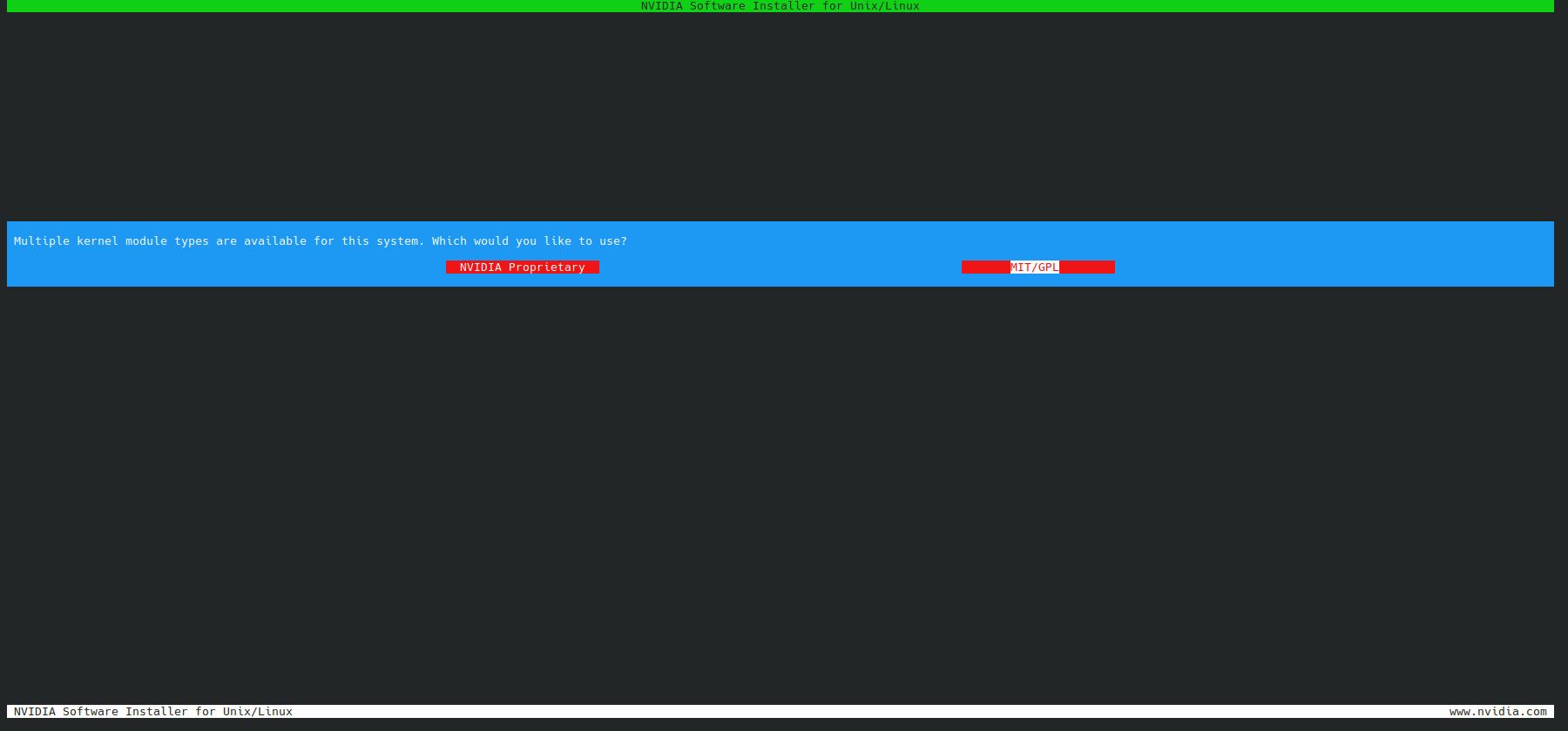
# nvidia-smi
Tue Sep  1 14:50:52 2026
+-----------------------------------------------------------------------------------------+
| NVIDIA-SMI 610.43.03              KMD Version: 610.43.03     CUDA UMD Version: 13.3     |
+-----------------------------------------+------------------------+----------------------+
| GPU  Name                 Persistence-M | Bus-Id          Disp.A | Volatile Uncorr. ECC |
| Fan  Temp   Perf          Pwr:Usage/Cap |           Memory-Usage | GPU-Util  Compute M. |
|                                         |                        |               MIG M. |
|=========================================+========================+======================|
|   0  NVIDIA GeForce RTX 3060 ...    Off |   00000000:01:00.0 Off |                  N/A |
| N/A   47C    P8             11W /  115W |       0MiB /   6144MiB |      0%      Default |
|                                         |                        |                  N/A |
+-----------------------------------------+------------------------+----------------------+
|   1  NVIDIA GeForce RTX 5060 Ti     Off |   00000000:05:00.0 Off |                  N/A |
|  0%   43C    P8              5W /  180W |       0MiB /  16311MiB |      0%      Default |
|                                         |                        |                  N/A |
+-----------------------------------------+------------------------+----------------------+

+-----------------------------------------------------------------------------------------+
| Processes:                                                                              |
|  GPU   GI   CI              PID   Type   Process name                        GPU Memory |
|        ID   ID                                                               Usage      |
|=========================================================================================|
|  No running processes found                                                             |
+-----------------------------------------------------------------------------------------+
# python3.11 -m venv garmin-to-fittrackee
# source garmin-to-fittrackee/bin/activate
# cd garmin-to-fittrackee/
# git clone https://git.dryusdan.fr/Dryusdan/garmin-to-fittrackee.git
# cd garmin-to-fittrackee
# pip install poetry
# poetry install

Current Python version (3.11.2) is not allowed by the project (^3.12).
Please change python executable via the "env use" command.
# cat /etc/os-release
PRETTY_NAME="Debian GNU/Linux 12 (bookworm)"
NAME="Debian GNU/Linux"
VERSION_ID="12"
VERSION="12 (bookworm)"
VERSION_CODENAME=bookworm
ID=debian
HOME_URL="https://www.debian.org/"
SUPPORT_URL="https://www.debian.org/support"
BUG_REPORT_URL="https://bugs.debian.org/"
# deactivate
 nvidia-smi
Fri Aug  7 15:51:53 2026
+-----------------------------------------------------------------------------------------+
| NVIDIA-SMI 610.43.03              KMD Version: 610.43.03     CUDA UMD Version: 13.3     |
+-----------------------------------------+------------------------+----------------------+
| GPU  Name                 Persistence-M | Bus-Id          Disp.A | Volatile Uncorr. ECC |
| Fan  Temp   Perf          Pwr:Usage/Cap |           Memory-Usage | GPU-Util  Compute M. |
|                                         |                        |               MIG M. |
|=========================================+========================+======================|
|   0  NVIDIA GeForce RTX 3060 ...    Off |   00000000:01:00.0 Off |                  N/A |
| N/A   64C    P0             33W /  115W |    1918MiB /   6144MiB |      8%      Default |
|                                         |                        |                  N/A |
+-----------------------------------------+------------------------+----------------------+
|   1  NVIDIA GeForce RTX 5060 Ti     Off |   00000000:05:00.0 Off |                  N/A |
| 30%   51C    P1             41W /  180W |    7550MiB /  16311MiB |     25%      Default |
|                                         |                        |                  N/A |
+-----------------------------------------+------------------------+----------------------+

+-----------------------------------------------------------------------------------------+
| Processes:                                                                              |
|  GPU   GI   CI              PID   Type   Process name                        GPU Memory |
|        ID   ID                                                               Usage      |
|=========================================================================================|
|    0   N/A  N/A         1863585      C   /usr/local/bin/llama-server            1910MiB |
|    1   N/A  N/A         1863585      C   /usr/local/bin/llama-server            7542MiB |
+-----------------------------------------------------------------------------------------+
/usr/local/bin/llama-server -m /models/Qwen3.6-35B-A3B-UD-Q4_K_M.gguf --ctx-size ${default_ctx} --temp ${temp} --top-p 0.95 --top-k 20 --min-p 0.00 --reasoning-preserve --host 0.0.0.0 --fit off -ngl 99 --port 8999 --n-cpu-moe 35 -fa on --flash-attn on
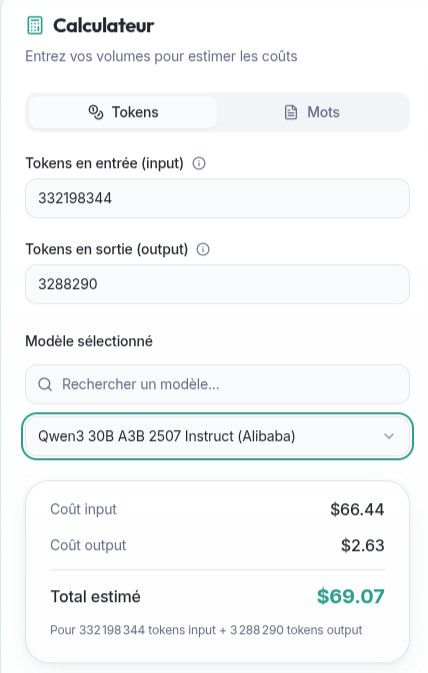
Site : https://www.demeter-sante.fr/calculateur-llm
Mes valeurs :

Cached : 312 405 987 tokens
Processed : 19 792 357 tokens
Generated : 3 288 290 tokens
IN : Cached+Processed = 332198344 ?
OUT : Generated : 3288290 ?
Installation de vllm : https://oneuptime.com/blog/post/2026-03-02-how-to-install-and-configure-vllm-on-ubuntu/view
# nvidia-smi
Fri Aug  7 11:33:15 2026
+-----------------------------------------------------------------------------------------+
| NVIDIA-SMI 610.43.03              KMD Version: 610.43.03     CUDA UMD Version: 13.3     |
+-----------------------------------------+------------------------+----------------------+
| GPU  Name                 Persistence-M | Bus-Id          Disp.A | Volatile Uncorr. ECC |
| Fan  Temp   Perf          Pwr:Usage/Cap |           Memory-Usage | GPU-Util  Compute M. |
|                                         |                        |               MIG M. |
|=========================================+========================+======================|
|   0  NVIDIA GeForce RTX 3060 ...    Off |   00000000:01:00.0 Off |                  N/A |
| N/A   46C    P8             15W /  115W |       0MiB /   6144MiB |      0%      Default |
|                                         |                        |                  N/A |
+-----------------------------------------+------------------------+----------------------+
|   1  NVIDIA GeForce RTX 5060 Ti     Off |   00000000:05:00.0 Off |                  N/A |
|  0%   45C    P8              5W /  180W |       0MiB /  16311MiB |      0%      Default |
|                                         |                        |                  N/A |
+-----------------------------------------+------------------------+----------------------+

+-----------------------------------------------------------------------------------------+
| Processes:                                                                              |
|  GPU   GI   CI              PID   Type   Process name                        GPU Memory |
|        ID   ID                                                               Usage      |
|=========================================================================================|
|  No running processes found                                                             |
+-----------------------------------------------------------------------------------------+

# nvcc --version || nvidia-smi | grep "CUDA Version"
nvcc: NVIDIA (R) Cuda compiler driver
Copyright (c) 2005-2023 NVIDIA Corporation
Built on Fri_Jan__6_16:45:21_PST_2023
Cuda compilation tools, release 12.0, V12.0.140
Build cuda_12.0.r12.0/compiler.32267302_0
# Install Python, venv, curl, and uv
sudo apt-get update && sudo apt-get install -y python3 python3-pip python3-venv curl
curl -LsSf https://astral.sh/uv/install.sh | sh
source "$HOME/.local/bin/env"

# Create a dedicated venv
uv venv --python 3.12 --seed --managed-python ~/vllm-env
source ~/vllm-env/bin/activate

# Upgrade pip
pip install --upgrade pip
# Install vLLM with a PyTorch backend selected for your CUDA driver
uv pip install vllm --torch-backend=auto

# Verify installation
python3 -c "import vllm; print(vllm.__version__)"
# Install huggingface_hub for model downloading
pip install huggingface_hub

# Pre-download a model (optional - vLLM downloads on first use)
python3 -c "
from huggingface_hub import snapshot_download
snapshot_download(
    repo_id='meta-llama/Meta-Llama-3-8B-Instruct',  # 8B model, needs 16GB VRAM
    local_dir='/models/llama-3.2-1b-instruct'
)
"
Je vais devoir ajouter dans mon config.xml :
host: "127.0.0.1"
port: 8080
idle_ttl: 300

models:
  # Modèle : Nvidia Qwen 3.6 35B NVFP4 poussé à 180k de contexte
  - name: "nvidia/Qwen3.6-35B-A3B-NVFP4"
    command: >
      bash -c "source ~/vllm-env/bin/activate && vllm serve nvidia/Qwen3.6-35B-A3B-NVFP4 --port 8002 --gpu-memory-utilization 0.95 --max-model-len 180000 --max-num-seqs 1 --kv-cache-dtype fp8 --enable-chunked-prefill --max-num-batched-tokens 4096 --gpu-memory-buffer-kv-cache-space 4 --attention-backend flashinfer --reasoning-parser qwen3"
    ready_url: "http://127.0.0"
    upstream_url: "http://127.0.0"
A suivre.
Chargement via :
Available Repositories & VariantsStandard NVFP4 GGUF:
Hardware Requirements & Running Tips :
Le PC en question :
# inxi -F
System:
  Host: pcremi Kernel: 6.18.33.1-microsoft-standard-WSL2 arch: x86_64 bits: 64
  Console: pty pts/2 Distro: Ubuntu 24.04.4 LTS (Noble Numbat)
Machine:
  Message: No machine data: try newer kernel. Is dmidecode installed? Try -M
    --dmidecode.
CPU:
  Info: 6-core model: AMD Ryzen 5 7500X3D bits: 64 type: MT MCP cache:
    L2: 6 MiB
  Speed (MHz): avg: 3992 min/max: N/A cores: 1: 3992 2: 3992 3: 3992 4: 3992
    5: 3992 6: 3992 7: 3992 8: 3992 9: 3992 10: 3992 11: 3992 12: 3992
Graphics:
  Device-1: Microsoft Basic Render Driver driver: dxgkrnl v: 2.0.3
  Device-2: Microsoft Basic Render Driver driver: dxgkrnl v: 2.0.3
  Display: server: X.Org v: 24.1.6 driver: dri: swrast gpu: dxgkrnl,dxgkrnl
    resolution: 3840x2160~60Hz
  API: EGL v: 1.5 drivers: swrast platforms: wayland,x11,surfaceless,device
  API: OpenGL v: 4.6 vendor: microsoft mesa v: 24.0.9-0ubuntu0.3
    renderer: D3D12 (AMD Radeon RX 9060 XT)
Audio:
  Message: No device data found.
Network:
  Message: No PCI device data found.
  IF-ID-1: eth0 state: up speed: 10000 Mbps duplex: full
    mac:
Drives:
  Local Storage: total: 1 TiB used: 1.93 GiB (0.2%)
  ID-1: /dev/sda model: Virtual Disk size: 356.9 MiB
  ID-2: /dev/sdb model: Virtual Disk size: 159.5 MiB
  ID-3: /dev/sdc model: Virtual Disk size: 4 GiB
  ID-4: /dev/sdd model: Virtual Disk size: 1024 GiB
Partition:
  ID-1: / size: 1006.85 GiB used: 1.93 GiB (0.2%) fs: ext4 dev: /dev/sdd
Swap:
  ID-1: swap-1 type: partition size: 4 GiB used: 0 KiB (0.0%) dev: /dev/sdc
Sensors:
  Src: lm-sensors+/sys Message: No sensor data found using /sys/class/hwmon
    or lm-sensors.
Info:
  Memory: total: 16 GiB note: est. available: 15.2 GiB used: 775.9 MiB (5.0%)
  Processes: 30 Uptime: 5m Shell: Bash inxi: 3.3.34