Aller directement au contenu

Monde

Sujets en dehors de ce forum. Les vues et opinions exprimées ici ne reflètent pas nécessairement celles de ce forum et de ses membres.

Un monde de contenus à portée de main…

Voyez cela comme votre fil de découverte global. Il rassemble des discussions intéressantes issues du web et d’autres communautés, en un seul endroit.

Bien que vous puissiez consulter les tendances du moment, la meilleure façon d’utiliser ce fil est de le personnaliser. En créant un compte, vous pouvez suivre des créateurs et des sujets spécifiques afin de filtrer le bruit et de ne voir que ce qui vous intéresse.

Prêt à vous lancer ? Créez un compte pour suivre d’autres personnes, recevoir des notifications quand on vous répond et sauvegarder vos contenus favoris.

S'inscrire Se connecter
  • Tuxedo17T

    Voici un exemple de fichier service : /etc/systemd/system/llama-server.service

    [Unit]
    Description=Llama Server
    After=network.target
    
    [Service]
    Type=simple
    User=root
    WorkingDirectory=/home/XXXX/llama.cpp
    Environment="NVM_BIN=/home/XXXX/.nvm/versions/node/v24.17.0/bin"
    Environment="NVM_DIR=/home/XXXXX/.nvm"
    Environment="NVM_INC=/home/XXXXX/.nvm/versions/node/v24.17.0/include/node"
    Environnent="PATH=/home/XXXX/.nvm/versions/node/v24.17.0/bin:/usr/local/sbin:/usr/local/bin:/usr/sbin:/usr/bin:/sbin:/bin"
    ExecStart=/usr/local/bin/llama-server \
      -m /models/XXXXX.gguf --mmproj /models/mmproj-XXXX.gguf \
      --host 0.0.0.0 --port 8080
    Restart=on-failure
    RestartSec=5s
    StandardOutput=file:/tmp/llama-server.stdout.log
    StandardError=file:/tmp/llama-server.stderr.log
    
     
    [Install]
    WantedBy=multi-user.target


  • fariasF

    Les commandes :

    Ma version de Ubuntu :

    # inxi -F
    System:
      Host: XXXX Kernel: 6.8.0-117-generic arch: x86_64 bits: 64
      Console: pty pts/1 Distro: Ubuntu 24.04.4 LTS (Noble Numbat)
    Machine:
      Type: Kvm System: QEMU product: Standard PC (i440FX + PIIX, 1996) v: pc-i440fx-10.1 serial: N/A
      Mobo: N/A model: N/A serial: N/A BIOS: SeaBIOS v: rel-1.17.0-0-gb52ca86e094d-prebuilt.qemu.org
        date: 04/01/2014
    CPU:
      Info: 4x 8-core model: Intel Xeon E5-2450 v2 bits: 64 type: MCP SMP cache:
        L2: 4x 32 MiB (128 MiB)
      Speed (MHz): avg: 2500 min/max: N/A cores: 1: 2500 2: 2500 3: 2500 4: 2500 5: 2500 6: 2500
        7: 2500 8: 2500 9: 2500 10: 2500 11: 2500 12: 2500 13: 2500 14: 2500 15: 2500 16: 2500 17: 2500
        18: 2500 19: 2500 20: 2500 21: 2500 22: 2500 23: 2500 24: 2500 25: 2500 26: 2500 27: 2500
        28: 2500 29: 2500 30: 2500 31: 2500 32: 2500
    Graphics:
      Device-1: driver: bochs-drm v: N/A
      Device-2: NVIDIA GM204GL [Quadro M5000] driver: nvidia v: 580.159.03
      Device-3: NVIDIA GM204GL [Quadro M4000] driver: nvidia v: 580.159.03
      Display: server: X.org v: 1.21.1.11 driver: gpu: bochs-drm tty: 213x51 resolution: 1280x800
      API: EGL v: 1.5 drivers: swrast platforms: surfaceless,device
      API: OpenGL v: 4.5 vendor: mesa v: 25.2.8-0ubuntu0.24.04.2 note: console (EGL sourced)
        renderer: llvmpipe (LLVM 20.1.2 256 bits)
    Audio:
      Message: No device data found.
    Network:
      Device-1: Intel 82371AB/EB/MB PIIX4 ACPI type: network bridge driver: piix4_smbus
      Device-2: Red Hat Virtio network driver: virtio-pci
      IF: ens18 state: up speed: -1 duplex: unknown mac: bc:24:11:b5:30:62
    Drives:
      Local Storage: total: 20.51 TiB used: 13.02 TiB (63.5%)
      ID-1: /dev/sda vendor: QEMU model: HARDDISK size: 400 GiB
      ID-2: /dev/sdb model: Portable SSD T5 size: 931.51 GiB type: USB
      ID-3: /dev/sdc vendor: Seagate model: FireCuda HDD size: 4.55 TiB type: USB
      ID-4: /dev/sdd vendor: Seagate model: Expansion Desk size: 14.55 TiB type: USB
      ID-5: /dev/sde vendor: Kingston model: SA400S37120G size: 111.79 GiB type: USB
    Partition:
      ID-1: / size: 391.18 GiB used: 292.79 GiB (74.8%) fs: ext4 dev: /dev/dm-0
      ID-2: /boot size: 1.9 GiB used: 345.4 MiB (17.7%) fs: ext4 dev: /dev/sda2
    Swap:
      ID-1: swap-1 type: file size: 4 GiB used: 8.5 MiB (0.2%) file: /swap.img
    Sensors:
      Src: lm-sensors+/sys Message: No sensor data found using /sys/class/hwmon or lm-sensors.
    Info:
      Memory: total: 78.19 GiB available: 18.14 GiB used: 2.62 GiB (14.4%)
      Processes: 416 Uptime: 24d 19h 4m Init: systemd target: graphical (5) Shell: Bash inxi: 3.3.34
    

    Mise à jours de CUDA :

    # apt-get update
    # apt-get upgrade
    # ubuntu-drivers autoinstall
    # apt install nvidia-cuda-toolkit -y
    # echo 'vm.swappiness=10' | sudo tee -a /etc/sysctl.conf
    # nvcc --version
    nvcc: NVIDIA (R) Cuda compiler driver
    Copyright (c) 2005-2025 NVIDIA Corporation
    Built on Fri_Feb_21_20:23:50_PST_2025
    Cuda compilation tools, release 12.8, V12.8.93
    Build cuda_12.8.r12.8/compiler.35583870_0
    

    Aie … on refait :

    # wget https://developer.download.nvidia.com/compute/cuda/repos/ubuntu2404/x86_64/cuda-ubuntu2404.pin
    # mv cuda-ubuntu2404.pin /etc/apt/preferences.d/cuda-repository-pin-600
    # wget https://developer.download.nvidia.com/compute/cuda/13.3.0/local_installers/cuda-repo-ubuntu2404-13-3-local_13.3.0-610.43.02-1_amd64.deb
    # dpkg -i cuda-repo-ubuntu2404-13-3-local_13.3.0-610.43.02-1_amd64.deb
    # cp /var/cuda-repo-ubuntu2404-13-3-local/cuda-*-keyring.gpg /usr/share/keyrings/
    # apt-get update
    # apt-get -y install cuda-toolkit-13-3
    # nvcc --version
    nvcc: NVIDIA (R) Cuda compiler driver
    Copyright (c) 2005-2026 NVIDIA Corporation
    Built on Fri_Apr_24_07:22:02_PM_PDT_2026
    Cuda compilation tools, release 13.3, V13.3.33
    Build cuda_13.3.r13.3/compiler.37862127_0
    # apt-get autoremove
    # ldconfig -v
    

    La page pour le téléchargement de cuda : https://developer.nvidia.com/cuda-downloads?target_os=Linux&target_arch=x86_64&Distribution=Ubuntu&target_version=24.04&target_type=deb_local

    Installation nvm :

    # curl https://raw.githubusercontent.com/creationix/nvm/master/install.sh | bash
    ...
    # source ~/.profile
    ...
    # nvm install node
    ...
    # nvm install 24
    ...
    # nvm use 24
    Now using node v24.17.0 (npm v11.13.0)
    

    Installation de la libnccl :

    # apt install libnccl2 libnccl-dev
    

    Installation llama.ccp :

    # git clone https://github.com/ggml-org/llama.cpp.git
    # cd llama.cpp
    # mkdir build
    # cd build
    # cmake ..
    # cmake --build . --config Release
    # make install
    

    Chargement des modèles :

    # mkdir /models
    # curl -L --fail -o /models/qwen2.5-1.5b-instruct-q4_k_m.gguf   https://huggingface.co/bartowski/Qwen2.5-1.5B-Instruct-GGUF/resolve/main/Qwen2.5-1.5B-Instruct-Q4_K_M.gguf
    

    Benchmark ( sans CUDA, seulement CPU ) :

    # llama-bench -m  /models/qwen2.5-1.5b-instruct-q4_k_m.gguf
    | model                          |       size |     params | backend    | threads |            test |                  t/s |
    | ------------------------------ | ---------: | ---------: | ---------- | ------: | --------------: | -------------------: |
    | qwen2 1.5B Q4_K - Medium       | 934.69 MiB |     1.54 B | CPU        |      32 |           pp512 |         74.97 ± 4.53 |


    C’est vraiment mauvais …


    Mise à jours de Ollama : # curl -fsSL https://ollama.com/install.sh | sh >>> Cleaning up old version at /usr/local/lib/ollama >>> Installing ollama to /usr/local >>> Downloading ollama-linux-amd64.tar.zst ######################################################################## 100.0% >>> Adding ollama user to render group... >>> Adding ollama user to video group... >>> Adding current user to ollama group... >>> Creating ollama systemd service... >>> Enabling and starting ollama service... >>> NVIDIA GPU installed. Visiblement même problème : ... juin 19 10:51:37 ollama[2964]: time=2026-06-19T10:51:37.153Z level=INFO source=model_list_cache.go:111 msg="model list cache hydration complete" models=16 failures=0 elapsed=654.370427ms juin 19 10:51:42 ollama[2964]: time=2026-06-19T10:51:42.591Z level=WARN source=cuda_compat.go:38 msg="NVIDIA driver too old" device="Quadro M5000" compute=5.2 driver=535 required_driver="570 or newer" juin 19 10:51:42 ollama[2964]: time=2026-06-19T10:51:42.591Z level=WARN source=cuda_compat.go:38 msg="NVIDIA driver too old" device="Quadro M4000" compute=5.2 driver=535 required_driver="570 or newer" juin 19 10:51:43 ollama[2964]: time=2026-06-19T10:51:43.181Z level=INFO source=types.go:32 msg="inference compute" id=1 filter_id=1 library=Vulkan compute=0.0 name=Vulkan1 description="Quadro M4000" libd> juin 19 10:51:43 ollama[2964]: time=2026-06-19T10:51:43.181Z level=INFO source=types.go:32 msg="inference compute" id=0 filter_id=0 library=Vulkan compute=0.0 name=Vulkan0 description="Quadro M5000" libd> ...
  • Tuxedo17T
    Processeur vcpu RAM qwen35moe 35B.A3B Q4_K – Medium pp512 qwen35moe 35B.A3B Q4_K – Medium tg128 gemma3 1B Q4_K – Medium pp512 gemma3 1B Q4_K – Medium tg128
    Intel Xeon Gold 6240 16 32 66 2 370 10
    Intel Xeon Gold 6240 28 62 112 7 631 22
    11th Gen Intel Core i7-11800H 16 64 ? ? 322 48

  • Tuxedo17T

    C’est à cause de npm :

    # curl https://raw.githubusercontent.com/creationix/nvm/master/install.sh | bash
    ...
    # source ~/.profile
    ...
    # nvm install node
    ...
    # nvm install 24
    ...
    # nvm use 24
    Now using node v24.17.0 (npm v11.13.0)


    Ensuite il faut refaire un build de llama.cpp.


    Les logs avant le build : # export LD_LIBRARY_PATH=/usr/local/cuda/lib # export PATH=$PATH:/usr/local/cuda/bin # cmake .. -DGGML_CUDA=ON CMAKE_BUILD_TYPE=Release -- Warning: ccache not found - consider installing it for faster compilation or disable this warning with GGML_CCACHE=OFF -- CMAKE_SYSTEM_PROCESSOR: x86_64 -- GGML_SYSTEM_ARCH: x86 -- Including CPU backend -- x86 detected -- Adding CPU backend variant ggml-cpu: -march=native -- CUDA Toolkit found -- Using CMAKE_CUDA_ARCHITECTURES=75-virtual;80-virtual;86-real;89-real;90-virtual;120a-real;121a-real CMAKE_CUDA_ARCHITECTURES_NATIVE= -- CUDA host compiler is GNU 11.4.0 -- Including CUDA backend -- ggml version: 0.15.1 -- ggml commit: b4024af6c -- OpenSSL found: 3.0.2 -- Generating embedded license file for target: llama-app -- Configuring done -- Generating done -- Build files have been written to: /home/XXXX/GIT/llama.cpp/build
  • Tuxedo17T

    Distribution linux

    Local IA

    Interface à Ollama / …

    Pour le chargement des modèles :

    Meilleur modèle pour carte 16 Go :

    ollama pull gpt-oss:20b
    ollama run gpt-oss:20b


    Comparaison

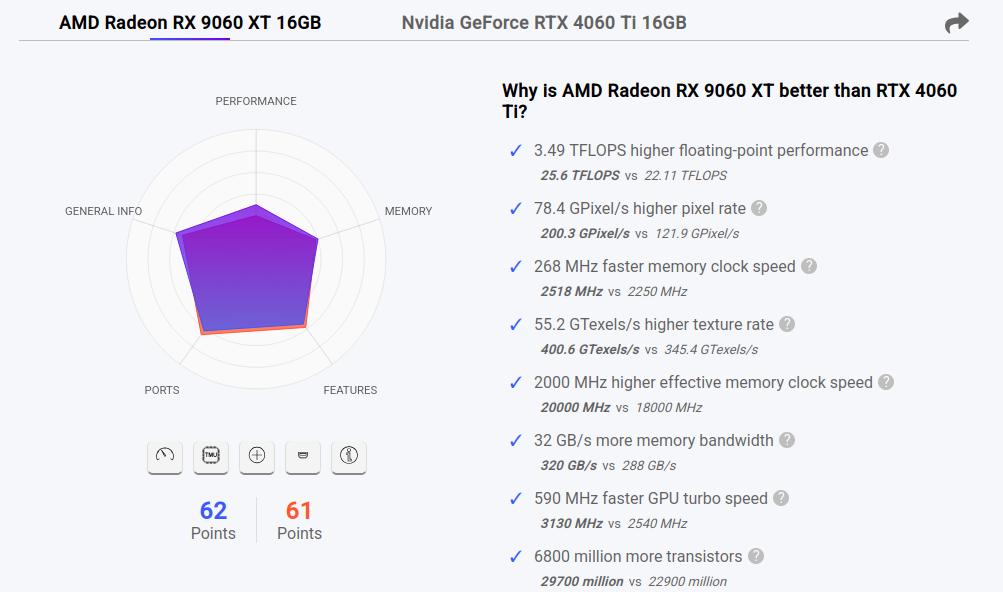
    • Asus Radeon RX 9060 XT 16 Go vs NVIDIA 4060 TI 16 Go :

    Elles sont similaires :

    58eef493-c718-4c09-b0bb-940546595862-image.png


    Après la mise à jours des modèles : # ollama list NAME ID SIZE MODIFIED gpt-oss:20b 17052f91a42e 13 GB About a minute ago llama2:latest 78e26419b446 3.8 GB 18 minutes ago phi4:latest ac896e5b8b34 9.1 GB 18 minutes ago qwen2:latest dd314f039b9d 4.4 GB 18 minutes ago gemma2:latest ff02c3702f32 5.4 GB 18 minutes ago mistral:latest 6577803aa9a0 4.4 GB 18 minutes ago llama3.1:latest 46e0c10c039e 4.9 GB 22 minutes ago llava:latest 8dd30f6b0cb1 4.7 GB 22 minutes ago llava:13b 0d0eb4d7f485 8.0 GB 16 months ago llava:7b 8dd30f6b0cb1 4.7 GB 16 months ago llama3.1:8b 46e0c10c039e 4.9 GB 16 months ago mistral:7b f974a74358d6 4.1 GB 16 months ago gemma2:9b ff02c3702f32 5.4 GB 16 months ago qwen2:7b dd314f039b9d 4.4 GB 16 months ago phi4:14b ac896e5b8b34 9.1 GB 16 months ago
  • fariasF

    N°1 : Internet Service Provider, Dhaka, Bangladesh ( https://ipinfo.io/119.40.84.186?lookup_source=search-bar )
    N°2 : Aliyun Computing Co., LTD - Chine .( https://ipinfo.io/39.98.173.163?lookup_source=search-bar )
    N°3 : CHINANET Guangdong province network - Chine ( https://ipinfo.io/203.2.112.241?lookup_source=search-bar à

    # zgrep "xmlrpc.php" /var/log/apache2/access.*.gz | sed 's/:/ /g' | awk '{print $2}' | sort -n | uniq -c | sort -n | tail -20
       3398 150.223.194.157
       3407 183.56.195.106
       3413 34.82.1.242
       3415 14.116.213.102
       3429 14.116.211.167
       3429 203.2.115.155
       3433 203.2.114.29
       3434 182.43.76.198
       3439 151.243.28.121
       3439 45.8.146.128
       3446 219.152.63.187
       4272 140.246.238.176
       4345 150.223.194.182
       4499 206.189.212.148
       5031 34.6.0.214
       5863 43.139.65.222
       5871 14.116.251.29
       6865 203.2.112.241
       6887 39.98.173.163
      19939 119.40.84.186
    

  • fariasF

    N°1 : Internet Service Provider, Dhaka, Bangladesh 119-40-84-186.bdcom.com ( https://ipinfo.io/119.40.84.186?lookup_source=search-bar )
    N°2 : Company behind the IP traffic. PT Fasma Multi Solusindo Jakarta, Jakarta, ( https://ipinfo.io/103.253.244.95?lookup_source=search-bar )

    # zgrep "wp-login.php" /var/log/apache2/access.*.gz | sed 's/:/ /g' | awk '{print $2}' | sort -n | uniq -c | sort -n | tail -20
       1513 165.232.166.79
       1569 157.245.151.185
       1707 129.212.238.200
       1746 168.144.35.138
       1786 165.245.134.45
       1786 51.161.174.174
       1934 37.60.141.252
       2001 194.60.132.195
       2001 195.26.224.52
       2001 212.34.135.143
       2134 134.185.82.95
       2211 104.248.150.181
       2502 144.124.240.71
       3143 188.166.185.148
       3407 138.2.105.157
       3536 138.2.67.95
       4404 176.65.132.122
       4503 91.84.114.159
      12546 103.253.244.95
      18064 119.40.84.186
    

  • fariasF

    Test :
    7f4fae89-063b-471c-84c8-6ff1d0a30712-image.png


  • fariasF

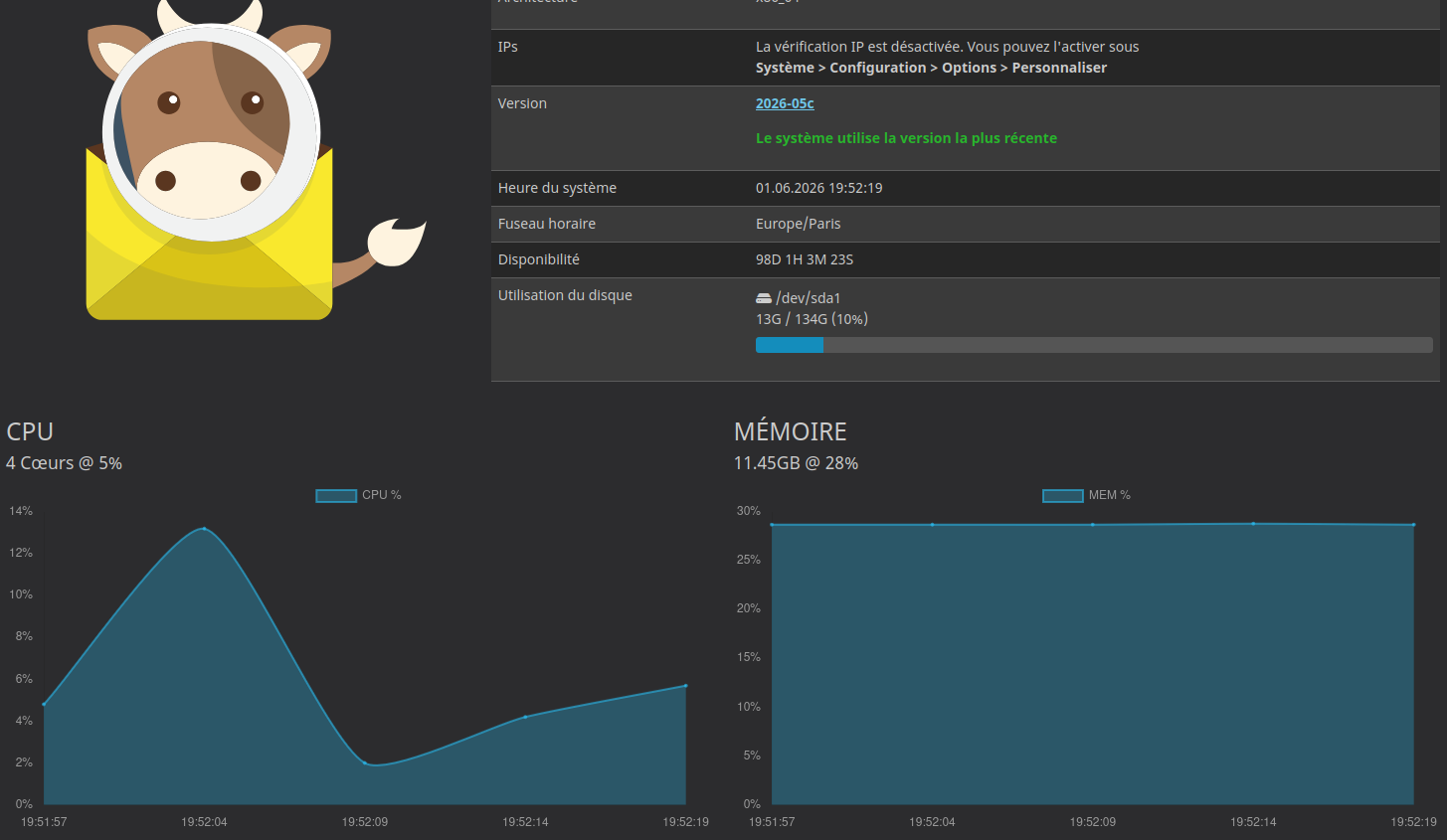
    Installation de MailCow pour le Domaine : arias-frederic.org afin de partir de NUXIT.

    c4b89436-317a-4f46-9393-931bc4c02ecd-image.png

    Chez NUXIT on est limité à 3 boites emails par domaine …


  • fariasF

    Passage de la version 32.0.2 à 32.0.9.
    Augmentation de l’espace disque.


    Modification de opcache /etc/php/8.2/cli/php.ini ; The amount of memory for interned strings in Mbytes. ;opcache.interned_strings_buffer=8 Après : ; The amount of memory for interned strings in Mbytes. opcache.interned_strings_buffer=16 Lancement de apache : # systemctl restart apache2
  • fariasF

    Voici le process

    # lsblk
    NAME               MAJ:MIN RM  SIZE RO TYPE MOUNTPOINTS
    sda                  8:0    0   90G  0 disk 
    `-sda1               8:1    0   90G  0 part 
      |-turnkey-root   254:0    0  8.8G  0 lvm  /
      `-turnkey-swap_1 254:1    0    2G  0 lvm  [SWAP]
    sdb                  8:16   0 20.8G  0 disk 
    `-sdb1               8:17   0  825M  0 part 
    # pvresize /dev/sda1
      Physical volume "/dev/sda1" changed
      1 physical volume(s) resized or updated / 0 physical volume(s) not resized
    # lvextend -l +100%FREE /dev/turnkey/root
      Size of logical volume turnkey/root changed from <8.80 GiB (2252 extents) to 88.00 GiB (22528 extents).
      Logical volume turnkey/root successfully resized.
    # resize2fs /dev/turnkey/root
    resize2fs 1.47.0 (5-Feb-2023)
    Filesystem at /dev/turnkey/root is mounted on /; on-line resizing required
    old_desc_blocks = 2, new_desc_blocks = 11
    The filesystem on /dev/turnkey/root is now 23068672 (4k) blocks long.
    
    # df -h
    Filesystem                Size  Used Avail Use% Mounted on
    udev                      7.7G     0  7.7G   0% /dev
    tmpfs                     1.6G  536K  1.6G   1% /run
    /dev/mapper/turnkey-root   87G  8.2G   75G  10% /
    tmpfs                     7.7G     0  7.7G   0% /dev/shm
    tmpfs                     5.0M     0  5.0M   0% /run/lock
    tmpfs                     1.6G     0  1.6G   0% /run/user/0


  • fariasF

    Visiblement on est limité sur la taille des fichiers … c’est domage.

    # du -sh /etc/pve/firewall/*.fw 
    512	/etc/pve/firewall/104.fw
    512	/etc/pve/firewall/116.fw
    512	/etc/pve/firewall/124.fw
    73K	/etc/pve/firewall/126.fw
    512	/etc/pve/firewall/127.fw
    512	/etc/pve/firewall/129.fw
    92K	/etc/pve/firewall/cluster.fw
    

    J’ai du mettre toutes les IP Russes dans 126.fw à la place de cluster.fw car il était trop gros.


    Nouvelle optimisation : # du -sh /etc/pve/firewall/cluster.fw 103K /etc/pve/firewall/cluster.fw # wc -l /etc/pve/firewall/cluster.fw 23780 /etc/pve/firewall/cluster.fw
  • fariasF

    Impossible d’installer grub-pc sur mon serveur :

    Paramétrage de grub-pc (2.06-13+deb12u2) ...
    grub-pc: Running grub-install ...
    Installation pour la plate-forme i386-pc.
    grub-install : attention : Le système de fichiers « ext2 » ne prend pas en charge l'embarquage.
    grub-install : erreur : l'embarquage est impossible, il est pourtant nécessaire pour les installations interdisques.
      grub-install failure for /dev/sda
    grub-pc: Running grub-install ...
    Installation pour la plate-forme i386-pc.
    grub-install : attention : Le système de fichiers « ext2 » ne prend pas en charge l'embarquage.
    grub-install : erreur : l'embarquage est impossible, il est pourtant nécessaire pour les installations interdisques.
      grub-install failure for /dev/sda
    grub-pc: Running grub-install ...
    Installation pour la plate-forme i386-pc.
    grub-install : attention : Le système de fichiers « ext2 » ne prend pas en charge l'embarquage.
    grub-install : erreur : l'embarquage est impossible, il est pourtant nécessaire pour les installations interdisques.
      grub-install failure for /dev/sda
    grub-pc: Running grub-install ...
    grub-pc: Running grub-install ...
    Generating grub configuration file ...
    Found linux image: /boot/vmlinuz-6.1.0-41-amd64
    Found initrd image: /boot/initrd.img-6.1.0-41-amd64
    Found linux image: /boot/vmlinuz-5.10.0-36-amd64
    Found initrd image: /boot/initrd.img-5.10.0-36-amd64
    Warning: os-prober will not be executed to detect other bootable partitions.
    Systems on them will not be added to the GRUB boot configuration.
    Check GRUB_DISABLE_OS_PROBER documentation entry.
    done


    J’ai du mal à voir : # /usr/sbin/parted -l Model: ATA QEMU HARDDISK (scsi) Disk /dev/sda: 64,4GB Sector size (logical/physical): 512B/512B Partition Table: loop Disk Flags: Number Start End Size File system Flags 1 0,00B 64,4GB 64,4GB ext4 Model: ATA QEMU HARDDISK (scsi) Disk /dev/sdb: 85,9GB Sector size (logical/physical): 512B/512B Partition Table: msdos Disk Flags: Number Start End Size Type File system Flags 1 1049kB 63,4GB 63,4GB primary ext4 boot 2 63,4GB 64,4GB 1022MB extended 5 63,4GB 64,4GB 1022MB logical linux-swap(v1) swap
  • fariasF

    Passage de la version :
    11.0.3 => 11.0.4

    La derniere version n’est pas disponible pour LXC.


    Update : alpine-forgejo:~# apk update v3.23.4-222-g6275d971a54 [http://dl-cdn.alpinelinux.org/alpine/latest-stable/main] v3.23.4-222-g6275d971a54 [http://dl-cdn.alpinelinux.org/alpine/latest-stable/community] OK: 27601 distinct packages available alpine-forgejo:~# apk upgrade (1/4) Upgrading git-lfs (3.7.0-r8 -> 3.7.0-r9) (2/4) Upgrading libldap (2.6.10-r0 -> 2.6.13-r0) (3/4) Upgrading forgejo (13.0.5-r3 -> 13.0.5-r4) Installing file to etc/forgejo/app.ini.apk-new (4/4) Upgrading forgejo-openrc (13.0.5-r3 -> 13.0.5-r4) Executing busybox-1.37.0-r30.trigger OK: 180.1 MiB in 138 packages alpine-forgejo:~# apk update v3.23.4-222-g6275d971a54 [http://dl-cdn.alpinelinux.org/alpine/latest-stable/main] v3.23.4-222-g6275d971a54 [http://dl-cdn.alpinelinux.org/alpine/latest-stable/community] OK: 27597 distinct packages available alpine-forgejo:~# apk upgrade OK: 180.1 MiB in 138 packages
  • fariasF

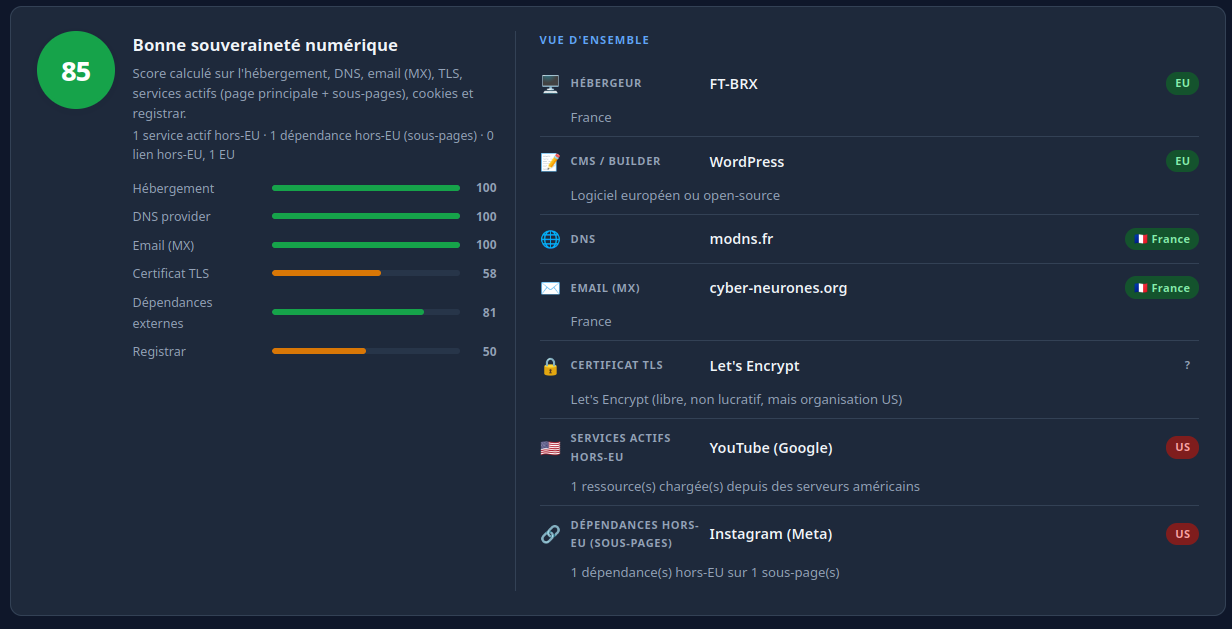
    Sur https://aventures.cyber-neurones.org/

    Je suis passé de la version v0.18.0 => v0.18.1.

    Release Note : https://github.com/Flomp/wanderer/releases/tag/v0.18.1


    Update v0.19.1 : https://github.com/open-wanderer/wanderer/releases/tag/v0.19.1
  • Tuxedo17T

    J’ai pas trouvé de bon process pour la purge, donc ma méthode :

    # uptrack-uname -r
    5.4.17-2136.349.3.1.el8uek.x86_64
    #  uptrack-show
    Installed updates:
    None
    
    Effective kernel version is 5.4.17-2136.349.3.1.el8uek
    
    # du -sh /var/cache/uptrack/Linux/x86_64/*
    449M    /var/cache/uptrack/Linux/x86_64/5.4.17-2102.201.3.el8uek.x86_64
    287M    /var/cache/uptrack/Linux/x86_64/5.4.17-2136.316.7.el8uek.x86_64
    211M    /var/cache/uptrack/Linux/x86_64/5.4.17-2136.324.5.3.el8uek.x86_64
    214M    /var/cache/uptrack/Linux/x86_64/5.4.17-2136.328.3.el8uek.x86_64
    456M    /var/cache/uptrack/Linux/x86_64/5.4.17-2136.331.7.el8uek.x86_64
    132M    /var/cache/uptrack/Linux/x86_64/5.4.17-2136.335.4.1.el8uek.x86_64
    270M    /var/cache/uptrack/Linux/x86_64/5.4.17-2136.336.5.1.el8uek.x86_64
    604M    /var/cache/uptrack/Linux/x86_64/5.4.17-2136.337.5.1.el8uek.x86_64
    126M    /var/cache/uptrack/Linux/x86_64/5.4.17-2136.349.3.1.el8uek.x86_64
    #  yum remove uptrack
    Dependencies resolved.
    =============================================================================================================================================================================================================================================
     Package                                                          Architecture                                     Version                                                  Repository                                                  Size
    =============================================================================================================================================================================================================================================
    Removing:
     uptrack                                                          noarch                                           1.2.80-0.el8                                             @ksplice-uptrack                                           626 k
    Removing unused dependencies:
     perl-IPC-System-Simple                                           noarch                                           1.25-17.el8                                              @ol8_appstream                                              69 k
     perl-autodie                                                     noarch                                           2.29-396.el8                                             @ol8_appstream                                             211 k
     python3-pycurl                                                   x86_64                                           7.43.0.2-4.el8                                           @ol8_appstream                                             767 k
    
    Transaction Summary
    =============================================================================================================================================================================================================================================
    Remove  4 Packages
    
    Freed space: 1.6 M
    Is this ok [y/N]: y
    Running transaction check
    Transaction check succeeded.
    Running transaction test
    Transaction test succeeded.
    Running transaction
      Preparing        :                                                                                                                                                                                                                     1/1
      Running scriptlet: uptrack-1.2.80-0.el8.noarch                                                                                                                                                                                         1/1
      Running scriptlet: uptrack-1.2.80-0.el8.noarch                                                                                                                                                                                         1/4
      Erasing          : uptrack-1.2.80-0.el8.noarch                                                                                                                                                                                         1/4
    warning: /etc/uptrack/uptrack.conf saved as /etc/uptrack/uptrack.conf.rpmsave
    
      Running scriptlet: uptrack-1.2.80-0.el8.noarch                                                                                                                                                                                         1/4
      Erasing          : perl-autodie-2.29-396.el8.noarch                                                                                                                                                                                    2/4
      Erasing          : perl-IPC-System-Simple-1.25-17.el8.noarch                                                                                                                                                                           3/4
      Erasing          : python3-pycurl-7.43.0.2-4.el8.x86_64                                                                                                                                                                                4/4
      Running scriptlet: python3-pycurl-7.43.0.2-4.el8.x86_64                                                                                                                                                                                4/4
      Verifying        : perl-IPC-System-Simple-1.25-17.el8.noarch                                                                                                                                                                           1/4
      Verifying        : perl-autodie-2.29-396.el8.noarch                                                                                                                                                                                    2/4
      Verifying        : python3-pycurl-7.43.0.2-4.el8.x86_64                                                                                                                                                                                3/4
      Verifying        : uptrack-1.2.80-0.el8.noarch                                                                                                                                                                                         4/4
    
    Removed:
      perl-IPC-System-Simple-1.25-17.el8.noarch                         perl-autodie-2.29-396.el8.noarch                         python3-pycurl-7.43.0.2-4.el8.x86_64                         uptrack-1.2.80-0.el8.noarch
    
    Complete!
    #  yum install uptrack
    Extra Packages for Enterprise Linux 8 - x86_64                                                                                                                                                               4.1 MB/s |  14 MB     00:03
    Ksplice Uptrack for Oracle Linux                                                                                                                                                                             4.6 kB/s | 5.0 kB     00:01
    packages-microsoft-com-prod                                                                                                                                                                                   43 MB/s |  20 MB     00:00
    Oracle Linux 8 BaseOS Latest (x86_64)                                                                                                                                                                         51 MB/s | 126 MB     00:02
    Oracle Linux 8 Application Stream (x86_64)                                                                                                                                                                    48 MB/s |  77 MB     00:01
    Latest Unbreakable Enterprise Kernel Release 6 for Oracle Linux 8 (x86_64)                                                                                                                                    49 MB/s | 136 MB     00:02
    Dependencies resolved.
    =============================================================================================================================================================================================================================================
     Package                                                          Architecture                                     Version                                                   Repository                                                 Size
    =============================================================================================================================================================================================================================================
    Installing:
     uptrack                                                          noarch                                           1.2.80-0.el8                                              ksplice-uptrack                                           160 k
    Installing dependencies:
     perl-IPC-System-Simple                                           noarch                                           1.25-17.el8                                               ol8_appstream                                              43 k
     perl-autodie                                                     noarch                                           2.29-396.el8                                              ol8_appstream                                              98 k
     python3-pycurl                                                   x86_64                                           7.43.0.2-4.el8                                            ol8_appstream                                             227 k
    
    Transaction Summary
    =============================================================================================================================================================================================================================================
    Install  4 Packages
    
    Total download size: 528 k
    Installed size: 1.6 M
    Is this ok [y/N]: y
    Downloading Packages:
    (1/4): perl-autodie-2.29-396.el8.noarch.rpm                                                                                                                                                                  1.0 MB/s |  98 kB     00:00
    (2/4): perl-IPC-System-Simple-1.25-17.el8.noarch.rpm                                                                                                                                                         433 kB/s |  43 kB     00:00
    (3/4): python3-pycurl-7.43.0.2-4.el8.x86_64.rpm                                                                                                                                                               10 MB/s | 227 kB     00:00
    (4/4): uptrack-1.2.80-0.el8.noarch.rpm                                                                                                                                                                       199 kB/s | 160 kB     00:00
    ---------------------------------------------------------------------------------------------------------------------------------------------------------------------------------------------------------------------------------------------
    Total                                                                                                                                                                                                        655 kB/s | 528 kB     00:00
    Running transaction check
    Transaction check succeeded.
    Running transaction test
    Transaction test succeeded.
    Running transaction
      Preparing        :                                                                                                                                                                                                                     1/1
      Installing       : python3-pycurl-7.43.0.2-4.el8.x86_64                                                                                                                                                                                1/4
      Installing       : perl-IPC-System-Simple-1.25-17.el8.noarch                                                                                                                                                                           2/4
      Installing       : perl-autodie-2.29-396.el8.noarch                                                                                                                                                                                    3/4
      Installing       : uptrack-1.2.80-0.el8.noarch                                                                                                                                                                                         4/4
      Running scriptlet: uptrack-1.2.80-0.el8.noarch                                                                                                                                                                                         4/4
    There are no existing modules on disk that need basename migration.
    
      Verifying        : uptrack-1.2.80-0.el8.noarch                                                                                                                                                                                         1/4
      Verifying        : perl-IPC-System-Simple-1.25-17.el8.noarch                                                                                                                                                                           2/4
      Verifying        : perl-autodie-2.29-396.el8.noarch                                                                                                                                                                                    3/4
      Verifying        : python3-pycurl-7.43.0.2-4.el8.x86_64                                                                                                                                                                                4/4
    
    Installed:
      perl-IPC-System-Simple-1.25-17.el8.noarch                         perl-autodie-2.29-396.el8.noarch                         python3-pycurl-7.43.0.2-4.el8.x86_64                         uptrack-1.2.80-0.el8.noarch
    
    Complete!
    # du -sh /var/cache/uptrack/
    0       /var/cache/uptrack/


    A suivre.


    Nouveau test : # du -sh /var/cache/uptrack/* 4.0K /var/cache/uptrack/backoff 4.0K /var/cache/uptrack/backoff-counter 2.5G /var/cache/uptrack/Linux 4.0K /var/cache/uptrack/status # uptrack-uname -r 5.4.17-2136.349.3.1.el8uek.x86_64 # uptrack-show Installed updates: None # du -sh /var/cache/uptrack/Linux/x86_64/* 426M /var/cache/uptrack/Linux/x86_64/5.4.17-2102.201.3.el8uek.x86_64 287M /var/cache/uptrack/Linux/x86_64/5.4.17-2136.316.7.el8uek.x86_64 287M /var/cache/uptrack/Linux/x86_64/5.4.17-2136.324.5.3.el8uek.x86_64 456M /var/cache/uptrack/Linux/x86_64/5.4.17-2136.331.7.el8uek.x86_64 270M /var/cache/uptrack/Linux/x86_64/5.4.17-2136.336.5.1.el8uek.x86_64 604M /var/cache/uptrack/Linux/x86_64/5.4.17-2136.337.5.1.el8uek.x86_64 170M /var/cache/uptrack/Linux/x86_64/5.4.17-2136.349.3.1.el8uek.x86_64 # yum remove uptrack Dependencies resolved. ... # yum install uptrack Last metadata expiration check: 1:38:15 ago on Tue 12 May 2026 01:20:27 PM CEST. Dependencies resolved. ... # du -sh /var/cache/uptrack/ 0 /var/cache/uptrack/
  • fariasF

    Pas de problème de synchronisation …

    # garmin2fittrackee sync
    [05/06/26 21:09:38] INFO     Fetching activities on Garminfrom May 03, 2026to May 04, 2026 main sync                                                                                                      main.py:144
    [05/06/26 21:09:39] INFO     Fetching activities on Garminfrom May 05, 2026to May 06, 2026 main sync                                                                                                      main.py:144
                        INFO     Activity data downloaded to file /tmp/22786864365.zip main _fetch_garmin_activity_file                                                                                       main.py:218
    [05/06/26 21:09:41] INFO     Activity added on Fittrackee with id nox3fkU8qTi8CRyzC2ansC fittrackee upload_workout                                                                                  fittrackee.py:256
    [05/06/26 21:09:42] INFO     Activity data downloaded to file /tmp/22783833992.zip main _fetch_garmin_activity_file                                                                                       main.py:218
    [05/06/26 21:09:46] INFO     Activity added on Fittrackee with id 27qtWoEUBdLEhGapTG7KyM fittrackee upload_workout                                                                                  fittrackee.py:256
                        INFO     Activity data downloaded to file /tmp/22781710872.zip main _fetch_garmin_activity_file                                                                                       main.py:218
    [05/06/26 21:09:48] INFO     Activity added on Fittrackee with id NRuQbG8Cffa8fERDiMgoRC fittrackee upload_workout  
    ...
    

    Par contre j’ai pas réussi à le faire fonctionner via une crontab.

    Mon instance : https://fit.cyber-neurones.org/

    db5da870-a8f8-4d45-91e4-cc7a69c3e42b-image.png


  • fariasF

    Utilisation de la commande Pveperf sur mon PROXMOX :

    root@balkany# pveperf
    CPU BOGOMIPS:      159998.72
    REGEX/SECOND:      1576978
    HD SIZE:           93.93 GB (/dev/mapper/pve-root)
    BUFFERED READS:    135.34 MB/sec
    AVERAGE SEEK TIME: 19.02 ms
    FSYNCS/SECOND:     2571.81
    DNS EXT:           42.07 ms
    DNS INT:           1.96 ms (home)
    
    root@balkany:# pveversion 
    pve-manager/9.1.9/ee7bad0a3d1546c9 (running kernel: 6.17.9-1-pve)
    
    oot@balkany:# inxi -Fxxxz
    System:
      Kernel: 6.17.9-1-pve arch: x86_64 bits: 64 compiler: gcc v: 14.2.0 clocksource: tsc
      Console: pty pts/3 Distro: Debian GNU/Linux 13 (trixie)
    Machine:
      Type: Server System: Dell product: PowerEdge T420 v: N/A serial: <filter> Chassis: type: 17
        serial: <filter>
      Mobo: Dell model: 061VPC v: A02 serial: <filter>
        part-nu: SKU=NotProvided;ModelName=PowerEdge T420 uuid: 4c4c4544-004b-3010-805a-b2c04f563432
        BIOS: Dell v: 2.9.0 date: 01/08/2020
    CPU:
      Info: 2x 8-core model: Intel Xeon E5-2450 v2 bits: 64 type: MT MCP SMP smt: enabled
        arch: Ivy Bridge rev: 4 cache: L1: 2x 512 KiB (1024 KiB) L2: 2x 2 MiB (4 MiB)
        L3: 2x 20 MiB (40 MiB)
      Speed (MHz): avg: 2250 high: 3300 min/max: 1200/3300 volts: 1.2 V ext-clock: 8000 MHz cores:
        1: 1200 2: 3300 3: 1200 4: 3300 5: 1200 6: 3300 7: 1200 8: 3300 9: 1200 10: 3300 11: 1200
        12: 3300 13: 1200 14: 3300 15: 1200 16: 3300 17: 1200 18: 3300 19: 1200 20: 3300 21: 1200
        22: 3300 23: 1200 24: 3300 25: 1200 26: 3300 27: 1200 28: 3300 29: 1200 30: 3300 31: 1200
        32: 3300 bogomips: 159998
      Flags: avx ht lm nx pae sse sse2 sse3 sse4_1 sse4_2 ssse3 vmx
    Graphics:
      Device-1: Matrox Systems G200eR2 vendor: Dell driver: mgag200 v: kernel ports: active: VGA-1
        empty: none bus-ID: 06:00.0 chip-ID: 102b:0534 class-ID: 0300
      Device-2: NVIDIA GM204GL [Quadro M5000] vendor: Hewlett-Packard driver: vfio-pci v: N/A
        arch: Maxwell pcie: speed: 2.5 GT/s lanes: 16 bus-ID: 0a:00.0 chip-ID: 10de:13f0 class-ID: 0300
      Device-3: NVIDIA GM204GL [Quadro M4000] vendor: Hewlett-Packard driver: vfio-pci v: N/A
        arch: Maxwell pcie: speed: 2.5 GT/s lanes: 16 bus-ID: 41:00.0 chip-ID: 10de:13f1 class-ID: 0300
      Display: server: No display server data found. Headless machine? tty: 213x51
      Monitor-1: VGA-1 model: Dell P2012H serial: <filter> res: 1600x900 dpi: 92
        size: 443x249mm (17.44x9.8") diag: 508mm (20") modes: max: 1600x900 min: 640x480
      API: EGL v: 1.5 platforms: device: 0 drv: swrast surfaceless: drv: swrast
        inactive: gbm,wayland,x11
      API: OpenGL v: 4.5 vendor: mesa v: 25.0.7-2 note: console (EGL sourced) renderer: llvmpipe
        (LLVM 19.1.7 256 bits)
      Info: Tools: api: eglinfo,glxinfo x11: xdriinfo, xdpyinfo, xprop, xrandr
    Audio:
      Device-1: NVIDIA GM204 High Definition Audio vendor: Hewlett-Packard driver: vfio-pci pcie:
        speed: 2.5 GT/s lanes: 16 bus-ID: 0a:00.1 chip-ID: 10de:0fbb class-ID: 0403
      Device-2: NVIDIA GM204 High Definition Audio vendor: Hewlett-Packard driver: vfio-pci pcie:
        speed: 2.5 GT/s lanes: 16 bus-ID: 41:00.1 chip-ID: 10de:0fbb class-ID: 0403
      API: ALSA v: k6.17.9-1-pve status: inactive
    RAID:
      Hardware-1: Broadcom / LSI MegaRAID SAS 2208 [Thunderbolt] driver: megaraid_sas
        v: 07.734.00.00-rc1 port: fc00 bus-ID: 08:00.0 chip-ID: 1000:005b rev: N/A class-ID: 0104
    Drives:
      Local Storage: total: 9.55 TiB lvm-free: 16.25 GiB used: 4.33 TiB (45.3%)
      ID-1: /dev/sda vendor: Dell PowerEdge RAID Card model: PERC H710 size: 4.09 TiB
        speed: <unknown> tech: N/A serial: N/A fw-rev: 3.13
      ID-2: /dev/sdb vendor: Dell PowerEdge RAID Card model: PERC H710 size: 1.82 TiB
        speed: <unknown> tech: N/A serial: N/A fw-rev: 3.13 scheme: GPT
      ID-3: /dev/sdc vendor: Seagate model: Expansion Desk size: 3.64 TiB type: USB rev: 2.1
        spd: 480 Mb/s lanes: 1 tech: N/A serial: <filter> fw-rev: 0915 scheme: GPT
    Partition:
      ID-1: / size: 93.93 GiB used: 52.96 GiB (56.4%) fs: ext4 dev: /dev/dm-1 mapped: pve-root
    Swap:
      ID-1: swap-1 type: partition size: 8 GiB used: 8 GiB (100.0%) priority: -2 dev: /dev/dm-0
        mapped: pve-swap
    Sensors:
      System Temperatures: cpu: 40.0 C mobo: N/A
      Fan Speeds (rpm): N/A
    Info:
      Memory: total: 224 GiB available: 220.33 GiB used: 178.64 GiB (81.1%)
      Processes: 622 Power: uptime: 71d 1h 15m states: freeze,mem,disk suspend: s2idle wakeups: 0
        hibernate: platform Init: systemd v: 257 default: graphical
      Packages: pm: dpkg pkgs: 1045 Compilers: gcc: 14.2.0 alt: 12 Shell: Bash v: 5.2.37
        running-in: pty pts/3 inxi: 3.3.38


    https://technical.city/en/cpu/Xeon-E5-2450-v2-vs-Xeon-Gold-6254 “Xeon Gold 6254 outperforms Xeon E5-2450 v2 by a whopping 257% based on our aggregate benchmark results.” [image: image.png] Sur CPU BOGOMIPS : 159998.72 à 374460.48 j’ai 134.04 % et pas 257%.