-
Installation de Visual Studio : https://visualstudio.microsoft.com/ .
Installation du Windows SDK : https://learn.microsoft.com/fr-fr/windows/apps/windows-sdk/J’ai donc fait un nouvel export :
# export win_sdk=/mnt/c/Program\ Files\ \(x86\)/Windows\ Kits/10/Include/10.0.28000.0/ -
C’est bon rocminfo fonctionne :
# rocminfo WSL environment detected. ===================== HSA System Attributes ===================== Runtime Version: 1.21 Runtime Ext Version: 1.26 System Timestamp Freq.: 1000.000000MHz Sig. Max Wait Duration: 18446744073709551615 (0xFFFFFFFFFFFFFFFF) (timestamp count) Machine Model: LARGE System Endianness: LITTLE Mwaitx: DISABLED XNACK enabled: NO DMAbuf Support: YES VMM Support: YES Fabric Support: NO ========== HSA Agents ========== ******* Agent 1 ******* Name: AMD Ryzen 5 7500X3D 6-Core Processor Uuid: CPU-XX Marketing Name: AMD Ryzen 5 7500X3D 6-Core Processor Vendor Name: CPU Feature: None specified Profile: FULL_PROFILE Float Round Mode: NEAR Max Queue Number: 0(0x0) Queue Min Size: 0(0x0) Queue Max Size: 0(0x0) Queue Type: MULTI Node: 0 Device Type: CPU Cache Info: L1: 32768(0x8000) KB Chip ID: 0(0x0) Cacheline Size: 64(0x40) BDFID: 0 Internal Node ID: 0 Compute Unit: 12 SIMDs per CU: 0 Shader Engines: 0 Shader Arrs. per Eng.: 0 Memory Properties: Features: None Pool Info: Pool 1 Segment: GLOBAL; FLAGS: FINE GRAINED Size: 15940236(0xf33a8c) KB Allocatable: TRUE Alloc Granule: 4KB Alloc Recommended Granule:4KB Alloc Alignment: 4KB Accessible by all: TRUE Pool 2 Segment: GLOBAL; FLAGS: EXTENDED FINE GRAINED Size: 15940236(0xf33a8c) KB Allocatable: TRUE Alloc Granule: 4KB Alloc Recommended Granule:4KB Alloc Alignment: 4KB Accessible by all: TRUE Pool 3 Segment: GLOBAL; FLAGS: KERNARG, FINE GRAINED Size: 15940236(0xf33a8c) KB Allocatable: TRUE Alloc Granule: 4KB Alloc Recommended Granule:4KB Alloc Alignment: 4KB Accessible by all: TRUE Pool 4 Segment: GLOBAL; FLAGS: COARSE GRAINED Size: 15940236(0xf33a8c) KB Allocatable: TRUE Alloc Granule: 4KB Alloc Recommended Granule:4KB Alloc Alignment: 4KB Accessible by all: TRUE ISA Info: ******* Agent 2 ******* Name: gfx1200 Uuid: GPU-a7d3e620dff8c443 Marketing Name: AMD Radeon RX 9060 XT Vendor Name: AMD Feature: KERNEL_DISPATCH Profile: BASE_PROFILE Float Round Mode: NEAR Max Queue Number: 128(0x80) Queue Min Size: 64(0x40) Queue Max Size: 131072(0x20000) Queue Type: MULTI Node: 1 Device Type: GPU Cache Info: L1: 32(0x20) KB L3: 32768(0x8000) KB Chip ID: 30096(0x7590) Cacheline Size: 64(0x40) Max Clock Freq. (MHz): 2620 BDFID: 768 Internal Node ID: 1 Compute Unit: 32 SIMDs per CU: 2 Shader Engines: 2 Shader Arrs. per Eng.: 2 Coherent Host Access: FALSE Memory Properties: Features: KERNEL_DISPATCH Fast F16 Operation: TRUE Wavefront Size: 32(0x20) Workgroup Max Size: 1024(0x400) Workgroup Max Size per Dimension: x 1024(0x400) y 1024(0x400) z 1024(0x400) Max Waves Per CU: 32(0x20) Max Work-item Per CU: 1024(0x400) Grid Max Size: 4294967295(0xffffffff) Grid Max Size per Dimension: x 4294967295(0xffffffff) y 65535(0xffff) z 65535(0xffff) Max fbarriers/Workgrp: 32 Packet Processor uCode:: 68 SDMA engine uCode:: 0 IOMMU Support:: None Pool Info: Pool 1 Segment: GLOBAL; FLAGS: COARSE GRAINED Size: 16695296(0xfec000) KB Allocatable: TRUE Alloc Granule: 4KB Alloc Recommended Granule:2048KB Alloc Alignment: 4KB Accessible by all: FALSE Pool 2 Segment: GROUP Size: 64(0x40) KB Allocatable: FALSE Alloc Granule: 0KB Alloc Recommended Granule:0KB Alloc Alignment: 0KB Accessible by all: FALSE ISA Info: ISA 1 Name: amdgcn-amd-amdhsa--gfx1200 Machine Models: HSA_MACHINE_MODEL_LARGE Profiles: HSA_PROFILE_BASE Default Rounding Mode: NEAR Default Rounding Mode: NEAR Fast f16: TRUE Workgroup Max Size: 1024(0x400) Workgroup Max Size per Dimension: x 1024(0x400) y 1024(0x400) z 1024(0x400) Grid Max Size: 4294967295(0xffffffff) Grid Max Size per Dimension: x 2147483647(0x7fffffff) y 65535(0xffff) z 65535(0xffff) FBarrier Max Size: 32 ISA 2 Name: amdgcn-amd-amdhsa--gfx12-generic Machine Models: HSA_MACHINE_MODEL_LARGE Profiles: HSA_PROFILE_BASE Default Rounding Mode: NEAR Default Rounding Mode: NEAR Fast f16: TRUE Workgroup Max Size: 1024(0x400) Workgroup Max Size per Dimension: x 1024(0x400) y 1024(0x400) z 1024(0x400) Grid Max Size: 4294967295(0xffffffff) Grid Max Size per Dimension: x 2147483647(0x7fffffff) y 65535(0xffff) z 65535(0xffff) FBarrier Max Size: 32 *** Done *** -
Pas possible de faire le build :
# cmake .. -G Ninja -DCMAKE_C_COMPILER=/opt/rocm/llvm/bin/clang -DCMAKE_CXX_COMPILER=/opt/rocm/llvm/bin/clang++ -DCMAKE_CXX_FLAGS="-I/opt/rocm/include" -DCMAKE_CROSSCOMPILING=ON -DCMAKE_BUILD_TYPE=Release -DGPU_TARGETS="gfx1151" -DBUILD_SHARED_LIBS=ON -DLLAMA_BUILD_TESTS=OFF -DGGML_HIP=ON -DGGML_OPENMP=OFF -DGGML_CUDA_FORCE_CUBLAS=OFF -DGGML_HIP_ROCWMMA_FATTN=OFF -DLLAMA_CURL=OFF -DGGML_NATIVE=OFF -DGGML_STATIC=OFF -DCMAKE_SYSTEM_NAME=Linux -DCMAKE_HIP_COMPILER_ROCM_ROOT=/opt/rocm-7.2.4/core-7.14 -DCMAKE_PREFIX_PATH=/opt/rocm-7.2.4/core-7.14 CMAKE_BUILD_TYPE=Release -- Setting GGML_NATIVE_DEFAULT to OFF -- Warning: ccache not found - consider installing it for faster compilation or disable this warning with GGML_CCACHE=OFF -- CMAKE_SYSTEM_PROCESSOR: -- GGML_SYSTEM_ARCH: UNKNOWN -- Including CPU backend CMake Warning at ggml/src/ggml-cpu/CMakeLists.txt:570 (message): Unknown CPU architecture. Falling back to generic implementations. Call Stack (most recent call first): ggml/src/CMakeLists.txt:470 (ggml_add_cpu_backend_variant_impl) -- Adding CPU backend variant ggml-cpu: -DGGML_CPU_GENERIC -- The HIP compiler identification is unknown CMake Error at /usr/share/cmake-3.28/Modules/CMakeDetermineHIPCompiler.cmake:217 (message): The ROCm root directory: /opt/rocm-7.2.4/core-7.14 does not contain the HIP runtime CMake package, expected at one of: /opt/rocm-7.2.4/core-7.14/lib/cmake/hip-lang/hip-lang-config.cmake /opt/rocm-7.2.4/core-7.14/lib64/cmake/hip-lang/hip-lang-config.cmake Call Stack (most recent call first): ggml/src/ggml-hip/CMakeLists.txt:43 (enable_language) -- Configuring incomplete, errors occurred! -
Aie …
# /opt/rocm/bin/hipconfig --full Warning: HIP version file: "/opt/rocm-7.2.4/core-7.14/hip/share/hip/version" not found. Cannot give HIP version information. Warning: HIP version file: "/opt/rocm-7.2.4/core-7.14/hip/share/hip/version" not found. Cannot give HIP version information. HIP version: ==hipconfig HIP_PATH :/opt/rocm-7.2.4/core-7.14/hip ROCM_PATH :/opt/rocm-7.2.4/core-7.14 HIP_COMPILER :clang HIP_PLATFORM :amd HIP_RUNTIME :rocclr CPP_CONFIG : -D__HIP_PLATFORM_HCC__= -D__HIP_PLATFORM_AMD__= -I/opt/rocm-7.2.4/core-7.14/hip/include -I/include ==hip-clang HIP_CLANG_PATH :/opt/rocm-7.2.4/core-7.14/lib/llvm/bin AMD clang version 23.0.0git (https://github.com/ROCm/llvm-project.git 46fcb339fb61119b337f973c7ca9e710a319fdd0+PATCHED:440716f8b87be9d8e20ed910e10e5b6d14d57cf6) Target: x86_64-unknown-linux-gnu Thread model: posix InstalledDir: /opt/rocm-7.2.4/core-7.14/lib/llvm/bin sh: 1: /opt/rocm-7.2.4/core-7.14/lib/llvm/bin/llc: not found hip-clang-cxxflags : sh: 1: /opt/rocm-7.2.4/core-7.14/hip/bin/hipcc: not found hip-clang-ldflags : sh: 1: /opt/rocm-7.2.4/core-7.14/hip/bin/hipcc: not found == Environment Variables PATH =/opt/vulkan-sdk/x86_64/bin:/root/.nvm/versions/node/v26.3.1/bin:/usr/local/sbin:/usr/local/bin:/usr/sbin:/usr/bin:/sbin:/bin:/usr/games:/usr/local/games:/snap/bin LD_LIBRARY_PATH=/opt/vulkan-sdk/x86_64/lib/VulkanLoader/lib HIP_PATH=/opt/rocm-7.2.4/core-7.14/hip == Linux Kernel Hostname : pcremi Linux pcremi 6.18.33.1-microsoft-standard-WSL2 #1 SMP PREEMPT_DYNAMIC Fri Jun 5 01:12:21 UTC 2026 x86_64 x86_64 x86_64 GNU/Linux No LSB modules are available. Distributor ID: Ubuntu Description: Ubuntu 24.04.4 LTS Release: 24.04 Codename: noble -
-
Lancement de docker :
# docker run -it --name=$(whoami)_llamacpp --privileged --network=host --device=/dev/kfd --device=/dev/dri --group-add video --cap-add=SYS_PTRACE --security-opt seccomp=unconfined --ipc=host --shm-size 16G -v $MODEL_PATH:/data rocm/dev-ubuntu-24.04:6.4-complete -
Aie …
#  llama-bench -m  /models/qwen2.5-1.5b-instruct-q4_k_m.gguf
llama-bench: error while loading shared libraries: libllama-bench-impl.so: cannot open shared object file: No such file or directory
Pourtant pas de problème de compilation avec https://rocm.docs.amd.com/projects/llama-cpp/en/docs-25.08/install/llama-cpp-install.html
Cela ne fonctionne pas :
# ./build/bin/test-backend-ops
ggml_cuda_init: failed to initialize ROCm: no ROCm-capable device is detected
Testing 1 devices

Backend 1/1: CPU
  Skipping CPU backend
1/1 backends passed
OK
Alors que j’ai fait le build pour toutes les architectures :
export LLAMACPP_ROCM_ARCH=gfx803,gfx900,gfx906,gfx908,gfx90a,gfx942,gfx1010,gfx1030,gfx1032,gfx1100,gfx1101,gfx1102 -
J’essaye de déplacer …
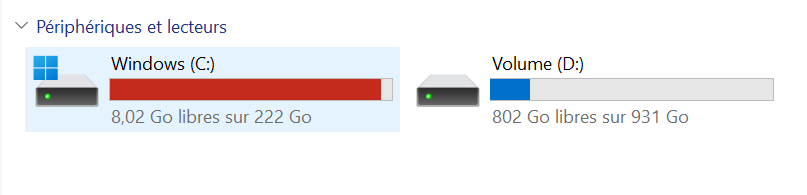
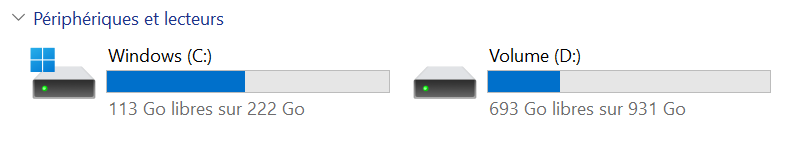
PS C:\Windows\system32> wsl --list --verbose NAME STATE VERSION * Ubuntu Running 2 PS C:\Windows\system32> wsl --terminate Ubuntu L’opération a réussi. PS C:\Windows\system32> wsl --list --verbose NAME STATE VERSION * Ubuntu Stopped 2 PS C:\Windows\system32> wsl --manage Ubuntu --move D:\WSL\Ubuntu Le processus ne peut pas accéder au fichier car ce fichier est utilisé par un autre processus. Code d'erreur : Wsl/Service/MoveDistro/ERROR_SHARING_VIOLATION PS C:\Windows\system32> wsl --manage Ubuntu --move D:\WSL\Ubuntu Le processus ne peut pas accéder au fichier car ce fichier est utilisé par un autre processus. Code d'erreur : Wsl/Service/MoveDistro/ERROR_SHARING_VIOLATION -
Nouveau build :
# export LLAMACPP_ROCM_ARCH=gfx803,gfx900,gfx906,gfx908,gfx90a,gfx942,gfx1010,gfx1030,gfx1032,gfx1100,gfx1101,gfx1102 # HIPCXX="$(hipconfig -l)/clang" HIP_PATH="$(hipconfig -R)" \ cmake -S . -B build -DGGML_HIP=ON -DAMDGPU_TARGETS=$LLAMACPP_ROCM_ARCH \ -DCMAKE_BUILD_TYPE=Release -DLLAMA_CURL=ON \ && cmake --build build --config Release -j$(nproc) -
Je vais essayer la version Docker :
# export MODEL_PATH='/models/' # docker run --privileged --network=host --device=/dev/kfd --device=/dev/dri --group-add video --cap-add=SYS_PTRACE --security-opt seccomp=unconfined --ipc=host --shm-size 16G -v $MODEL_PATH:/data rocm/llama.cpp:llama.cpp-b5997_rocm6.4.0_ubuntu24.04_full -m /data/Qwen3.6-27B-Q4_K_M.gguf -p "Building a website can be done in 10 simple steps:" -n 512 --n-gpu-layers 999 Unable to find image 'rocm/llama.cpp:llama.cpp-b5997_rocm6.4.0_ubuntu24.04_full' locally llama.cpp-b5997_rocm6.4.0_ubuntu24.04_full: Pulling from rocm/llama.cpp 757fe5b21110: Downloading [==> ] 6.291MB/114.7MB 0f1832fb3fb1: Downloading [> ] 5.243MB/646.4MB 52ae0682347f: Downloading [======================================> ] 107MB/138.7MB b00fa23324d1: Pull complete -
Pas mieux :
root@pcremi:/workspace/llama.cpp/build/bin# pwd /workspace/llama.cpp/build/bin root@pcremi:/workspace/llama.cpp/build/bin# ./llama-bench -m /models/qwen2.5-1.5b-instruct-q4_k_m.gguf ggml_cuda_init: found 1 ROCm devices (Total VRAM: 16304 MiB): Device 0: AMD Radeon RX 9060 XT, gfx1200 (0x1200), VMM: no, Wave Size: 32, VRAM: 16304 MiB | model | size | params | backend | ngl | test | t/s | | ------------------------------ | ---------: | ---------: | ---------- | --: | --------------: | -------------------: | Segmentation fault (core dumped) -
Je fait un make install avant puis un nouveau test :
root@pcremi:/workspace/llama.cpp/build/bin# ./llama-bench -m  /models/Qwen3.6-27B-Q4_K_M.gguf
ggml_cuda_init: found 1 ROCm devices (Total VRAM: 16304 MiB):
  Device 0: AMD Radeon RX 9060 XT, gfx1200 (0x1200), VMM: no, Wave Size: 32, VRAM: 16304 MiB
| model                          |       size |     params | backend    | ngl |            test |                  t/s |
| ------------------------------ | ---------: | ---------: | ---------- | --: | --------------: | -------------------: |
pid:3402 tid:0x757b61d04280 [CreateContext] fail 11
llama-bench: /home/remia/librocdxg/src/wddm/queue.cpp:267: wsl::thunk::ComputeQueue::ComputeQueue(wsl::thunk::WDDMDevice*, void*, uint64_t, std::atomic<long unsigned int>*, std::atomic<long unsigned int>*, volatile int64_t*, uint32_t, uint32_t, bool): Assertion `ret' failed.
Aborted (core dumped)
Pas mieux.
-
 F farias a déplacé ce sujet de Linux sur
Bonjour ! Vous semblez intéressé par cette conversation, mais vous n’avez pas encore de compte.
Marre de refaire défiler les mêmes messages ? Créez un compte pour retrouver votre position, recevoir des notifications des nouvelles réponses, sauvegarder vos favoris et voter pour les messages que vous appréciez.
Grâce à votre participation, ce message peut devenir encore meilleur 💗
S'inscrire Se connecter