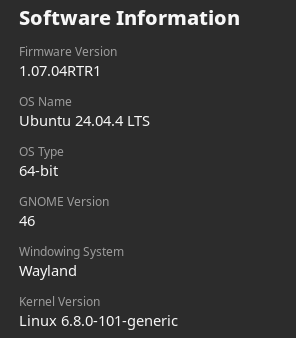
Gestion clavier de la luminosité sous Ubuntu 24.04.4 ne fonctionne plus ...
-
Commande brightnessctl :
# brightnessctl --list Available devices: Device 'input4::capslock' of class 'leds': Current brightness: 0 (0%) Max brightness: 1 Device 'phy0-led' of class 'leds': Current brightness: 0 (0%) Max brightness: 1 Device 'input4::scrolllock' of class 'leds': Current brightness: 0 (0%) Max brightness: 1 Device 'enp59s0f1-2::lan' of class 'leds': Current brightness: 0 (0%) Max brightness: 255 Device 'enp59s0f1-1::lan' of class 'leds': Current brightness: 0 (0%) Max brightness: 255 Device 'input12::scrolllock' of class 'leds': Current brightness: 0 (0%) Max brightness: 1 Device 'input4::numlock' of class 'leds': Current brightness: 1 (100%) Max brightness: 1 Device 'enp59s0f1-0::lan' of class 'leds': Current brightness: 0 (0%) Max brightness: 255 Device 'input12::numlock' of class 'leds': Current brightness: 1 (100%) Max brightness: 1 Device 'input12::capslock' of class 'leds': Current brightness: 0 (0%) Max brightness: 1 -
Recherche de Edid :
# find /sys/devices/ -iname edid
/sys/devices/pci0000:00/0000:00:02.0/drm/card1/card1-HDMI-A-1/edid
/sys/devices/pci0000:00/0000:00:02.0/drm/card1/card1-eDP-1/edid
/sys/devices/pci0000:00/0000:00:02.0/drm/card1/card1-HDMI-A-2/edid
/sys/devices/pci0000:00/0000:00:02.0/drm/card1/card1-DP-1/edid
# find /sys/devices/ -iname brightness /sys/devices/platform/i8042/serio0/input/input4/input4::capslock/brightness /sys/devices/platform/i8042/serio0/input/input4/input4::scrolllock/brightness /sys/devices/platform/i8042/serio0/input/input4/input4::numlock/brightness /sys/devices/platform/tuxedo_keyboard/brightness /sys/devices/pci0000:00/0000:00:1d.1/0000:40:00.0/leds/phy0-led/brightness /sys/devices/pci0000:00/0000:00:1d.0/0000:3b:00.1/net/enp59s0f1/enp59s0f1-2::lan/brightness /sys/devices/pci0000:00/0000:00:1d.0/0000:3b:00.1/net/enp59s0f1/enp59s0f1-1::lan/brightness /sys/devices/pci0000:00/0000:00:1d.0/0000:3b:00.1/net/enp59s0f1/enp59s0f1-0::lan/brightness /sys/devices/pci0000:00/0000:00:14.0/usb1/1-4/1-4.4/1-4.4:1.0/0003:413C:2110.0002/input/input12/input12::scrolllock/brightness /sys/devices/pci0000:00/0000:00:14.0/usb1/1-4/1-4.4/1-4.4:1.0/0003:413C:2110.0002/input/input12/input12::numlock/brightness /sys/devices/pci0000:00/0000:00:14.0/usb1/1-4/1-4.4/1-4.4:1.0/0003:413C:2110.0002/input/input12/input12::capslock/brightness -
Xorg :
# cat /var/log/Xorg.0.log | grep " file" [ 9.729] (--) Log file renamed from "/var/log/Xorg.pid-2950.log" to "/var/log/Xorg.0.log" [ 9.730] Markers: (--) probed, (**) from config file, (==) default setting, [ 9.730] (==) Log file: "/var/log/Xorg.0.log", Time: Sat Feb 22 14:42:32 2025 [ 10.212] (II) This device may have been added with another device file. [ 10.228] (II) This device may have been added with another device file. [ 10.459] (II) This device may have been added with another device file. [ 2902.537] (II) Server terminated successfully (0). Closing log file. -
Command inxi :
# inxi -Fxxxz System: Kernel: 6.8.0-101-generic arch: x86_64 bits: 64 compiler: gcc v: 13.3.0 clocksource: tsc Desktop: GNOME v: 46.0 tk: GTK v: 3.24.41 wm: gnome-shell tools: gsd-screensaver-proxy dm: GDM3 v: 46.2 Distro: Ubuntu 24.04.4 LTS (Noble Numbat) Machine: Type: Laptop System: TUXEDO product: TUXEDO v: N/A serial: N/A Chassis: Notebook type: 10 serial: N/A ... Graphics: Device-1: Intel CometLake-U GT2 [UHD Graphics] vendor: CLEVO/KAPOK driver: i915 v: kernel arch: Gen-9.5 ports: active: HDMI-A-2,eDP-1 empty: DP-1,HDMI-A-1 bus-ID: 00:02.0 chip-ID: 8086:9b41 class-ID: 0300 Device-2: Chicony USB2.0 Camera driver: uvcvideo type: USB rev: 2.0 speed: 480 Mb/s lanes: 1 bus-ID: 1-7:7 chip-ID: 04f2:b649 class-ID: 0e02 Display: server: X.Org v: 23.2.6 with: Xwayland v: 23.2.6 compositor: gnome-shell driver: dri: iris gpu: i915 display-ID: :0 screens: 1 Screen-1: 0 s-res: 3840x1080 s-dpi: 96 s-size: 1016x285mm (40.00x11.22") s-diag: 1055mm (41.54") Monitor-1: not-matched mapped: HDMI-2 pos: right res: 1920x1080 hz: 60 dpi: 81 size: 600x340mm (23.62x13.39") diag: 690mm (27.15") modes: N/A Monitor-2: not-matched mapped: eDP-1 pos: primary,left res: 1920x1080 hz: 60 dpi: 157 size: 310x170mm (12.2x6.69") diag: 354mm (13.92") modes: N/A API: EGL v: 1.5 hw: drv: intel iris platforms: device: 0 drv: iris device: 1 drv: swrast gbm: drv: iris surfaceless: drv: iris x11: drv: iris inactive: wayland API: OpenGL v: 4.6 compat-v: 4.5 vendor: intel mesa v: 25.2.8-0ubuntu0.24.04.1 glx-v: 1.4 direct-render: yes renderer: Mesa Intel UHD Graphics (CML GT2) device-ID: 8086:9b41 -
Command : acpi_listen
Je vois bien le + et - via les commandes claviers … mais pas d’effet.
# acpi_listen thermal_zone LNXTHERM:00 00000081 00000000 thermal_zone LNXTHERM:00 00000081 00000000 video/brightnessup BRTUP 00000086 00000000 video/brightnessup BRTUP 00000086 00000000 video/brightnessdown BRTDN 00000087 00000000 video/brightnessdown BRTDN 00000087 00000000 -
Command :
 cat /proc/cmdline
BOOT_IMAGE=/boot/vmlinuz-6.8.0-101-generic root=UUID=3c3ae400-eaf9-4fec-bcd1-312dd83a63e6 ro quiet splash acpi_os_name=Linux acpi_osi= acpi_backlight=vendor vt.handoff=7
Il faudrait tester :
acpi_backlight=none
video.use_native_backlight=1A suivre.
-
Command lspci :
# lspci -k | grep -EA3 'VGA|3D|Display'
00:02.0 VGA compatible controller: Intel Corporation CometLake-U GT2 [UHD Graphics] (rev 02)
	Subsystem: CLEVO/KAPOK Computer CometLake-U GT2 [UHD Graphics]
	Kernel driver in use: i915
	Kernel modules: i915

Bonjour ! Vous semblez intéressé par cette conversation, mais vous n’avez pas encore de compte.
Marre de refaire défiler les mêmes messages ? Créez un compte pour retrouver votre position, recevoir des notifications des nouvelles réponses, sauvegarder vos favoris et voter pour les messages que vous appréciez.
Grâce à votre participation, ce message peut devenir encore meilleur 💗
S'inscrire Se connecter