VM Ollama
-
Build de llama.cpp : https://github.com/ggml-org/llama.cpp
# git clone https://github.com/ggml-org/llama.cpp # cd llama.cpp # cmake -B build # cmake --build build --config Release -
Update Ollama :
# ollama list NAME ID SIZE MODIFIED deepseek-r1:latest 6995872bfe4c 5.2 GB 23 minutes ago llama3.2:latest a80c4f17acd5 2.0 GB 25 minutes ago llama3.1:latest 46e0c10c039e 4.9 GB 25 minutes ago mistral:latest 6577803aa9a0 4.4 GB 25 minutes ago llama3.3:latest a6eb4748fd29 42 GB 25 minutes ago deepseek-r1:1.5b e0979632db5a 1.1 GB 25 minutes ago gemma3:4b a2af6cc3eb7f 3.3 GB 25 minutes ago mistral:7b 6577803aa9a0 4.4 GB 25 minutes ago qwen2:7b dd314f039b9d 4.4 GB 26 minutes ago llava:7b 8dd30f6b0cb1 4.7 GB 26 minutes ago gemma2:9b ff02c3702f32 5.4 GB 26 minutes ago llava:13b 0d0eb4d7f485 8.0 GB 27 minutes ago phi4:14b ac896e5b8b34 9.1 GB 27 minutes ago deepseek-r1:14b c333b7232bdb 9.0 GB 27 minutes ago deepseek-r1:32b edba8017331d 19 GB 27 minutes ago llama3.1:8b 46e0c10c039e 4.9 GB 27 minutes ago -
Script pour la mise à jours :
# cat update_ollama.bash #!/bin/bash ollama list | tail -n +2 | awk '{print $1}' | while read -r model; do ollama pull $model done -
root@balkany:~# lspci -v | grep "NVIDIA"
0a:00.0 VGA compatible controller: NVIDIA Corporation GM204GL [Quadro M5000] (rev a1) (prog-if 00 [VGA controller])
0a:00.1 Audio device: NVIDIA Corporation GM204 High Definition Audio Controller (rev a1)
41:00.0 VGA compatible controller: NVIDIA Corporation GM204GL [Quadro M4000] (rev a1) (prog-if 00 [VGA controller])
41:00.1 Audio device: NVIDIA Corporation GM204 High Definition Audio Controller (rev a1)
root@balkany:~# lspci -n -s 0a:00.0
0a:00.0 0300: 10de:13f0 (rev a1)
root@balkany:~# lspci -n -s 0a:00.1
0a:00.1 0403: 10de:0fbb (rev a1)
root@balkany:~# lspci -n -s 41:00.0
41:00.0 0300: 10de:13f1 (rev a1)
root@balkany:~# lspci -n -s 41:00.1
41:00.1 0403: 10de:0fbb (rev a1)
Dans : /etc/modprobe.d/vfio.conf
options vfio-pci ids=10ba:2b85,10de:22e8,10de:13f0,10de:0fbb,10de:13f1,10de:0fbb disable_vga=1 -
More configuration :
# cat /etc/modprobe.d/blacklist.conf blacklist radeon blacklist nouveau blacklist nvidia blacklist nvidiafb blacklist i915 # cat /etc/modules # /etc/modules: kernel modules to load at boot time. # # This file contains the names of kernel modules that should be loaded # at boot time, one per line. Lines beginning with "#" are ignored. # Parameters can be specified after the module name. vfio vfio_iommu_type1 vfio_pci vfio_virqfd -
Re-installation :
$ ubuntu-drivers devices udevadm hwdb is deprecated. Use systemd-hwdb instead. udevadm hwdb is deprecated. Use systemd-hwdb instead. udevadm hwdb is deprecated. Use systemd-hwdb instead. udevadm hwdb is deprecated. Use systemd-hwdb instead. udevadm hwdb is deprecated. Use systemd-hwdb instead. udevadm hwdb is deprecated. Use systemd-hwdb instead. udevadm hwdb is deprecated. Use systemd-hwdb instead. udevadm hwdb is deprecated. Use systemd-hwdb instead. udevadm hwdb is deprecated. Use systemd-hwdb instead. udevadm hwdb is deprecated. Use systemd-hwdb instead. udevadm hwdb is deprecated. Use systemd-hwdb instead. udevadm hwdb is deprecated. Use systemd-hwdb instead. udevadm hwdb is deprecated. Use systemd-hwdb instead. udevadm hwdb is deprecated. Use systemd-hwdb instead. udevadm hwdb is deprecated. Use systemd-hwdb instead. udevadm hwdb is deprecated. Use systemd-hwdb instead. == /sys/devices/pci0000:00/0000:00:1b.0 == modalias : pci:v000010DEd000013F1sv0000103Csd00001153bc03sc00i00 vendor : NVIDIA Corporation model : GM204GL [Quadro M4000] manual_install: True driver : nvidia-driver-570-server - distro non-free driver : nvidia-driver-470-server - distro non-free driver : nvidia-driver-580-server - distro non-free driver : nvidia-driver-580 - distro non-free driver : nvidia-driver-535 - distro non-free recommended driver : nvidia-driver-535-server - distro non-free driver : nvidia-driver-470 - distro non-free driver : nvidia-driver-570 - distro non-free driver : xserver-xorg-video-nouveau - distro free builtin # ubuntu-drivers autoinstall udevadm hwdb is deprecated. Use systemd-hwdb instead. udevadm hwdb is deprecated. Use systemd-hwdb instead. udevadm hwdb is deprecated. Use systemd-hwdb instead. udevadm hwdb is deprecated. Use systemd-hwdb instead. udevadm hwdb is deprecated. Use systemd-hwdb instead. udevadm hwdb is deprecated. Use systemd-hwdb instead. udevadm hwdb is deprecated. Use systemd-hwdb instead. udevadm hwdb is deprecated. Use systemd-hwdb instead. udevadm hwdb is deprecated. Use systemd-hwdb instead. udevadm hwdb is deprecated. Use systemd-hwdb instead. udevadm hwdb is deprecated. Use systemd-hwdb instead. udevadm hwdb is deprecated. Use systemd-hwdb instead. udevadm hwdb is deprecated. Use systemd-hwdb instead. udevadm hwdb is deprecated. Use systemd-hwdb instead. udevadm hwdb is deprecated. Use systemd-hwdb instead. udevadm hwdb is deprecated. Use systemd-hwdb instead. Lecture des listes de paquets... Fait Construction de l'arbre des dépendances... Fait Lecture des informations d'état... Fait Les paquets suivants ont été installés automatiquement et ne sont plus nécessaires : dkms libnvidia-gpucomp-575 nvidia-firmware-575-575.51.03 nvidia-modprobe switcheroo-control Veuillez utiliser « sudo apt autoremove » pour les supprimer. Les paquets supplémentaires suivants seront installés : libnvidia-cfg1-535 libnvidia-common-535 libnvidia-compute-535 libnvidia-decode-535 libnvidia-egl-wayland1 libnvidia-encode-535 libnvidia-extra-535 libnvidia-fbc1-535 libnvidia-gl-535 linux-image-6.8.0-100-generic linux-modules-6.8.0-100-generic linux-modules-nvidia-535-6.8.0-100-generic linux-objects-nvidia-535-6.8.0-100-generic linux-signatures-nvidia-6.8.0-100-generic nvidia-compute-utils-535 nvidia-firmware-535-535.288.01 nvidia-kernel-common-535 nvidia-kernel-source-535 nvidia-prime nvidia-utils-535 xserver-xorg-video-nvidia-535 ... info: The home dir /nonexistent you specified can't be accessed: No such file or directory info: Selecting UID from range 100 to 999 ... info: Selecting GID from range 100 to 999 ... info: Adding system user `nvidia-persistenced' (UID 117) ... info: Adding new group `nvidia-persistenced' (GID 121) ... info: Adding new user `nvidia-persistenced' (UID 117) with group `nvidia-persistenced' ... info: Not creating `/nonexistent'. Paramétrage de nvidia-kernel-common-535 (535.288.01-0ubuntu0.24.04.1) ... Installation de la nouvelle version du fichier de configuration /etc/modprobe.d/nvidia-graphics-drivers-kms.conf ... update-initramfs: deferring update (trigger activated) update-initramfs: Generating /boot/initrd.img-6.8.0-79-generic -
Test :
# nvidia-smi Mon Feb 23 17:15:13 2026 +---------------------------------------------------------------------------------------+ | NVIDIA-SMI 535.288.01 Driver Version: 535.288.01 CUDA Version: 12.2 | |-----------------------------------------+----------------------+----------------------+ | GPU Name Persistence-M | Bus-Id Disp.A | Volatile Uncorr. ECC | | Fan Temp Perf Pwr:Usage/Cap | Memory-Usage | GPU-Util Compute M. | | | | MIG M. | |=========================================+======================+======================| | 0 Quadro M5000 Off | 00000000:00:10.0 Off | Off | | 38% 41C P8 14W / 150W | 4MiB / 8192MiB | 0% Default | | | | N/A | +-----------------------------------------+----------------------+----------------------+ | 1 Quadro M4000 Off | 00000000:00:1B.0 Off | N/A | | 47% 43C P8 14W / 120W | 4MiB / 8192MiB | 0% Default | | | | N/A | +-----------------------------------------+----------------------+----------------------+ +---------------------------------------------------------------------------------------+ | Processes: | | GPU GI CI PID Type Process name GPU Memory | | ID ID Usage | |=======================================================================================| | No running processes found | +---------------------------------------------------------------------------------------+ WARNING: infoROM is corrupted at gpu 0000:00:10.0 -
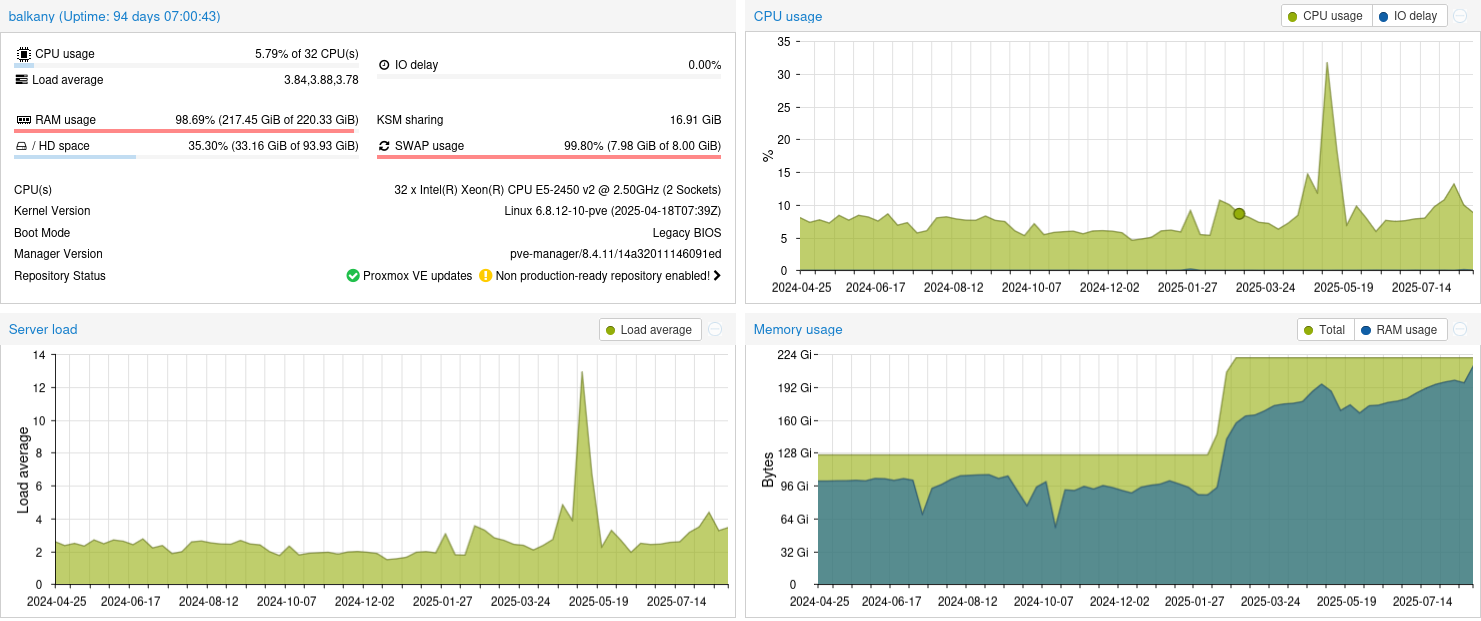
Mon serveur Proxmox (Balkany)
La version de mon serveur #Proxmox : 8.4.11 : 32 x Intel Xeon CPU E5-2450 v2 @ 2.50GHz (2 Sockets) Kernel Version Linux 6.8.12-10-pve (2025-04-18T07:39Z) 22...
NodeBB (lemmy.cyber-neurones.org)
Bizarre j’ai un truc plus ancien maintenant :
NVIDIA-SMI 535.288.01 Driver Version: 535.288.01 CUDA Version: 12.2Avant :
NVIDIA-SMI 575.51.03 Driver Version: 575.51.03 CUDA Version: 12.9


Bonjour ! Vous semblez intéressé par cette conversation, mais vous n’avez pas encore de compte.
Marre de refaire défiler les mêmes messages ? Créez un compte pour retrouver votre position, recevoir des notifications des nouvelles réponses, sauvegarder vos favoris et voter pour les messages que vous appréciez.
Grâce à votre participation, ce message peut devenir encore meilleur 💗
S'inscrire Se connecter