Llama-swap : Test de --tensor-split
-
Ma commande :
  "Best_Qwen3.6-27B-Q3_K_M.gguf_mmproj-BF16.gguf":
    proxy: http://127.0.0.1:8999
    capabilities:
      context: 140000
    name: "Best_Qwen3.6-27B-Q3_K_M"
    description: "-m /models/Qwen3.6-27B-Q3_K_M.gguf --mmproj /models/mmproj-BF16.gguf --ctx-size ${default_ctx} --temp ${temp} --top-p 0.95 --top-k 20 --min-p 0.00  --reasoning-preserve  --no-mmproj-offload --host 0.0.0.0 --fit off -ngl 40  --port 8999"
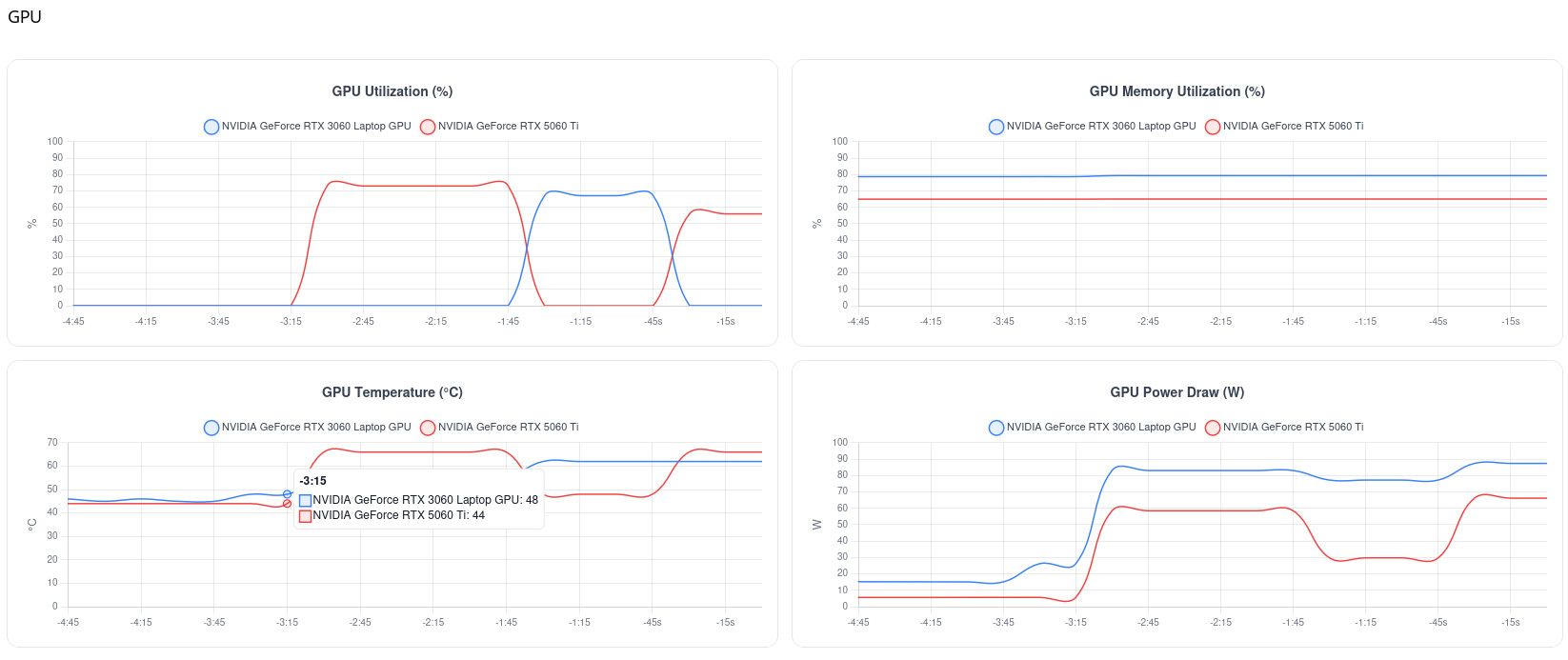
    cmd: /usr/local/bin/llama-server  -m /models/Qwen3.6-27B-Q3_K_M.gguf --mmproj /models/mmproj-BF16.gguf --ctx-size ${default_ctx} --temp ${temp} --top-p 0.95 --top-k 20 --min-p 0.00  --reasoning-preserve  --no-mmproj-offload --host 0.0.0.0 --fit off -ngl 40 --tensor-split 3,7  --port 8999
    aliases:
      - "best-Qwen3.6-27B-Q3_K_M"
      - "llama-swap2"
    macros:
      "default_ctx": 140000
      "temp": 1.0
    metadata:
      temperature: ${temp}
      note: "The ${MODEL_ID} is running on port 8999 temp=${temp}, context=${default_ctx}"
    env:
      - "NVM_BIN=/root/.nvm/versions/node/v24.17.0/bin"
      - "NVM_DIR=/root/.nvm"
      - "NVM_INC=/root/.nvm/versions/node/v24.17.0/include/node"
      - "PATH=/root/.nvm/versions/node/v24.17.0/bin:/usr/local/sbin:/usr/local/bin:/usr/sbin:/usr/bin:/sbin:/bin"
      - "CUDA_DEVICE_ORDER=PCI_BUS_ID"
    ttl: 60
    unloadTimeout: 30
Ma configuration :
nvidia-smi Tue Sep 22 11:47:50 2026 +-----------------------------------------------------------------------------------------+ | NVIDIA-SMI 610.57.04 KMD Version: 610.57.04 CUDA UMD Version: 13.3 | +-----------------------------------------+------------------------+----------------------+ | GPU Name Persistence-M | Bus-Id Disp.A | Volatile Uncorr. ECC | | Fan Temp Perf Pwr:Usage/Cap | Memory-Usage | GPU-Util Compute M. | | | | MIG M. | |=========================================+========================+======================| | 0 NVIDIA GeForce RTX 3060 ... Off | 00000000:01:00.0 Off | N/A | | N/A 45C P8 11W / 115W | 0MiB / 6144MiB | 0% Default | | | | N/A | +-----------------------------------------+------------------------+----------------------+ | 1 NVIDIA GeForce RTX 5060 Ti Off | 00000000:05:00.0 Off | N/A | | 0% 40C P8 5W / 180W | 0MiB / 16311MiB | 0% Default | | | | N/A | +-----------------------------------------+------------------------+----------------------+ +-----------------------------------------------------------------------------------------+ | Processes: | | GPU GI CI PID Type Process name GPU Memory | | ID ID Usage | |=========================================================================================| | No running processes found | +-----------------------------------------------------------------------------------------+ -
Modification de la configuration à cause d’erreur 502 sur le traitement des images :

La nouvelle configuration :
  "Best_Qwen3.6-27B-Q3_K_M.gguf_mmproj-BF16.gguf":
    proxy: http://127.0.0.1:8999
    capabilities:
      context: 130000
    name: "Best_Qwen3.6-27B-Q3_K_M"
    description: "-m /models/Qwen3.6-27B-Q3_K_M.gguf --mmproj /models/mmproj-BF16.gguf --ctx-size ${default_ctx} --temp ${temp} --top-p 0.95 --top-k 20 --min-p 0.00  --reasoning-preserve  --no-mmproj-offload --host 0.0.0.0 --fit off -ngl 40  --port 8999"
    cmd: /usr/local/bin/llama-server  -m /models/Qwen3.6-27B-Q3_K_M.gguf --mmproj /models/mmproj-BF16.gguf --ctx-size ${default_ctx} --temp ${temp} --top-p 0.95 --top-k 20 --min-p 0.00  --reasoning-preserve --host 0.0.0.0 --fit off -ngl 40 --tensor-split 3,7  --port 8999
    aliases:
      - "best-Qwen3.6-27B-Q3_K_M"
      - "llama-swap2"
    macros:
      "default_ctx": 130000
      "temp": 1.0
    metadata:
      temperature: ${temp}
      note: "The ${MODEL_ID} is running on port 8999 temp=${temp}, context=${default_ctx}"
    env:
      - "NVM_BIN=/root/.nvm/versions/node/v24.17.0/bin"
      - "NVM_DIR=/root/.nvm"
      - "NVM_INC=/root/.nvm/versions/node/v24.17.0/include/node"
      - "PATH=/root/.nvm/versions/node/v24.17.0/bin:/usr/local/sbin:/usr/local/bin:/usr/sbin:/usr/bin:/sbin:/bin"
      - "CUDA_DEVICE_ORDER=PCI_BUS_ID"
    ttl: 60
    unloadTimeout: 30
=> KO .
J’ai donc encore diminuer la taille du contexte à 100000 :
  "Best_Qwen3.6-27B-Q3_K_M.gguf_mmproj-BF16.gguf":
    proxy: http://127.0.0.1:8999
    capabilities:
      context: 100000
    name: "Best_Qwen3.6-27B-Q3_K_M"
    description: "-m /models/Qwen3.6-27B-Q3_K_M.gguf --mmproj /models/mmproj-BF16.gguf --ctx-size ${default_ctx} --temp ${temp} --top-p 0.95 --top-k 20 --min-p 0.00  --reasoning-preserve  --no-mmproj-offload --host 0.0.0.0 --fit off -ngl 40  --port 8999"
    cmd: /usr/local/bin/llama-server  -m /models/Qwen3.6-27B-Q3_K_M.gguf --mmproj /models/mmproj-BF16.gguf --ctx-size ${default_ctx} --temp ${temp} --top-p 0.95 --top-k 20 --min-p 0.00  --reasoning-preserve --host 0.0.0.0 --fit off -ngl 40 --tensor-split 3,7  --port 8999
    aliases:
      - "best-Qwen3.6-27B-Q3_K_M"
      - "llama-swap2"
    macros:
      "default_ctx": 100000
      "temp": 1.0
    metadata:
      temperature: ${temp}
      note: "The ${MODEL_ID} is running on port 8999 temp=${temp}, context=${default_ctx}"
    env:
      - "NVM_BIN=/root/.nvm/versions/node/v24.17.0/bin"
      - "NVM_DIR=/root/.nvm"
      - "NVM_INC=/root/.nvm/versions/node/v24.17.0/include/node"
      - "PATH=/root/.nvm/versions/node/v24.17.0/bin:/usr/local/sbin:/usr/local/bin:/usr/sbin:/usr/bin:/sbin:/bin"
      - "CUDA_DEVICE_ORDER=PCI_BUS_ID"
    ttl: 60
    unloadTimeout: 30
=> OK.
-
Encore des erreurs 502, je supprime donc " --tensor-split"
"Best_Qwen3.6-27B-Q3_K_M.gguf_mmproj-BF16.gguf": proxy: http://127.0.0.1:8999 capabilities: context: 90000 name: "Best_Qwen3.6-27B-Q3_K_M" description: "-m /models/Qwen3.6-27B-Q3_K_M.gguf --mmproj /models/mmproj-BF16.gguf --ctx-size ${default_ctx} --temp ${temp} --top-p 0.95 --top-k 20 --min-p 0.00 --reasoning-preserve --no-mmproj-offload --host 0.0.0.0 --fit off -ngl 40 --port 8999" cmd: /usr/local/bin/llama-server -m /models/Qwen3.6-27B-Q3_K_M.gguf --mmproj /models/mmproj-BF16.gguf --ctx-size ${default_ctx} --temp ${temp} --top-p 0.95 --top-k 20 --min-p 0.00 --reasoning-preserve --host 0.0.0.0 --fit off -ngl 40 --port 8999 aliases: - "best-Qwen3.6-27B-Q3_K_M" - "llama-swap2" macros: "default_ctx": 90000 "temp": 1.0 metadata: temperature: ${temp} note: "The ${MODEL_ID} is running on port 8999 temp=${temp}, context=${default_ctx}" env: - "NVM_BIN=/root/.nvm/versions/node/v24.17.0/bin" - "NVM_DIR=/root/.nvm" - "NVM_INC=/root/.nvm/versions/node/v24.17.0/include/node" - "PATH=/root/.nvm/versions/node/v24.17.0/bin:/usr/local/sbin:/usr/local/bin:/usr/sbin:/usr/bin:/sbin:/bin" - "CUDA_DEVICE_ORDER=PCI_BUS_ID" ttl: 60 unloadTimeout: 30 -
Toujours erreur 502, je vais changer mon fusil d’épaule avec https://huggingface.co/meta-llama/Llama-3.2-11B-Vision-Instruct .
-
Aie …
0.00.392.687 I srv    load_model: loading model '/models/Llama-3.2-11B-Vision-Instruct.Q4_K_M.gguf'
0.00.554.292 E llama_model_load: error loading model: unknown model architecture: 'mllama'
0.00.554.306 E llama_model_load_from_file_impl: failed to load model
Ma version :
# /usr/local/bin/llama-server --version version: 10030 (c3d47e696) built with GNU 13.3.0 for Linux x86_64 -
Nouveau build :
# git clone https://github.com/ggml-org/llama.cpp
# export LD_LIBRARY_PATH=$LD_LIBRARY_PATH:/usr/local/cuda/lib64:/usr/local/cuda/extras/CUPTI/lib64
# export PATH=$PATH:$CUDA_HOME/bin
# cmake -B build -DGGML_CUDA=ON  -DCMAKE_CUDA_COMPILER=`which nvcc` -DLLAMA_CURL=ON -DCMAKE_CUDA_ARCHITECTURES=86
# cmake --build build -j$(nproc)
# systemctl stop llama-swap
# cmake --install build
Test :
# /usr/local/bin/llama-server --version 0.00.000.502 I srv llama_server: initializing ... version: 0.4.1-dev (build 11102, commit bfd73a876) built with GNU 13.3.0 for Linux x86_64 -
Misère :
# ./build/bin/llama-server -m /models/Llama-3.2-11B-Vision-Instruct.Q4_K_M.gguf --mmproj /models/Llama-3.2-11B-Vision-Instruct-mmproj.f16.gguf --host 0.0.0.0 --port 8999 -ngl 99 0.00.000.798 I srv llama_server: initializing ... 0.03.603.511 I cmn common_param: common_params_print_info: verbosity = 3 (adjust with the `-lv N` CLI arg) 0.03.604.094 W srv llama_server: security: no API key is set and CORS allows all origins (see https://github.com/ggml-org/llama.cpp/pull/25655) 0.03.605.470 I srv load_model: loading model '/models/Llama-3.2-11B-Vision-Instruct.Q4_K_M.gguf' 0.03.616.937 E mtmd_get_memory_usage: error: Failed to load CLIP model from /models/Llama-3.2-11B-Vision-Instruct-mmproj.f16.gguf 0.03.616.965 E srv load_model: [mtmd] failed to get memory usage of mmproj 0.03.780.011 E llama_model_load: error loading model: unknown model architecture: 'mllama' 0.03.780.027 E llama_model_load_from_file_impl: failed to load model 0.03.780.131 E common_fit_params: encountered an error while trying to fit params to free device memory: failed to load model 0.03.920.968 E llama_model_load: error loading model: unknown model architecture: 'mllama' 0.03.921.005 E llama_model_load_from_file_impl: failed to load model 0.03.921.014 E cmn common_init_: failed to load model '/models/Llama-3.2-11B-Vision-Instruct.Q4_K_M.gguf' 0.03.921.021 E srv load_model: failed to load model, '/models/Llama-3.2-11B-Vision-Instruct.Q4_K_M.gguf' 0.03.921.023 I srv operator(): operator(): cleaning up before exit... 0.03.922.987 E srv llama_server: exiting due to model loading error -
Gémini :
La principale différence entre ces deux versions réside dans l’écart temporel et le volume considérable de développement (plus d’un millier de commits) qui sépare le build 10030 du build 11102.
Voici les évolutions majeures introduites entre ces deux versions de llama.cpp :
Support des modèles multimodaux (mllama) : C'est le point critique pour votre cas. Le build 11102 intègre les parseurs et les couches nécessaires pour décoder l'architecture mllama (utilisée par Llama 3.2 Vision), alors que le build 10030 est trop ancien et renvoie l'erreur d'architecture inconnue. Refonte et stabilité du serveur (llama-server) : De nombreux correctifs ont été apportés au serveur HTTP intégré, améliorant la gestion des connexions simultanées, des en-têtes CORS, et de la compatibilité avec l'API OpenAI. Optimisations des backends matériels : Mises à jour des moteurs d'accélération (CUDA pour Nvidia, Metal pour Apple Silicon, Vulkan), améliorant l'efficacité du transfert des couches (-ngl) et la gestion de la mémoire VRAM. Gestion de la mémoire et des contextes : Correction de bugs liés à l'allocation dynamique de la mémoire pour les contextes larges et les projecteurs de vision (mmproj). -
Misère :
# ./build/bin/llama-server -m /models/Llama-3.2-11B-Vision-Instruct.Q4_K_M.gguf --mmproj /models/Llama-3.2-11B-Vision-Instruct-mmproj.f16.gguf --host 0.0.0.0 --port 8999 -ngl 99 0.00.000.798 I srv llama_server: initializing ... 0.03.603.511 I cmn common_param: common_params_print_info: verbosity = 3 (adjust with the `-lv N` CLI arg) 0.03.604.094 W srv llama_server: security: no API key is set and CORS allows all origins (see https://github.com/ggml-org/llama.cpp/pull/25655) 0.03.605.470 I srv load_model: loading model '/models/Llama-3.2-11B-Vision-Instruct.Q4_K_M.gguf' 0.03.616.937 E mtmd_get_memory_usage: error: Failed to load CLIP model from /models/Llama-3.2-11B-Vision-Instruct-mmproj.f16.gguf 0.03.616.965 E srv load_model: [mtmd] failed to get memory usage of mmproj 0.03.780.011 E llama_model_load: error loading model: unknown model architecture: 'mllama' 0.03.780.027 E llama_model_load_from_file_impl: failed to load model 0.03.780.131 E common_fit_params: encountered an error while trying to fit params to free device memory: failed to load model 0.03.920.968 E llama_model_load: error loading model: unknown model architecture: 'mllama' 0.03.921.005 E llama_model_load_from_file_impl: failed to load model 0.03.921.014 E cmn common_init_: failed to load model '/models/Llama-3.2-11B-Vision-Instruct.Q4_K_M.gguf' 0.03.921.021 E srv load_model: failed to load model, '/models/Llama-3.2-11B-Vision-Instruct.Q4_K_M.gguf' 0.03.921.023 I srv operator(): operator(): cleaning up before exit... 0.03.922.987 E srv llama_server: exiting due to model loading errorTuxedo17 a dit:
unknown model architecture: ‘mllama’

leafspark/Llama-3.2-11B-Vision-Instruct-GGUF · error loading model
llama_model_load: error loading model: error loading model architecture: unknown model architecture: 'mllama' llama_load_model_from_file: failed to load model
(huggingface.co)
Seulement avec ollama visiblement.
-
Reste à tester : https://huggingface.co/unsloth/gemma-3-12b-it-GGUF/tree/main
-
Configuration :
  "gemma-3-12b-it-Q4_K_M":
    proxy: http://127.0.0.1:8999
    capabilities:
      context: 90000
    name: "gemma-3-12b-it-Q4_K_M"
    description: " -m /models/gemma-3-12b-it-Q4_K_M.gguf --mmproj /models/gemma-3-12b-mmproj-F16.gguf  --ctx-size 80000 --temp ${temp} --top-p 0.95 --top-k 20 --min-p 0.00  --reasoning-preserve --host 0.0.0.0 --fit off -ngl 40  --port 8999 --n-cpu-moe 35 -fa on --flash-attn on  --no-mmproj-offload  "
    cmd: /usr/local/bin/llama-server -m /models/gemma-3-12b-it-Q4_K_M.gguf --mmproj /models/gemma-3-12b-mmproj-F16.gguf   --ctx-size 80000 --temp ${temp} --top-p 0.95 --top-k 20 --min-p 0.00  --reasoning-preserve --host 0.0.0.0 --fit off -ngl 40  --port 8999 --n-cpu-moe 35 -fa on --flash-attn on  --no-mmproj-offload
    aliases:
      - "gemma-3-12b-it-Q4_K_M"
      - "llama-swap4"
    macros:
      "default_ctx": 90000
      "temp": 1.0
    metadata:
      temperature: ${temp}
      note: "The ${MODEL_ID} is running on port 8999 temp=${temp}, context=${default_ctx}"
    env:
      - "NVM_BIN=/root/.nvm/versions/node/v24.17.0/bin"
      - "NVM_DIR=/root/.nvm"
      - "NVM_INC=/root/.nvm/versions/node/v24.17.0/include/node"
      - "PATH=/root/.nvm/versions/node/v24.17.0/bin:/usr/local/sbin:/usr/local/bin:/usr/sbin:/usr/bin:/sbin:/bin"
      - "CUDA_DEVICE_ORDER=PCI_BUS_ID"
    ttl: 60
    unloadTimeout: 30

Bonjour ! Vous semblez intéressé par cette conversation, mais vous n’avez pas encore de compte.
Marre de refaire défiler les mêmes messages ? Créez un compte pour retrouver votre position, recevoir des notifications des nouvelles réponses, sauvegarder vos favoris et voter pour les messages que vous appréciez.
Grâce à votre participation, ce message peut devenir encore meilleur 💗
S'inscrire Se connecter