Aller directement au contenu
  • Catégories
  • Récent
  • Mots-clés
  • Populaire
  • Web
  • Utilisateurs
  • Groupes
Habillages
  • Clair
  • Brite
  • Cerulean
  • Cosmo
  • Flatly
  • Journal
  • Litera
  • Lumen
  • Lux
  • Materia
  • Minty
  • Morph
  • Pulse
  • Sandstone
  • Simplex
  • Sketchy
  • Spacelab
  • United
  • Yeti
  • Zephyr
  • Sombre
  • Cyborg
  • Darkly
  • Quartz
  • Slate
  • Solar
  • Superhero
  • Vapor

  • Défaut (Darkly)
  • Aucun habillage
Réduire

NodeBB

F

FredR

@FredR
À propos
Messages
116
Sujets
54
Partages
0
Groupes
0
Abonnés
2
Abonnements
0

Messages

Récent Meilleur sujets Contesté

  • Build nethogs
    F FredR

    Téléchargement :

    # git clone https://github.com/raboof/nethogs
    Cloning into 'nethogs'...
    remote: Enumerating objects: 1888, done.
    remote: Counting objects: 100% (276/276), done.
    remote: Compressing objects: 100% (71/71), done.
    remote: Total 1888 (delta 230), reused 205 (delta 205), pack-reused 1612 (from 1)
    Receiving objects: 100% (1888/1888), 1.53 MiB | 6.39 MiB/s, done.
    Resolving deltas: 100% (1245/1245), done.
    
    # apt-get install libpcap-dev
    
    # make
    
    # make install
    
    # ldd src/nethogs
            linux-vdso.so.1 (0x00007ffde5ee4000)
            libpcap.so.0.8 => /lib/x86_64-linux-gnu/libpcap.so.0.8 (0x00007f5feedff000)
            libncurses.so.6 => /lib/x86_64-linux-gnu/libncurses.so.6 (0x00007f5feedd7000)
            libtinfo.so.6 => /lib/x86_64-linux-gnu/libtinfo.so.6 (0x00007f5feeda5000)
            libstdc++.so.6 => /lib/x86_64-linux-gnu/libstdc++.so.6 (0x00007f5feeb79000)
            libgcc_s.so.1 => /lib/x86_64-linux-gnu/libgcc_s.so.1 (0x00007f5feeb59000)
            libc.so.6 => /lib/x86_64-linux-gnu/libc.so.6 (0x00007f5fee92e000)
            libdbus-1.so.3 => /lib/x86_64-linux-gnu/libdbus-1.so.3 (0x00007f5fee8e0000)
            libm.so.6 => /lib/x86_64-linux-gnu/libm.so.6 (0x00007f5fee7f9000)
            /lib64/ld-linux-x86-64.so.2 (0x00007f5feee7b000)
            libsystemd.so.0 => /lib/x86_64-linux-gnu/libsystemd.so.0 (0x00007f5fee732000)
            liblzma.so.5 => /lib/x86_64-linux-gnu/liblzma.so.5 (0x00007f5fee707000)
            libzstd.so.1 => /lib/x86_64-linux-gnu/libzstd.so.1 (0x00007f5fee636000)
            liblz4.so.1 => /lib/x86_64-linux-gnu/liblz4.so.1 (0x00007f5fee616000)
            libcap.so.2 => /lib/x86_64-linux-gnu/libcap.so.2 (0x00007f5fee60b000)
            libgcrypt.so.20 => /lib/x86_64-linux-gnu/libgcrypt.so.20 (0x00007f5fee4cd000)
            libgpg-error.so.0 => /lib/x86_64-linux-gnu/libgpg-error.so.0 (0x00007f5fee4a7000)
    
    # elf-arch src/nethogs
    amd64
    
    Dev build nethogs arm

  • Docker issue : failed to write "a *:* rwm": write /sys/fs/cgroup/devices/docker/...../devices.allow: operation not permitted: unknown
    F FredR

    Le problème :

    docker: Error response from daemon: failed to create task for container: failed to create shim task: OCI runtime create failed: runc create failed: unable to start container process: error during container init: error setting cgroup config for procHooks process: failed to write "a *:* rwm": write /sys/fs/cgroup/devices/docker/9062e5fe97eaccd163ea072644a4593a1dc707e090298a08d959ae5dc8f510b3/devices.allow: operation not permitted: unknown.
    

    Version :

    #  lsb_release -a
    No LSB modules are available.
    Distributor ID: Ubuntu
    Description:    Ubuntu 22.04.5 LTS
    Release:        22.04
    Codename:       jammy
    
    # docker --version
    Docker version 24.0.2, build cb74dfc
    
    # docker info | grep Cgroup
     Cgroup Driver: cgroupfs
     Cgroup Version: 1
    
    # grep cgroup /proc/filesystems
    nodev   cgroup
    nodev   cgroup2
    
    # stat -fc %T /sys/fs/cgroup/
    tmpfs
    
    # dpkg -l | grep docker
    ii  docker-buildx-plugin              0.10.5-1~ubuntu.18.04~bionic                     amd64        Docker Buildx cli plugin.
    ii  docker-ce                         5:24.0.2-1~ubuntu.18.04~bionic                   amd64        Docker: the open-source application container engine
    ii  docker-ce-cli                     5:24.0.2-1~ubuntu.18.04~bionic                   amd64        Docker CLI: the open-source application container engine
    ii  docker-ce-rootless-extras         5:24.0.2-1~ubuntu.18.04~bionic                   amd64        Rootless support for Docker.
    ii  docker-compose-plugin             2.18.1-1~ubuntu.18.04~bionic                     amd64        Docker Compose (V2) plugin for the Docker CLI.
    
    Linux

  • Ubuntu : Suppression du cache apt
    F FredR

    Trop de cache sur apt :

    # du -sh /var/cache/apt/
    2.0G    /var/cache/apt/
    # sudo apt clean
    # sudo apt autoclean
    Reading package lists... Done
    Building dependency tree... Done
    Reading state information... Done
    # du -sh /var/cache/apt/
    119M    /var/cache/apt/
    
    Linux at work ubuntu

  • Abuse IP
    F FredR

    Link Preview Image
    GitHub - borestad/blocklist-abuseipdb: Aggregated AbuseIPDB blocklists with worst IPv4 & IPv6 offenders (~99% confidence)

    Aggregated AbuseIPDB blocklists with worst IPv4 & IPv6 offenders (~99% confidence) - borestad/blocklist-abuseipdb

    favicon

    GitHub (github.com)

    ❯ abuseipdb-s100-1d (53363 ips)
    ❯ abuseipdb-s100-3d (58143 ips)
    ❯ abuseipdb-s100-7d (69300 ips)
    ❯ abuseipdb-s100-14d (86898 ips)
    ❯ abuseipdb-s100-30d (125070 ips)
    ❯ abuseipdb-s100-60d (183928 ips)
    ❯ abuseipdb-s100-90d (247119 ips)
    ❯ abuseipdb-s100-120d (357106 ips)
    ❯ abuseipdb-s100-180d (654007 ips)
    ❯ abuseipdb-s100-365d (1173988 ips)
    ❯ abuseipdb-s100-all (1830085 ips)

    Scan Attack

  • PROXMOX : Hardware
    F FredR

    Hardware utilisé pour le dev :

    # lshw
    local
        description: Desktop Computer
        product: Precision 3660 (0A9F)
        vendor: Dell Inc.
    ...
      *-core
           description: Motherboard
           product: 0PRR48
           vendor: Dell Inc.
    ...
         *-firmware
              description: BIOS
              vendor: Dell Inc.
              physical id: 1
              version: 2.12.0
              date: 01/30/2024
    ...
         *-cpu
              description: CPU
              product: 13th Gen Intel(R) Core(TM) i9-13900
              vendor: Intel Corp.
              physical id: 400
              bus info: cpu@0
              version: 6.183.1
    ...
         *-memory
    ....
            *-bank:0
                 description: DIMM Synchronous 5600 MHz (0.2 ns)
                 product: HMCG88AGBUA081N
    ...
            *-bank:1
                 description: DIMM Synchronous 5600 MHz (0.2 ns)
                 product: HMCG88AGBUA081N
    ....
            *-bank:2
                 description: DIMM Synchronous 4800 MHz (0.2 ns)
                 product: CT32G48C40U5.M16A1
                 vendor: Micron Technology
    ....
            *-bank:3
                 description: DIMM Synchronous 4800 MHz (0.2 ns)
                 product: CT32G48C40U5.M16A1
                 vendor: Micron Technology
    ....
            *-pci:0
                 description: PCI bridge
                 product: Alder Lake-S PCH PCI Express Root Port #25
    ....
               *-network:0
                    description: Ethernet interface
                    product: 82576 Gigabit Network Connection
                    vendor: Intel Corporation
                    physical id: 0
                    bus info: pci@0000:01:00.0
                    logical name: enp1s0f0
    ....
            *-network DISABLED
                 description: Ethernet interface
                 product: Ethernet Connection (17) I219-LM
                 vendor: Intel Corporation
                 physical id: 1f.6
                 bus info: pci@0000:00:1f.6
                 logical name: enp0s31f6
    ...
      *-nvme0
           description: NVMe device
           product: Samsung SSD 990 PRO 2TB
           physical id: 2
           logical name: /dev/nvme0
           version: 4B2QJXD7
    ....
      *-nvme1
           description: NVMe device
           product: Samsung SSD 9100 PRO 2TB
           physical id: 3
           logical name: /dev/nvme1
           version: 0B2QNXH7
    ....
      *-nvme2
           description: NVMe device
           product: Samsung SSD 9100 PRO 2TB
           physical id: 4
           logical name: /dev/nvme2
           version: 0B2QNXH7


    En résumé :

    • DELL Precision 3660 (Nvidia T1000, 4GB) :
      • 124 Go de RAM .
      • 32 x 13th Gen Intel® Core™ i9-13900 .
      • 2 x Samsung SSD 990 PRO 2TB .
      • 1 x Samsung SSD 990 PRO 2TB .
      • 4TB 5400rpm SATA 3.5" HDD.
      • 1 x PCIe Intel 82576 Gigabit Network Connection.

    Configuration à 4100 Euros chez DELL, pour moi c’est le minimum.

    Hardware

  • Oracle Linux : Suppression de fichiers dans /var/cache/uptrack/
    F FredR

    Je sais pas si c’est conseillé mais j’ai supprimé des fichiers dans /var/cache/uptrack/.

    # du -sh /var/cache/uptrack/
    2.1G    /var/cache/uptrack/
    # yum clean all
    44 files removed
    # du -sh /var/cache/uptrack/
    2.1G    /var/cache/uptrack/
    # ls -l /var/cache/uptrack/Linux/x86_64/
    total 0
    drwxr-xr-x. 3 root root 49 Feb 14  2023 5.4.17-2102.201.3.el8uek.x86_64
    drwxr-xr-x. 3 root root 49 Feb 14  2023 5.4.17-2136.316.7.el8uek.x86_64
    drwxr-xr-x  3 root root 49 Nov  9  2023 5.4.17-2136.324.5.3.el8uek.x86_64
    drwxr-xr-x  3 root root 48 Jun  6  2024 5.4.17-2136.331.7.el8uek.x86_64
    drwxr-xr-x  3 root root 48 Nov 12  2024 5.4.17-2136.336.5.1.el8uek.x86_64
    drwxr-xr-x  3 root root 49 Jan  8  2025 5.4.17-2136.337.5.1.el8uek.x86_64
    # rm -rf /var/cache/uptrack/Linux/x86_64/5.4.17-2102.201.3.el8uek.x86_64/ /var/cache/uptrack/Linux/x86_64/5.4.17-2136.316.7.el8uek.x86_64/  /var/cache/uptrack/Linux/x86_64/5.4.17-2136.324.5.3.el8uek.x86_64/ /var/cache/uptrack/Linux/x86_64/5.4.17-2136.331.7.el8uek.x86_64/ /var/cache/uptrack/Linux/x86_64/5.4.17-2136.336.5.1.el8uek.x86_64/
    # du -sh /var/cache/uptrack/
    399M    /var/cache/uptrack/
    

    J’ai gardé seulement les fichiers du noyau en cours ‘5.4.17-2136.337.5.1.el8uek.x86_64’ .
    J’ai gagné 2 Go.

    J’ai pas essayé la commande :

    uptrack-remove —all
    
    Linux at work uptrack oracle linux

  • PROXMOX : Installation du dernier drivers nvidia sur une VM
    F FredR

    En bref:

    
    $ sudo apt-get remove --purge '^nvidia-.*'
    
    $ sudo apt-get remove --purge '^libnvidia-.*'
    
    $ sudo apt-get remove --purge '^cuda-.*'
    
    $ sudo apt-get install linux-headers-$(uname -r)
    
    $ cat /etc/os-release | grep "PRETTY_NAME"
    PRETTY_NAME="Ubuntu 24.04.3 LTS"
    
    $ wget https://developer.download.nvidia.com/compute/cuda/repos/ubuntu2404/x86_64/cuda-keyring_1.1-1_all.deb
    
    $ sudo dpkg -i cuda-keyring_1.1-1_all.deb
    
    $ sudo apt-get update
    
    $ sudo apt-get -y install cuda-toolkit-13-0
    
    $ sudo apt-get install -y nvidia-open
    
    $ nvidia-smi
    Wed Aug 13 10:40:03 2025
    +-----------------------------------------------------------------------------------------+
    | NVIDIA-SMI 580.65.06              Driver Version: 580.65.06      CUDA Version: 13.0     |
    +-----------------------------------------+------------------------+----------------------+
    | GPU  Name                 Persistence-M | Bus-Id          Disp.A | Volatile Uncorr. ECC |
    | Fan  Temp   Perf          Pwr:Usage/Cap |           Memory-Usage | GPU-Util  Compute M. |
    |                                         |                        |               MIG M. |
    |=========================================+========================+======================|
    |   0  NVIDIA T1000                   Off |   00000000:00:10.0 Off |                  N/A |
    | 54%   51C    P0            N/A  /   50W |       0MiB /   4096MiB |      0%      Default |
    |                                         |                        |                  N/A |
    +-----------------------------------------+------------------------+----------------------+
    
    +-----------------------------------------------------------------------------------------+
    | Processes:                                                                              |
    |  GPU   GI   CI              PID   Type   Process name                        GPU Memory |
    |        ID   ID                                                               Usage      |
    |=========================================================================================|
    |  No running processes found                                                             |
    +-----------------------------------------------------------------------------------------+


    Pas de problème …

    Proxmox

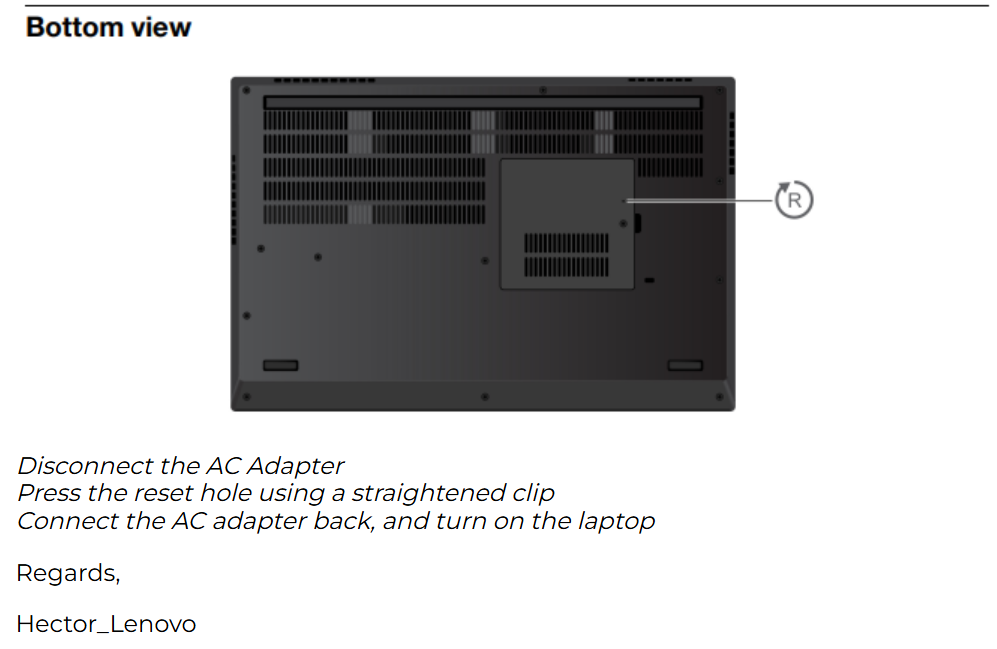
  • Portable Lenovo P15 : Blocage ... obliger d'enlever la batterie pour un redémarrage.
    F FredR

    A tester le bouton reset pendant 15 sec :
    cd18f8c3-c304-4111-b88d-d5f2649dc206-image.png

    General Discussion

  • Ubuntu 22 : changed its 'Label' value from 'PPA for Apache 2.x' to 'PPA for Apache 2'
    F FredR

    Pour fixer j’ai du faire :

    # apt update --allow-releaseinfo-change 
    

    A suivre.

    Linux at work ubuntu apt

  • PROXMOX : e1000e : Detected Hardware Unit Hang:
    F FredR

    J’ai l’erreur “Detected Hardware Unit Hang:”

    # journalctl --since=2025-08-13 | grep "e1000e" | more
    Journal file /var/log/journal/99b0a514478f45a993f76cd1a02892ef/system@000622d8a1539478-fcd8335a7d591443.journal~ is truncated, ignoring file.
    Aug 13 12:12:58 local kernel: e1000e: Intel(R) PRO/1000 Network Driver
    Aug 13 12:12:58 local kernel: e1000e: Copyright(c) 1999 - 2015 Intel Corporation.
    Aug 13 12:12:58 local kernel: e1000e 0000:00:1f.6: Interrupt Throttling Rate (ints/sec) set to dynamic conservative mode
    Aug 13 12:12:58 local kernel: e1000e 0000:00:1f.6 0000:00:1f.6 (uninitialized): registered PHC clock
    Aug 13 12:12:58 local kernel: e1000e 0000:00:1f.6 eth0: (PCI Express:2.5GT/s:Width x1) 4c:d7:17:84:3a:65
    Aug 13 12:12:58 local kernel: e1000e 0000:00:1f.6 eth0: Intel(R) PRO/1000 Network Connection
    Aug 13 12:12:58 local kernel: e1000e 0000:00:1f.6 eth0: MAC: 15, PHY: 12, PBA No: FFFFFF-0FF
    Aug 13 12:12:58 local kernel: e1000e 0000:02:00.0: enabling device (0000 -> 0002)
    Aug 13 12:12:58 local kernel: e1000e 0000:02:00.0: Interrupt Throttling Rate (ints/sec) set to dynamic conservative mode
    Aug 13 12:12:58 local kernel: e1000e 0000:02:00.0 eth1: (PCI Express:2.5GT/s:Width x1) 00:1b:21:05:05:4f
    Aug 13 12:12:58 local kernel: e1000e 0000:02:00.0 eth1: Intel(R) PRO/1000 Network Connection
    Aug 13 12:12:58 local kernel: e1000e 0000:02:00.0 eth1: MAC: 1, PHY: 4, PBA No: D50854-003
    Aug 13 12:12:58 local kernel: e1000e 0000:02:00.0 enp2s0: renamed from eth1
    Aug 13 12:12:58 local kernel: e1000e 0000:00:1f.6 enp0s31f6: renamed from eth0
    Aug 13 12:13:02 local kernel: e1000e 0000:00:1f.6 enp0s31f6: entered allmulticast mode
    Aug 13 12:13:02 local kernel: e1000e 0000:00:1f.6 enp0s31f6: entered promiscuous mode
    Aug 13 12:13:05 local kernel: e1000e 0000:00:1f.6 enp0s31f6: NIC Link is Up 1000 Mbps Full Duplex, Flow Control: None
    Aug 13 12:22:21 local kernel: e1000e: Intel(R) PRO/1000 Network Driver
    Aug 13 12:22:21 local kernel: e1000e: Copyright(c) 1999 - 2015 Intel Corporation.
    Aug 13 12:22:21 local kernel: e1000e 0000:00:1f.6: Interrupt Throttling Rate (ints/sec) set to dynamic conservative mode
    Aug 13 12:22:21 local kernel: e1000e 0000:00:1f.6 0000:00:1f.6 (uninitialized): registered PHC clock
    Aug 13 12:22:21 local kernel: e1000e 0000:00:1f.6 eth0: (PCI Express:2.5GT/s:Width x1) 4c:d7:17:84:3a:65
    Aug 13 12:22:21 local kernel: e1000e 0000:00:1f.6 eth0: Intel(R) PRO/1000 Network Connection
    Aug 13 12:22:21 local kernel: e1000e 0000:00:1f.6 eth0: MAC: 15, PHY: 12, PBA No: FFFFFF-0FF
    Aug 13 12:22:21 local kernel: e1000e 0000:02:00.0: enabling device (0000 -> 0002)
    Aug 13 12:22:21 local kernel: e1000e 0000:02:00.0: Interrupt Throttling Rate (ints/sec) set to dynamic conservative mode
    Aug 13 12:22:21 local kernel: e1000e 0000:02:00.0 eth1: (PCI Express:2.5GT/s:Width x1) 00:1b:21:05:05:4f
    Aug 13 12:22:21 local kernel: e1000e 0000:02:00.0 eth1: Intel(R) PRO/1000 Network Connection
    Aug 13 12:22:21 local kernel: e1000e 0000:02:00.0 eth1: MAC: 1, PHY: 4, PBA No: D50854-003
    Aug 13 12:22:21 local kernel: e1000e 0000:00:1f.6 enp0s31f6: renamed from eth0
    Aug 13 12:22:21 local kernel: e1000e 0000:02:00.0 enp2s0: renamed from eth1
    Aug 13 12:22:25 local kernel: e1000e 0000:00:1f.6 enp0s31f6: entered allmulticast mode
    Aug 13 12:22:25 local kernel: e1000e 0000:00:1f.6 enp0s31f6: entered promiscuous mode
    Aug 13 12:22:28 local kernel: e1000e 0000:00:1f.6 enp0s31f6: NIC Link is Up 1000 Mbps Full Duplex, Flow Control: None
    Aug 14 16:05:00 local kernel: e1000e 0000:00:1f.6 enp0s31f6: Detected Hardware Unit Hang:
    Aug 14 16:05:02 local kernel: e1000e 0000:00:1f.6 enp0s31f6: Detected Hardware Unit Hang:
    Aug 14 16:05:04 local kernel: e1000e 0000:00:1f.6 enp0s31f6: Detected Hardware Unit Hang:
    Aug 14 16:05:06 local kernel: e1000e 0000:00:1f.6 enp0s31f6: Detected Hardware Unit Hang:
    Aug 14 16:05:08 local kernel: e1000e 0000:00:1f.6 enp0s31f6: Detected Hardware Unit Hang:
    Aug 14 16:05:10 local kernel: e1000e 0000:00:1f.6 enp0s31f6: Detected Hardware Unit Hang:
    Aug 14 16:05:12 local kernel: e1000e 0000:00:1f.6 enp0s31f6: Detected Hardware Unit Hang:
    Aug 14 16:05:14 local kernel: e1000e 0000:00:1f.6 enp0s31f6: Detected Hardware Unit Hang:
    Aug 14 16:05:16 local kernel: e1000e 0000:00:1f.6 enp0s31f6: Detected Hardware Unit Hang:
    Aug 14 16:05:18 local kernel: e1000e 0000:00:1f.6 enp0s31f6: Detected Hardware Unit Hang:
    

    Mon kernel :

    # uname -a
    Linux local 6.14.11-1-pve #1 SMP PREEMPT_DYNAMIC PMX 6.14.11-1 (2025-08-26T16:06Z) x86_64 GNU/Linux
    # cat /etc/os-release | grep "PRETTY"
    PRETTY_NAME="Debian GNU/Linux 13 (trixie)"
    

    La configuration de la carte :

    # ethtool -k  enp0s31f6
    Features for enp0s31f6:
    rx-checksumming: on
    tx-checksumming: on
            tx-checksum-ipv4: off [fixed]
            tx-checksum-ip-generic: on
            tx-checksum-ipv6: off [fixed]
            tx-checksum-fcoe-crc: off [fixed]
            tx-checksum-sctp: off [fixed]
    scatter-gather: on
            tx-scatter-gather: on
            tx-scatter-gather-fraglist: off [fixed]
    tcp-segmentation-offload: on
            tx-tcp-segmentation: on
            tx-tcp-ecn-segmentation: off [fixed]
            tx-tcp-mangleid-segmentation: off
            tx-tcp6-segmentation: on
    generic-segmentation-offload: on
    generic-receive-offload: on
    large-receive-offload: off [fixed]
    rx-vlan-offload: on
    tx-vlan-offload: on
    ntuple-filters: off [fixed]
    receive-hashing: on
    highdma: on [fixed]
    rx-vlan-filter: off [fixed]
    vlan-challenged: off [fixed]
    tx-gso-robust: off [fixed]
    tx-fcoe-segmentation: off [fixed]
    tx-gre-segmentation: off [fixed]
    tx-gre-csum-segmentation: off [fixed]
    tx-ipxip4-segmentation: off [fixed]
    tx-ipxip6-segmentation: off [fixed]
    tx-udp_tnl-segmentation: off [fixed]
    tx-udp_tnl-csum-segmentation: off [fixed]
    tx-gso-partial: off [fixed]
    tx-tunnel-remcsum-segmentation: off [fixed]
    tx-sctp-segmentation: off [fixed]
    tx-esp-segmentation: off [fixed]
    tx-udp-segmentation: off [fixed]
    tx-gso-list: off [fixed]
    tx-nocache-copy: off
    loopback: off [fixed]
    rx-fcs: off
    rx-all: off
    tx-vlan-stag-hw-insert: off [fixed]
    rx-vlan-stag-hw-parse: off [fixed]
    rx-vlan-stag-filter: off [fixed]
    l2-fwd-offload: off [fixed]
    hw-tc-offload: off [fixed]
    esp-hw-offload: off [fixed]
    esp-tx-csum-hw-offload: off [fixed]
    rx-udp_tunnel-port-offload: off [fixed]
    tls-hw-tx-offload: off [fixed]
    tls-hw-rx-offload: off [fixed]
    rx-gro-hw: off [fixed]
    tls-hw-record: off [fixed]
    rx-gro-list: off
    macsec-hw-offload: off [fixed]
    rx-udp-gro-forwarding: off
    hsr-tag-ins-offload: off [fixed]
    hsr-tag-rm-offload: off [fixed]
    hsr-fwd-offload: off [fixed]
    hsr-dup-offload: off [fixed]
    

    Sur un forum j’ai vu : https://forum.proxmox.com/threads/intel-nic-e1000e-hardware-unit-hang.106001/

    ethtool -K eth0 gso off gro off tso off tx off rx off rxvlan off txvlan off
    

    Il me faudrait remplacer eth0 par enp0s31f6 …

    Et sur : https://forum.proxmox.com/threads/help-eno1-detected-hardware-unit-hang.117305/ , modifier /etc/networking/interfaces .

    iface eno1 inet manual
    post-up /usr/sbin/ethtool -K $IFACE tso off gso off 2> /dev/null
    

    A suivre …

    Proxmox

  • PROXMOX : Ménage dans journalctl ( disk-usage & vacuum-size )
    F FredR

    Les commandes :

    # journalctl --disk-usage
    Journal file /var/log/journal/99b0a514478f45a993f76cd1a02892ef/system@000622d8a1539478-fcd8335a7d591443.journal~ is truncated, ignoring file.
    Archived and active journals take up 3.7G in the file system.
    # journalctl --verify
    ...
    # journalctl --flush
    # journalctl --disk-usage
    Journal file /var/log/journal/99b0a514478f45a993f76cd1a02892ef/system@000622d8a1539478-fcd8335a7d591443.journal~ is truncated, ignoring file.
    Archived and active journals take up 3.7G in the file system.
    root@local:~# journalctl --vacuum-size=100M
    # journalctl --disk-usage
    Archived and active journals take up 77.9M in the file system.
    

    Première ligne :

    # journalctl -b | head -1
    Sep 03 15:46:30 local kernel: Linux version 6.14.11-1-pve (tom@alp1) (gcc (Debian 14.2.0-19) 14.2.0, GNU ld (GNU Binutils for Debian) 2.44) #1 SMP PREEMPT_DYNAMIC PMX 6.14.11-1 (2025-08-26T16:06Z) ()
    

    Cela m’a permis de supprimer les logs de crash de la carte réseau.

    Proxmox
  • Se connecter

  • Vous n'avez pas de compte ? S'inscrire

  • Connectez-vous ou inscrivez-vous pour faire une recherche.
Powered by NodeBB Contributors
  • Premier message
    Dernier message
0
  • Catégories
  • Récent
  • Mots-clés
  • Populaire
  • Web
  • Utilisateurs
  • Groupes