Aller directement au contenu
  • Catégories
  • Récent
  • Mots-clés
  • Populaire
  • Web
  • Utilisateurs
  • Groupes
Habillages
  • Clair
  • Brite
  • Cerulean
  • Cosmo
  • Flatly
  • Journal
  • Litera
  • Lumen
  • Lux
  • Materia
  • Minty
  • Morph
  • Pulse
  • Sandstone
  • Simplex
  • Sketchy
  • Spacelab
  • United
  • Yeti
  • Zephyr
  • Sombre
  • Cyborg
  • Darkly
  • Quartz
  • Slate
  • Solar
  • Superhero
  • Vapor

  • Défaut (Darkly)
  • Aucun habillage
Réduire

NodeBB

  1. Accueil
  2. General Discussion
  3. Linux
  4. Gestion clavier de la luminosité sous Ubuntu 24.04.4 ne fonctionne plus ...

Gestion clavier de la luminosité sous Ubuntu 24.04.4 ne fonctionne plus ...

Planifié Épinglé Verrouillé Déplacé Linux
13 Messages 1 Publieurs 137 Vues 1 Abonné
  • Du plus ancien au plus récent
  • Du plus récent au plus ancien
  • Les plus votés
Répondre
  • Répondre à l'aide d'un nouveau sujet
Se connecter pour répondre
Ce sujet a été supprimé. Seuls les utilisateurs avec les droits d'administration peuvent le voir.
  • fariasF En ligne
    fariasF En ligne
    farias
    a écrit sur dernière édition par
    #1

    Mes commandes clavier pour la luminosité ne fonctionne plus :

    # neofetch
                .-/+oossssoo+/-.               root@CYBERNEURONES 
            `:+ssssssssssssssssss+:`           ------------------ 
          -+ssssssssssssssssssyyssss+-         OS: Ubuntu 24.04.4 LTS x86_64 
        .ossssssssssssssssssdMMMNysssso.       Host: TUXEDO 
       /ssssssssssshdmmNNmmyNMMMMhssssss/      Kernel: 6.8.0-101-generic 
      +ssssssssshmydMMMMMMMNddddyssssssss+     Uptime: 52 days, 5 hours, 49 mins 
     /sssssssshNMMMyhhyyyyhmNMMMNhssssssss/    Packages: 4780 (dpkg), 61 (snap) 
    .ssssssssdMMMNhsssssssssshNMMMdssssssss.   Shell: bash 5.2.21 
    +sssshhhyNMMNyssssssssssssyNMMMysssssss+   Resolution: 1920x1080, 1920x1080 
    ossyNMMMNyMMhsssssssssssssshmmmhssssssso   DE: GNOME 46.0 
    ossyNMMMNyMMhsssssssssssssshmmmhssssssso   WM: Mutter 
    +sssshhhyNMMNyssssssssssssyNMMMysssssss+   WM Theme: Adwaita 
    .ssssssssdMMMNhsssssssssshNMMMdssssssss.   Theme: Adwaita [GTK2/3] 
     /sssssssshNMMMyhhyyyyhdNMMMNhssssssss/    Icons: Adwaita [GTK2/3] 
      +sssssssssdmydMMMMMMMMddddyssssssss+     Terminal: tilix 
       /ssssssssssshdmNNNNmyNMMMMhssssss/      CPU: Intel i5-10210U (8) @ 4.200GHz 
        .ossssssssssssssssssdMMMNysssso.       GPU: Intel CometLake-U GT2 [UHD Graphics] 
          -+sssssssssssssssssyyyssss+-         Memory: 14516MiB / 63995MiB 
            `:+ssssssssssssssssss+:`
                .-/+oossssoo+/-.                                       
                                                                       
    # ls -al /sys/class/backlight/
    total 0
    drwxr-xr-x  2 root root 0 mai    4 16:21 .
    drwxr-xr-x 82 root root 0 mai    4 16:21 ..
    
    # cat /etc/default/grub | grep "GRUB_CMDLINE_LINUX_DEFAULT"
    GRUB_CMDLINE_LINUX_DEFAULT="quiet splash acpi_os_name=Linux acpi_osi= acpi_backlight=vendor"
    
    
    1 réponse Dernière réponse
    0
    • fariasF En ligne
      fariasF En ligne
      farias
      a écrit sur dernière édition par
      #2

      Autre information :

      # ddcutil detect
      Display 1
         I2C bus:  /dev/i2c-2
         DRM connector:           card1-HDMI-A-2
         EDID synopsis:
            Mfg id:               IVM - Iiyama North America
            Model:                PLX2783H
            Product code:         26184  (0x6648)
            Serial number:        1155890322923
            Binary serial number: 2923 (0x00000b6b)
            Manufacture year:     2019,  Week: 3
         VCP version:         2.1
      
      Invalid display
         I2C bus:  /dev/i2c-5
         DRM connector:           card1-eDP-1
         EDID synopsis:
            Mfg id:               AUO - UNK
            Model:                
            Product code:         21565  (0x543d)
            Serial number:        
            Binary serial number: 0 (0x00000000)
            Manufacture year:     2017,  Week: 0
         DDC communication failed
         This is an eDP laptop display. Laptop displays do not support DDC/CI.
      
      
      1 réponse Dernière réponse
      0
      • fariasF En ligne
        fariasF En ligne
        farias
        a écrit sur dernière édition par
        #3

        Les commandes fonctionnent sur l’écran :

        # ddcutil  -d 1 getvcp 10
        VCP code 0x10 (Brightness                    ): current value =   100, max value =   100
        # ddcutil  -d 1 setvcp 10 80
        # ddcutil  -d 1 getvcp 10
        VCP code 0x10 (Brightness                    ): current value =    80, max value =   100
        
        
        1 réponse Dernière réponse
        0
        • fariasF En ligne
          fariasF En ligne
          farias
          a écrit sur dernière édition par
          #4

          Commande brightnessctl :

          # brightnessctl --list
          Available devices:
          Device 'input4::capslock' of class 'leds':
          	Current brightness: 0 (0%)
          	Max brightness: 1
          
          Device 'phy0-led' of class 'leds':
          	Current brightness: 0 (0%)
          	Max brightness: 1
          
          Device 'input4::scrolllock' of class 'leds':
          	Current brightness: 0 (0%)
          	Max brightness: 1
          
          Device 'enp59s0f1-2::lan' of class 'leds':
          	Current brightness: 0 (0%)
          	Max brightness: 255
          
          Device 'enp59s0f1-1::lan' of class 'leds':
          	Current brightness: 0 (0%)
          	Max brightness: 255
          
          Device 'input12::scrolllock' of class 'leds':
          	Current brightness: 0 (0%)
          	Max brightness: 1
          
          Device 'input4::numlock' of class 'leds':
          	Current brightness: 1 (100%)
          	Max brightness: 1
          
          Device 'enp59s0f1-0::lan' of class 'leds':
          	Current brightness: 0 (0%)
          	Max brightness: 255
          
          Device 'input12::numlock' of class 'leds':
          	Current brightness: 1 (100%)
          	Max brightness: 1
          
          Device 'input12::capslock' of class 'leds':
          	Current brightness: 0 (0%)
          	Max brightness: 1
          
          
          1 réponse Dernière réponse
          0
          • fariasF En ligne
            fariasF En ligne
            farias
            a écrit sur dernière édition par farias
            #5

            Command xrandr :

            #  xrandr --listactivemonitors
            Monitors: 2
             0: +*eDP-1 1920/310x1080/170+0+0  eDP-1
             1: +HDMI-2 1920/600x1080/340+1920+0  HDMI-2


            test :

            #  xrandr --output eDP-1 --brightness  0.75
            
            1 réponse Dernière réponse
            0
            • fariasF En ligne
              fariasF En ligne
              farias
              a écrit sur dernière édition par farias
              #6

              Recherche de Edid :

              # find /sys/devices/ -iname edid
              /sys/devices/pci0000:00/0000:00:02.0/drm/card1/card1-HDMI-A-1/edid
              /sys/devices/pci0000:00/0000:00:02.0/drm/card1/card1-eDP-1/edid
              /sys/devices/pci0000:00/0000:00:02.0/drm/card1/card1-HDMI-A-2/edid
              /sys/devices/pci0000:00/0000:00:02.0/drm/card1/card1-DP-1/edid
              
              
              # find /sys/devices/ -iname brightness 
              /sys/devices/platform/i8042/serio0/input/input4/input4::capslock/brightness
              /sys/devices/platform/i8042/serio0/input/input4/input4::scrolllock/brightness
              /sys/devices/platform/i8042/serio0/input/input4/input4::numlock/brightness
              /sys/devices/platform/tuxedo_keyboard/brightness
              /sys/devices/pci0000:00/0000:00:1d.1/0000:40:00.0/leds/phy0-led/brightness
              /sys/devices/pci0000:00/0000:00:1d.0/0000:3b:00.1/net/enp59s0f1/enp59s0f1-2::lan/brightness
              /sys/devices/pci0000:00/0000:00:1d.0/0000:3b:00.1/net/enp59s0f1/enp59s0f1-1::lan/brightness
              /sys/devices/pci0000:00/0000:00:1d.0/0000:3b:00.1/net/enp59s0f1/enp59s0f1-0::lan/brightness
              /sys/devices/pci0000:00/0000:00:14.0/usb1/1-4/1-4.4/1-4.4:1.0/0003:413C:2110.0002/input/input12/input12::scrolllock/brightness
              /sys/devices/pci0000:00/0000:00:14.0/usb1/1-4/1-4.4/1-4.4:1.0/0003:413C:2110.0002/input/input12/input12::numlock/brightness
              /sys/devices/pci0000:00/0000:00:14.0/usb1/1-4/1-4.4/1-4.4:1.0/0003:413C:2110.0002/input/input12/input12::capslock/brightness
              
              
              1 réponse Dernière réponse
              0
              • fariasF En ligne
                fariasF En ligne
                farias
                a écrit sur dernière édition par
                #7

                Command xbacklight

                $ xbacklight -get
                No outputs have backlight property
                
                1 réponse Dernière réponse
                0
                • fariasF En ligne
                  fariasF En ligne
                  farias
                  a écrit sur dernière édition par
                  #8

                  Xorg :

                  # cat /var/log/Xorg.0.log | grep " file"
                  [     9.729] (--) Log file renamed from "/var/log/Xorg.pid-2950.log" to "/var/log/Xorg.0.log"
                  [     9.730] Markers: (--) probed, (**) from config file, (==) default setting,
                  [     9.730] (==) Log file: "/var/log/Xorg.0.log", Time: Sat Feb 22 14:42:32 2025
                  [    10.212] (II) This device may have been added with another device file.
                  [    10.228] (II) This device may have been added with another device file.
                  [    10.459] (II) This device may have been added with another device file.
                  [  2902.537] (II) Server terminated successfully (0). Closing log file.
                  
                  
                  1 réponse Dernière réponse
                  0
                  • fariasF En ligne
                    fariasF En ligne
                    farias
                    a écrit sur dernière édition par
                    #9

                    Visiblement je suis sur Wayland :

                    # loginctl show-session 2 | grep "wayland"
                    Type=wayland
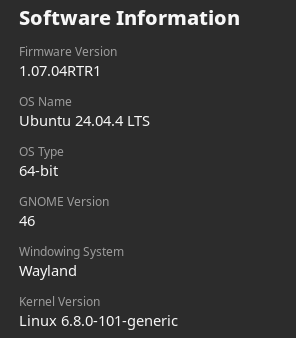


                    image.png

                    1 réponse Dernière réponse
                    0
                    • fariasF En ligne
                      fariasF En ligne
                      farias
                      a écrit sur dernière édition par
                      #10

                      Command inxi :

                      # inxi -Fxxxz
                      System:
                        Kernel: 6.8.0-101-generic arch: x86_64 bits: 64 compiler: gcc v: 13.3.0
                          clocksource: tsc
                        Desktop: GNOME v: 46.0 tk: GTK v: 3.24.41 wm: gnome-shell
                          tools: gsd-screensaver-proxy dm: GDM3 v: 46.2 Distro: Ubuntu 24.04.4 LTS
                          (Noble Numbat)
                      Machine:
                        Type: Laptop System: TUXEDO product: TUXEDO v: N/A serial: N/A
                          Chassis: Notebook type: 10 serial: N/A
                      ...
                      Graphics:
                        Device-1: Intel CometLake-U GT2 [UHD Graphics] vendor: CLEVO/KAPOK
                          driver: i915 v: kernel arch: Gen-9.5 ports: active: HDMI-A-2,eDP-1
                          empty: DP-1,HDMI-A-1 bus-ID: 00:02.0 chip-ID: 8086:9b41 class-ID: 0300
                        Device-2: Chicony USB2.0 Camera driver: uvcvideo type: USB rev: 2.0
                          speed: 480 Mb/s lanes: 1 bus-ID: 1-7:7 chip-ID: 04f2:b649 class-ID: 0e02
                        Display: server: X.Org v: 23.2.6 with: Xwayland v: 23.2.6
                          compositor: gnome-shell driver: dri: iris gpu: i915 display-ID: :0
                          screens: 1
                        Screen-1: 0 s-res: 3840x1080 s-dpi: 96 s-size: 1016x285mm (40.00x11.22")
                          s-diag: 1055mm (41.54")
                        Monitor-1: not-matched mapped: HDMI-2 pos: right res: 1920x1080 hz: 60
                          dpi: 81 size: 600x340mm (23.62x13.39") diag: 690mm (27.15") modes: N/A
                        Monitor-2: not-matched mapped: eDP-1 pos: primary,left res: 1920x1080
                          hz: 60 dpi: 157 size: 310x170mm (12.2x6.69") diag: 354mm (13.92") modes: N/A
                        API: EGL v: 1.5 hw: drv: intel iris platforms: device: 0 drv: iris
                          device: 1 drv: swrast gbm: drv: iris surfaceless: drv: iris x11: drv: iris
                          inactive: wayland
                        API: OpenGL v: 4.6 compat-v: 4.5 vendor: intel mesa
                          v: 25.2.8-0ubuntu0.24.04.1 glx-v: 1.4 direct-render: yes renderer: Mesa
                          Intel UHD Graphics (CML GT2) device-ID: 8086:9b41
                      
                      
                      1 réponse Dernière réponse
                      0
                      • fariasF En ligne
                        fariasF En ligne
                        farias
                        a écrit sur dernière édition par
                        #11

                        Command : acpi_listen

                        Je vois bien le + et - via les commandes claviers … mais pas d’effet.

                        # acpi_listen 
                        
                        thermal_zone LNXTHERM:00 00000081 00000000
                        thermal_zone LNXTHERM:00 00000081 00000000
                        video/brightnessup BRTUP 00000086 00000000
                        video/brightnessup BRTUP 00000086 00000000
                        video/brightnessdown BRTDN 00000087 00000000
                        video/brightnessdown BRTDN 00000087 00000000
                        
                        
                        1 réponse Dernière réponse
                        0
                        • fariasF En ligne
                          fariasF En ligne
                          farias
                          a écrit sur dernière édition par
                          #12

                          Command :

                           cat /proc/cmdline
                          BOOT_IMAGE=/boot/vmlinuz-6.8.0-101-generic root=UUID=3c3ae400-eaf9-4fec-bcd1-312dd83a63e6 ro quiet splash acpi_os_name=Linux acpi_osi= acpi_backlight=vendor vt.handoff=7


                          Il faudrait tester :
                          acpi_backlight=none
                          video.use_native_backlight=1

                          A suivre.

                          1 réponse Dernière réponse
                          0
                          • fariasF En ligne
                            fariasF En ligne
                            farias
                            a écrit sur dernière édition par
                            #13

                            Command lspci :

                            # lspci -k | grep -EA3 'VGA|3D|Display'
                            00:02.0 VGA compatible controller: Intel Corporation CometLake-U GT2 [UHD Graphics] (rev 02)
                            	Subsystem: CLEVO/KAPOK Computer CometLake-U GT2 [UHD Graphics]
                            	Kernel driver in use: i915
                            	Kernel modules: i915
                            
                            
                            1 réponse Dernière réponse
                            0

                            Bonjour ! Vous semblez intéressé par cette conversation, mais vous n’avez pas encore de compte.

                            Marre de refaire défiler les mêmes messages ? Créez un compte pour retrouver votre position, recevoir des notifications des nouvelles réponses, sauvegarder vos favoris et voter pour les messages que vous appréciez.

                            Grâce à votre participation, ce message peut devenir encore meilleur 💗

                            S'inscrire Se connecter
                            Répondre
                            • Répondre à l'aide d'un nouveau sujet
                            Se connecter pour répondre
                            • Du plus ancien au plus récent
                            • Du plus récent au plus ancien
                            • Les plus votés


                            • Se connecter

                            • Vous n'avez pas de compte ? S'inscrire

                            • Connectez-vous ou inscrivez-vous pour faire une recherche.
                            Powered by NodeBB Contributors
                            • Premier message
                              Dernier message
                            0
                            • Catégories
                            • Récent
                            • Mots-clés
                            • Populaire
                            • Web
                            • Utilisateurs
                            • Groupes