Aller directement au contenu
  • Catégories
  • Récent
  • Mots-clés
  • Populaire
  • Web
  • Utilisateurs
  • Groupes
Habillages
  • Clair
  • Brite
  • Cerulean
  • Cosmo
  • Flatly
  • Journal
  • Litera
  • Lumen
  • Lux
  • Materia
  • Minty
  • Morph
  • Pulse
  • Sandstone
  • Simplex
  • Sketchy
  • Spacelab
  • United
  • Yeti
  • Zephyr
  • Sombre
  • Cyborg
  • Darkly
  • Quartz
  • Slate
  • Solar
  • Superhero
  • Vapor

  • Défaut (Aucun habillage)
  • Aucun habillage
Réduire

NodeBB

R

Remi

@Remi
Se désabonner S'abonner
À propos
Messages
26
Sujets
1
Partages
0
Groupes
0
Abonnés
1
Abonnements
0

Messages

Récent Meilleur sujets Contesté

  • Installation llama.cpp sous Windows 11 avec Ubuntu 22
    R Remi

    Je vais essayer la version Docker :

    # export MODEL_PATH='/models/'
    # docker run --privileged            --network=host            --device=/dev/kfd            --device=/dev/dri            --group-add video            --cap-add=SYS_PTRACE            --security-opt seccomp=unconfined            --ipc=host            --shm-size 16G            -v $MODEL_PATH:/data            rocm/llama.cpp:llama.cpp-b5997_rocm6.4.0_ubuntu24.04_full              -m /data/Qwen3.6-27B-Q4_K_M.gguf              -p "Building a website can be done in 10 simple steps:" -n 512 --n-gpu-layers 999
    Unable to find image 'rocm/llama.cpp:llama.cpp-b5997_rocm6.4.0_ubuntu24.04_full' locally
    llama.cpp-b5997_rocm6.4.0_ubuntu24.04_full: Pulling from rocm/llama.cpp
    757fe5b21110: Downloading [==>                                                ]  6.291MB/114.7MB
    0f1832fb3fb1: Downloading [>                                                  ]  5.243MB/646.4MB
    52ae0682347f: Downloading [======================================>            ]    107MB/138.7MB
    b00fa23324d1: Pull complete
    
    
    Linux wsl2 llama.cpp

  • Installation llama.cpp sous Windows 11 avec Ubuntu 22
    R Remi

    Nouveau build :

    # export LLAMACPP_ROCM_ARCH=gfx803,gfx900,gfx906,gfx908,gfx90a,gfx942,gfx1010,gfx1030,gfx1032,gfx1100,gfx1101,gfx1102
    # HIPCXX="$(hipconfig -l)/clang" HIP_PATH="$(hipconfig -R)" \
    cmake -S . -B build -DGGML_HIP=ON -DAMDGPU_TARGETS=$LLAMACPP_ROCM_ARCH \
    -DCMAKE_BUILD_TYPE=Release -DLLAMA_CURL=ON \
    && cmake --build build --config Release -j$(nproc)
    
    Linux wsl2 llama.cpp

  • Installation llama.cpp sous Windows 11 avec Ubuntu 22
    R Remi

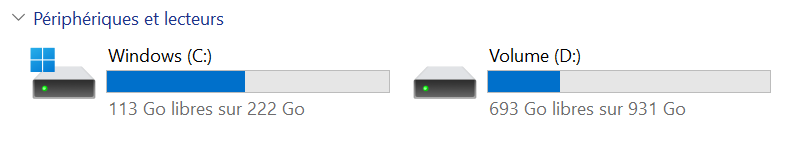
    Ouf …

    PS C:\Windows\system32> wsl --shutdown
    PS C:\Windows\system32> wsl --manage Ubuntu --move D:\WSL\Ubuntu
    L’opération a réussi.
    

    image.png

    Linux wsl2 llama.cpp

  • Installation llama.cpp sous Windows 11 avec Ubuntu 22
    R Remi

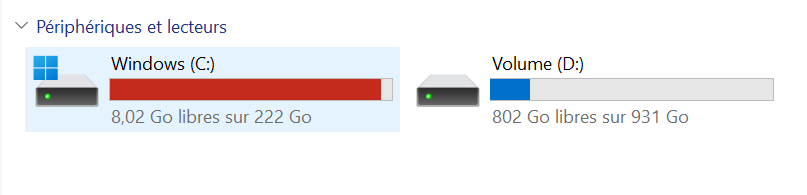
    J’essaye de déplacer …

    PS C:\Windows\system32> wsl --list --verbose
      NAME      STATE           VERSION
    * Ubuntu    Running         2
    PS C:\Windows\system32> wsl --terminate Ubuntu
    L’opération a réussi.
    PS C:\Windows\system32> wsl --list --verbose
      NAME      STATE           VERSION
    * Ubuntu    Stopped         2
    PS C:\Windows\system32> wsl --manage Ubuntu --move D:\WSL\Ubuntu
    Le processus ne peut pas accéder au fichier car ce fichier est utilisé par un autre processus.
    Code d'erreur : Wsl/Service/MoveDistro/ERROR_SHARING_VIOLATION
    PS C:\Windows\system32> wsl --manage Ubuntu --move D:\WSL\Ubuntu
    Le processus ne peut pas accéder au fichier car ce fichier est utilisé par un autre processus.
    Code d'erreur : Wsl/Service/MoveDistro/ERROR_SHARING_VIOLATION
    
    Linux wsl2 llama.cpp

  • Installation llama.cpp sous Windows 11 avec Ubuntu 22
    R Remi

    Aie …

    #  llama-bench -m  /models/qwen2.5-1.5b-instruct-q4_k_m.gguf
    llama-bench: error while loading shared libraries: libllama-bench-impl.so: cannot open shared object file: No such file or directory
    

    Pourtant pas de problème de compilation avec https://rocm.docs.amd.com/projects/llama-cpp/en/docs-25.08/install/llama-cpp-install.html

    Cela ne fonctionne pas :

    # ./build/bin/test-backend-ops
    ggml_cuda_init: failed to initialize ROCm: no ROCm-capable device is detected
    Testing 1 devices
    
    Backend 1/1: CPU
      Skipping CPU backend
    1/1 backends passed
    OK
    

    Alors que j’ai fait le build pour toutes les architectures :

    export LLAMACPP_ROCM_ARCH=gfx803,gfx900,gfx906,gfx908,gfx90a,gfx942,gfx1010,gfx1030,gfx1032,gfx1100,gfx1101,gfx1102
    
    Linux wsl2 llama.cpp

  • Installation llama.cpp sous Windows 11 avec Ubuntu 22
    R Remi

    Il faut déplacer votre distribution Ubuntu WSL vers un autre disque …

    image.png

    Linux wsl2 llama.cpp

  • Installation llama.cpp sous Windows 11 avec Ubuntu 22
    R Remi

    Lancement de docker :

    # docker run -it       --name=$(whoami)_llamacpp       --privileged --network=host       --device=/dev/kfd --device=/dev/dri       --group-add video --cap-add=SYS_PTRACE       --security-opt seccomp=unconfined       --ipc=host --shm-size 16G       -v $MODEL_PATH:/data rocm/dev-ubuntu-24.04:6.4-complete
    
    Linux wsl2 llama.cpp

  • Installation llama.cpp sous Windows 11 avec Ubuntu 22
    R Remi

    Nouveau test : https://rocm.docs.amd.com/projects/llama-cpp/en/docs-25.08/install/llama-cpp-install.html

    Linux wsl2 llama.cpp

  • Installation llama.cpp sous Windows 11 avec Ubuntu 22
    R Remi

    Aie …

    # /opt/rocm/bin/hipconfig --full
    Warning: HIP version file: "/opt/rocm-7.2.4/core-7.14/hip/share/hip/version" not found.  Cannot give HIP version information.
    Warning: HIP version file: "/opt/rocm-7.2.4/core-7.14/hip/share/hip/version" not found.  Cannot give HIP version information.
    HIP version:
    
    ==hipconfig
    HIP_PATH           :/opt/rocm-7.2.4/core-7.14/hip
    ROCM_PATH          :/opt/rocm-7.2.4/core-7.14
    HIP_COMPILER       :clang
    HIP_PLATFORM       :amd
    HIP_RUNTIME        :rocclr
    CPP_CONFIG         : -D__HIP_PLATFORM_HCC__= -D__HIP_PLATFORM_AMD__= -I/opt/rocm-7.2.4/core-7.14/hip/include -I/include
    
    ==hip-clang
    HIP_CLANG_PATH     :/opt/rocm-7.2.4/core-7.14/lib/llvm/bin
    AMD clang version 23.0.0git (https://github.com/ROCm/llvm-project.git 46fcb339fb61119b337f973c7ca9e710a319fdd0+PATCHED:440716f8b87be9d8e20ed910e10e5b6d14d57cf6)
    Target: x86_64-unknown-linux-gnu
    Thread model: posix
    InstalledDir: /opt/rocm-7.2.4/core-7.14/lib/llvm/bin
    sh: 1: /opt/rocm-7.2.4/core-7.14/lib/llvm/bin/llc: not found
    hip-clang-cxxflags :
    sh: 1: /opt/rocm-7.2.4/core-7.14/hip/bin/hipcc: not found
    
    hip-clang-ldflags :
    sh: 1: /opt/rocm-7.2.4/core-7.14/hip/bin/hipcc: not found
    
    
    == Environment Variables
    PATH =/opt/vulkan-sdk/x86_64/bin:/root/.nvm/versions/node/v26.3.1/bin:/usr/local/sbin:/usr/local/bin:/usr/sbin:/usr/bin:/sbin:/bin:/usr/games:/usr/local/games:/snap/bin
    LD_LIBRARY_PATH=/opt/vulkan-sdk/x86_64/lib/VulkanLoader/lib
    HIP_PATH=/opt/rocm-7.2.4/core-7.14/hip
    
    == Linux Kernel
    Hostname      :
    pcremi
    Linux pcremi 6.18.33.1-microsoft-standard-WSL2 #1 SMP PREEMPT_DYNAMIC Fri Jun  5 01:12:21 UTC 2026 x86_64 x86_64 x86_64 GNU/Linux
    No LSB modules are available.
    Distributor ID: Ubuntu
    Description:    Ubuntu 24.04.4 LTS
    Release:        24.04
    Codename:       noble
    
    
    Linux wsl2 llama.cpp

  • Installation llama.cpp sous Windows 11 avec Ubuntu 22
    R Remi

    Pas possible de faire le build :

    # cmake .. -G Ninja   -DCMAKE_C_COMPILER=/opt/rocm/llvm/bin/clang   -DCMAKE_CXX_COMPILER=/opt/rocm/llvm/bin/clang++   -DCMAKE_CXX_FLAGS="-I/opt/rocm/include"   -DCMAKE_CROSSCOMPILING=ON   -DCMAKE_BUILD_TYPE=Release   -DGPU_TARGETS="gfx1151"   -DBUILD_SHARED_LIBS=ON   -DLLAMA_BUILD_TESTS=OFF   -DGGML_HIP=ON   -DGGML_OPENMP=OFF   -DGGML_CUDA_FORCE_CUBLAS=OFF   -DGGML_HIP_ROCWMMA_FATTN=OFF   -DLLAMA_CURL=OFF   -DGGML_NATIVE=OFF   -DGGML_STATIC=OFF   -DCMAKE_SYSTEM_NAME=Linux -DCMAKE_HIP_COMPILER_ROCM_ROOT=/opt/rocm-7.2.4/core-7.14 -DCMAKE_PREFIX_PATH=/opt/rocm-7.2.4/core-7.14
    CMAKE_BUILD_TYPE=Release
    -- Setting GGML_NATIVE_DEFAULT to OFF
    -- Warning: ccache not found - consider installing it for faster compilation or disable this warning with GGML_CCACHE=OFF
    -- CMAKE_SYSTEM_PROCESSOR:
    -- GGML_SYSTEM_ARCH: UNKNOWN
    -- Including CPU backend
    CMake Warning at ggml/src/ggml-cpu/CMakeLists.txt:570 (message):
      Unknown CPU architecture.  Falling back to generic implementations.
    Call Stack (most recent call first):
      ggml/src/CMakeLists.txt:470 (ggml_add_cpu_backend_variant_impl)
    
    
    -- Adding CPU backend variant ggml-cpu: -DGGML_CPU_GENERIC
    -- The HIP compiler identification is unknown
    CMake Error at /usr/share/cmake-3.28/Modules/CMakeDetermineHIPCompiler.cmake:217 (message):
      The ROCm root directory:
    
       /opt/rocm-7.2.4/core-7.14
    
      does not contain the HIP runtime CMake package, expected at one of:
    
       /opt/rocm-7.2.4/core-7.14/lib/cmake/hip-lang/hip-lang-config.cmake
       /opt/rocm-7.2.4/core-7.14/lib64/cmake/hip-lang/hip-lang-config.cmake
    
    Call Stack (most recent call first):
      ggml/src/ggml-hip/CMakeLists.txt:43 (enable_language)
    
    -- Configuring incomplete, errors occurred!
    
    Linux wsl2 llama.cpp

  • Installation llama.cpp sous Windows 11 avec Ubuntu 22
    R Remi

    C’est bon rocminfo fonctionne :

    # rocminfo
    WSL environment detected.
    =====================
    HSA System Attributes
    =====================
    Runtime Version:         1.21
    Runtime Ext Version:     1.26
    System Timestamp Freq.:  1000.000000MHz
    Sig. Max Wait Duration:  18446744073709551615 (0xFFFFFFFFFFFFFFFF) (timestamp count)
    Machine Model:           LARGE
    System Endianness:       LITTLE
    Mwaitx:                  DISABLED
    XNACK enabled:           NO
    DMAbuf Support:          YES
    VMM Support:             YES
    Fabric Support:          NO
    
    ==========
    HSA Agents
    ==========
    *******
    Agent 1
    *******
      Name:                    AMD Ryzen 5 7500X3D 6-Core Processor
      Uuid:                    CPU-XX
      Marketing Name:          AMD Ryzen 5 7500X3D 6-Core Processor
      Vendor Name:             CPU
      Feature:                 None specified
      Profile:                 FULL_PROFILE
      Float Round Mode:        NEAR
      Max Queue Number:        0(0x0)
      Queue Min Size:          0(0x0)
      Queue Max Size:          0(0x0)
      Queue Type:              MULTI
      Node:                    0
      Device Type:             CPU
      Cache Info:
        L1:                      32768(0x8000) KB
      Chip ID:                 0(0x0)
      Cacheline Size:          64(0x40)
      BDFID:                   0
      Internal Node ID:        0
      Compute Unit:            12
      SIMDs per CU:            0
      Shader Engines:          0
      Shader Arrs. per Eng.:   0
      Memory Properties:
      Features:                None
      Pool Info:
        Pool 1
          Segment:                 GLOBAL; FLAGS: FINE GRAINED
          Size:                    15940236(0xf33a8c) KB
          Allocatable:             TRUE
          Alloc Granule:           4KB
          Alloc Recommended Granule:4KB
          Alloc Alignment:         4KB
          Accessible by all:       TRUE
        Pool 2
          Segment:                 GLOBAL; FLAGS: EXTENDED FINE GRAINED
          Size:                    15940236(0xf33a8c) KB
          Allocatable:             TRUE
          Alloc Granule:           4KB
          Alloc Recommended Granule:4KB
          Alloc Alignment:         4KB
          Accessible by all:       TRUE
        Pool 3
          Segment:                 GLOBAL; FLAGS: KERNARG, FINE GRAINED
          Size:                    15940236(0xf33a8c) KB
          Allocatable:             TRUE
          Alloc Granule:           4KB
          Alloc Recommended Granule:4KB
          Alloc Alignment:         4KB
          Accessible by all:       TRUE
        Pool 4
          Segment:                 GLOBAL; FLAGS: COARSE GRAINED
          Size:                    15940236(0xf33a8c) KB
          Allocatable:             TRUE
          Alloc Granule:           4KB
          Alloc Recommended Granule:4KB
          Alloc Alignment:         4KB
          Accessible by all:       TRUE
      ISA Info:
    *******
    Agent 2
    *******
      Name:                    gfx1200
      Uuid:                    GPU-a7d3e620dff8c443
      Marketing Name:          AMD Radeon RX 9060 XT
      Vendor Name:             AMD
      Feature:                 KERNEL_DISPATCH
      Profile:                 BASE_PROFILE
      Float Round Mode:        NEAR
      Max Queue Number:        128(0x80)
      Queue Min Size:          64(0x40)
      Queue Max Size:          131072(0x20000)
      Queue Type:              MULTI
      Node:                    1
      Device Type:             GPU
      Cache Info:
        L1:                      32(0x20) KB
        L3:                      32768(0x8000) KB
      Chip ID:                 30096(0x7590)
      Cacheline Size:          64(0x40)
      Max Clock Freq. (MHz):   2620
      BDFID:                   768
      Internal Node ID:        1
      Compute Unit:            32
      SIMDs per CU:            2
      Shader Engines:          2
      Shader Arrs. per Eng.:   2
      Coherent Host Access:    FALSE
      Memory Properties:
      Features:                KERNEL_DISPATCH
      Fast F16 Operation:      TRUE
      Wavefront Size:          32(0x20)
      Workgroup Max Size:      1024(0x400)
      Workgroup Max Size per Dimension:
        x                        1024(0x400)
        y                        1024(0x400)
        z                        1024(0x400)
      Max Waves Per CU:        32(0x20)
      Max Work-item Per CU:    1024(0x400)
      Grid Max Size:           4294967295(0xffffffff)
      Grid Max Size per Dimension:
        x                        4294967295(0xffffffff)
        y                        65535(0xffff)
        z                        65535(0xffff)
      Max fbarriers/Workgrp:   32
      Packet Processor uCode:: 68
      SDMA engine uCode::      0
      IOMMU Support::          None
      Pool Info:
        Pool 1
          Segment:                 GLOBAL; FLAGS: COARSE GRAINED
          Size:                    16695296(0xfec000) KB
          Allocatable:             TRUE
          Alloc Granule:           4KB
          Alloc Recommended Granule:2048KB
          Alloc Alignment:         4KB
          Accessible by all:       FALSE
        Pool 2
          Segment:                 GROUP
          Size:                    64(0x40) KB
          Allocatable:             FALSE
          Alloc Granule:           0KB
          Alloc Recommended Granule:0KB
          Alloc Alignment:         0KB
          Accessible by all:       FALSE
      ISA Info:
        ISA 1
          Name:                    amdgcn-amd-amdhsa--gfx1200
          Machine Models:          HSA_MACHINE_MODEL_LARGE
          Profiles:                HSA_PROFILE_BASE
          Default Rounding Mode:   NEAR
          Default Rounding Mode:   NEAR
          Fast f16:                TRUE
          Workgroup Max Size:      1024(0x400)
          Workgroup Max Size per Dimension:
            x                        1024(0x400)
            y                        1024(0x400)
            z                        1024(0x400)
          Grid Max Size:           4294967295(0xffffffff)
          Grid Max Size per Dimension:
            x                        2147483647(0x7fffffff)
            y                        65535(0xffff)
            z                        65535(0xffff)
          FBarrier Max Size:       32
        ISA 2
          Name:                    amdgcn-amd-amdhsa--gfx12-generic
          Machine Models:          HSA_MACHINE_MODEL_LARGE
          Profiles:                HSA_PROFILE_BASE
          Default Rounding Mode:   NEAR
          Default Rounding Mode:   NEAR
          Fast f16:                TRUE
          Workgroup Max Size:      1024(0x400)
          Workgroup Max Size per Dimension:
            x                        1024(0x400)
            y                        1024(0x400)
            z                        1024(0x400)
          Grid Max Size:           4294967295(0xffffffff)
          Grid Max Size per Dimension:
            x                        2147483647(0x7fffffff)
            y                        65535(0xffff)
            z                        65535(0xffff)
          FBarrier Max Size:       32
    *** Done ***
    
    Linux wsl2 llama.cpp

  • Installation llama.cpp sous Windows 11 avec Ubuntu 22
    R Remi

    Installation de Visual Studio : https://visualstudio.microsoft.com/ .
    Installation du Windows SDK : https://learn.microsoft.com/fr-fr/windows/apps/windows-sdk/

    J’ai donc fait un nouvel export :

    # export win_sdk=/mnt/c/Program\ Files\ \(x86\)/Windows\ Kits/10/Include/10.0.28000.0/
    
    Linux wsl2 llama.cpp

  • Installation llama.cpp sous Windows 11 avec Ubuntu 22
    R Remi

    Compilation :

    #  git clone https://github.com/ROCm/librocdxg
    #  cd librocdxg
    # export win_sdk='/mnt/c/Program Files (x86)/Windows Kits/10/Include/10.0.26100.0'
    # mkdir -p build
    # cd build
    # cmake .. -DWIN_SDK="${win_sdk}/shared"
    # make
    # sudo make install
    

    Erreur :

    # make
    [  3%] Building CXX object shared/CMakeFiles/dxg_shared.dir/src/dxcore_loader.cpp.o
    In file included from /home/remia/librocdxg/shared/../shared/include/dxcore_loader.h:26,
                     from /home/remia/librocdxg/shared/src/dxcore_loader.cpp:5:
    /home/remia/librocdxg/shared/../shared/include/d3dkmt_types.h:47:10: fatal error: ntstatus.h: No such file or directory
       47 | #include <ntstatus.h>
          |          ^~~~~~~~~~~~
    compilation terminated.
    make[2]: *** [shared/CMakeFiles/dxg_shared.dir/build.make:76: shared/CMakeFiles/dxg_shared.dir/src/dxcore_loader.cpp.o] Error 1
    make[1]: *** [CMakeFiles/Makefile2:126: shared/CMakeFiles/dxg_shared.dir/all] Error 2
    make: *** [Makefile:156: all] Error 2
    
    Linux wsl2 llama.cpp

  • Installation llama.cpp sous Windows 11 avec Ubuntu 22
    R Remi

    Aie …

    # rocminfo
    WSL environment detected.
    Cannot load librocdxg.so, failed:librocdxg.so: cannot open shared object file: No such file or directory
    GetExportAddress failed: /opt/rocm-7.2.4/core-7.14/bin/../lib/libhsa-runtime64.so.1: undefined symbol: hsaKmtOpenKFD
    hsa_init Failed, possibly no supported GPU devices
    
    Linux wsl2 llama.cpp

  • Installation llama.cpp sous Windows 11 avec Ubuntu 22
    R Remi

    Je vais faire :

    # amdgpu-install --usecase=rocm,opencl --no-dkms
    
    Linux wsl2 llama.cpp

  • Installation llama.cpp sous Windows 11 avec Ubuntu 22
    R Remi

    Aie …

    # amdgpu-install --usecase=rocm,graphics --gfxversion=all
    INFO: Using generic amdrocm packages (--gfxversion=all)
    INFO: i386 architecture has not been enabled with dpkg.
    Installation of 32-bit run time has been excluded.
    
    Some packages could not be installed. This may mean that you have
    requested an impossible situation or if you are using the unstable
    distribution that some required packages have not yet been created
    or been moved out of Incoming.
    The following information may help to resolve the situation:
    
    The following packages have unmet dependencies:
     libegl1-amdgpu-mesa : Depends: libwayland-client0 (>= 1.24.0) but 1.22.0-2.1build1 is to be installed
     mesa-amdgpu-libgallium : Depends: libc6 (>= 2.43) but 2.39-0ubuntu8.8 is to be installed
    E: Unable to correct problems, you have held broken packages
    
    Linux wsl2 llama.cpp

  • Installation llama.cpp sous Windows 11 avec Ubuntu 22
    R Remi

    Installation :
    https://rocm.docs.amd.com/en/latest/install/rocm.html?fam=all&w=graphics&os=ubuntu&ubuntu-ver=26.04

    Linux wsl2 llama.cpp

  • Installation llama.cpp sous Windows 11 avec Ubuntu 22
    R Remi

    A lire : https://dev.to/nicholaswiseman/local-llm-inference-on-windows-11-and-amd-gpu-using-wsl-and-llamacpp-36e7

    Linux wsl2 llama.cpp

  • Installation llama.cpp sous Windows 11 avec Ubuntu 22
    R Remi

    Chargement d’un nouveau modèle :

    curl -L -o mistral.gguf \
    https://huggingface.co/TheBloke/Mistral-7B-Instruct-v0.2-GGUF/resolve/main/mistral-7b-instruct-v0.2.Q4_K_M.gguf
    
    Linux wsl2 llama.cpp

  • Installation llama.cpp sous Windows 11 avec Ubuntu 22
    R Remi

    Vulkan :

    # vulkaninfo | grep -i "deviceName"
    WARNING: [Loader Message] Code 0 : terminator_CreateInstance: Received return code -3 from call to vkCreateInstance in ICD /usr/lib/x86_64-linux-gnu/libvulkan_virtio.so. Skipping this driver.
            deviceName        = llvmpipe (LLVM 17.0.6, 256 bits)
    
    Linux wsl2 llama.cpp
  • Se connecter

  • Vous n'avez pas de compte ? S'inscrire

  • Connectez-vous ou inscrivez-vous pour faire une recherche.
Powered by NodeBB Contributors
  • Premier message
    Dernier message
0
  • Catégories
  • Récent
  • Mots-clés
  • Populaire
  • Web
  • Utilisateurs
  • Groupes